





 12 Fresh Instagram Reel Ideas That Actually Work (2025)
So, what exactly is Instagram whitelisting? At its core, it’s a strategic partnership. A creator gives a brand permission to run paid ads directly from their Instagram account, using their content and their handle. This allows brands to put serious advertising muscle behind a creator's authentic posts, blending a voice people trust with the power of precision ad targeting.
The result? Ads that feel less like clunky interruptions and more like genuine, helpful recommendations from a friend.
Table of Contents
What is Whitelisting on Instagram?
Here's a simple way to think about it: imagine a talented chef (the creator) makes a phenomenal dish (their viral post). Instead of just serving it at their small cafe, they give the keys to a major restaurant chain (the brand). The brand can now serve that incredible dish to a much larger crowd, using their resources and reach to get it in front of thousands of new customers who would love it.
That's whitelisting in a nutshell. The creator provides the authentic, high-performing content, and the brand brings the ad budget and hyper-specific targeting to the table. This collaboration lets the brand amplify the creator's voice far beyond their organic followers.
Instead of running an ad from a corporate account that users might just scroll past, whitelisting serves the ad directly from the creator’s profile. This keeps everything looking and feeling like a native post, complete with the creator’s handle, profile picture, and social proof.
The real magic of whitelisting is how it perfectly blends authenticity with control. When a follower sees a post from a creator they know and trust – even with a "Sponsored" label – it carries so much more weight than a standard ad from a faceless brand. The content feels organic and credible, which naturally leads to higher engagement and stellar campaign performance. Instagram whitelisting turns a one-time organic post into a scalable, long-term advertising asset. If you're new to the concept, you might want to start with our general guide on what is whitelisting in social media.
What Are the Requirements to Set Up Whitelisting on Instagram?
Before you can explore a killer Instagram whitelisting campaign, both the brand and the creator need to have their houses in order. Think of it as a pre-flight check. Nailing these foundational steps is the key to a smooth collaboration and helps you sidestep those annoying technical hiccups that can bring everything to a grinding halt.
Getting the basics right from the jump ensures your partnership is built for success. For brands, this means making sure your account is primed and ready for advertising. For creators, it's all about flicking the right switches to make these partnerships possible.
Instagram Whitelisting Requirements for Brands
If you're a brand eager to get started with whitelisting, there are a few non-negotiables you need to sort out first. These are the absolute bedrock requirements for running any ads on Meta's platforms, so getting them handled is critical.
Here’s your essential setup:
- An Instagram Business Account: This is mandatory, no way around it. A personal profile just doesn’t have the professional tools, analytics, or advertising muscle needed for whitelisting.
- A Linked Facebook Page: Your Instagram Business Account has to be connected to a Facebook Page. This is the bridge that lets you manage campaigns through the Meta Business Suite and Ads Manager.
- A Ready-to-Go Ad Account: You’ll need an active, properly set up Meta Ad Account with a valid payment method on file.
Once you’ve got the technical side buttoned up, it's time to find the right partners. This is about way more than just chasing high follower counts. For a full breakdown, check out our guide on how to find Instagram influencers who truly vibe with your brand's audience and goals.
Instagram Whitelisting Requirements for Creators
Creators, you’ve got a short but super important checklist to tackle as well. To join in on whitelisting campaigns, you need to configure your account to allow brand partnerships. Don't worry, it's a pretty straightforward process right inside the app's settings.
Here’s what you need to have in place:
- A Creator or Business Account: Just like brands, you can't use a personal account for this. Switching to a Creator or Business profile unlocks the professional dashboard and branded content tools.
- Branded Content Tools Enabled: Dig into your settings and make sure you've enabled the branded content tools. This is the feature that lets you tag your brand partners and give them the green light.
- A Clear Agreement in Place: Before you grant any permissions, make sure you have a clear, written agreement with the brand that spells out content usage rights, payment, and how long the campaign will run.
How to Whitelist on Instagram (Partnership Ads)
When it comes to Instagram whitelisting, using a Partnership Ad Code is easily the most straightforward route. This is a creator-driven process, meaning it's fast, efficient, and keeps the creator in the driver's seat, letting them share their best-performing content with a brand partner in just a few taps.
Think of it as the express lane. Forget a drawn-out, multi-step approval process. The creator just generates a unique code for a specific post and zips it over to the brand. This lets both sides get campaigns live in record time, turning organic wins into powerful ads almost instantly.
Step 1: The Creator Selects the Post to be Whitelisted
The whole thing kicks off when the creator chooses which piece of content to whitelist. This isn’t a random pick. You’re looking for a post that’s already crushing it organically – one with high engagement rates, tons of positive comments, and great reach. Those are all solid signs that it will perform well with a much bigger, paid audience.
Creators should be on the lookout for content that feels authentic and really shows off the product in a natural way. It could be an in-feed photo, a Carousel, or a Reel, but whatever it is, it needs to line up perfectly with what the brand wants to achieve with their campaign.
Step 2: Creator Generates the Instagram Partnership Ad Code
Once the perfect post has been identified, the creator can generate the Partnership Ad Code right from the Instagram app. The process is dead simple and literally takes seconds.
Here’s the quick breakdown for any creator:
- Go to the post you want to use and tap the three-dot menu icon (…) in the top-right corner.
- From the menu, choose “Partnership label & ads.”
- You’ll see a toggle for “Get partnership ad code.” It will be off by default.
- Just tap that toggle to switch it on. Bam! Instagram instantly creates a unique code just for that post.
This method gives creators total control over which specific posts are used for ads, keeping their feed's integrity intact while still making brand partnerships a breeze.
Step 3: Creator Shares the Whitelisting Ad Code with the Brand
The last step for the creator is to get this new code over to their brand partner securely. Instagram makes this easy with a "copy" button right next to the code. The creator can then just paste it into a DM, an email, or whatever secure channel they’ve agreed on with the brand.
Once the brand has the code, they plug it straight into Meta Ads Manager when they’re building their campaign. This code is what connects the creator's post to the brand's ad account, turning that awesome organic content into the ad creative. It’s the bridge between organic content and paid advertising, unlocking the potential to reach Instagram's massive audience of a staggering 1.74 billion people. You can dig into more Instagram user statistics at coolnerdsmarketing.com.
How to Manually Whitelist Creators on Instagram
While using a Partnership Ad Code is quick and clean, sometimes brands and agencies need to get their hands on the campaign's steering wheel. That’s where the manual Instagram whitelisting process comes in. It’s a brand-led approach that gives you much more granular control over the entire ad setup, from getting creator permissions to launching the campaign in Meta Ads Manager.
Think of it as getting a full backstage pass instead of just a front-row ticket. Yes, it takes a bit more coordination between you and the creator, but the payoff is direct access to use their content right inside the ad platform.
Step 1: Creator Requests a Brand Partnership
The whole manual process starts on the creator’s end. Before you can do anything, they need to establish a formal partnership with your brand using Instagram’s built-in branded content tools. It’s like the official digital handshake that gets everything started.
The creator just needs to head to their professional dashboard, find the branded content settings, and then search for your brand to request a partnership. This sends a notification straight to you, letting you know they’re ready to collaborate.
Step 2: Brand Approves the Brand Partnership, Creator Grants Ads Access
Once that request comes through, the ball is in your court. You'll see the pending partnership in your own branded content settings on Instagram or in the Meta Business Suite. A quick click on "Approve" makes the connection official.
But here’s the most important part: just approving the partnership isn’t enough. The creator has to take one more critical step. They need to find that partnership in their settings and flip the switch on "Allow brand to boost." This toggle is the key that actually lets you run their content as an ad. Without it, you can be tagged in their posts, but you can't touch them in Ads Manager.
Step 3: Brand Fill Out the Details of Their Instagram Ad
With all the permissions squared away, your marketing team can now jump into Meta Ads Manager and start building the campaign. This part of the process is exactly like setting up any other ad, so you have access to all of Meta's powerful targeting and optimization tools.
This is where you’ll define all the key details:
- Campaign Objective: What's the goal? Brand awareness, website traffic, sales – you name it.
- Target Audience: Go deep with Meta’s incredible targeting options, from demographics and interests to behaviors.
- Budget and Schedule: Set your daily or lifetime spend and decide how long the campaign will run.
- Placements: Choose exactly where your ad will show up, whether it's the Instagram Feed, Stories, Reels, or the Explore page.
Step 4. Brand Accesses the Creator’s Content to Complete the Ad
Now for the fun part – picking the creator's post for your ad. When you get to the "Ad" level of your campaign setup in Ads Manager, you'll be asked to select your creative. Instead of uploading something new, you’ll choose the "Use existing post" option.
For Existing Posts
A new window will pop up. From there, click on the "Branded content" tab. Because you've already been approved as a partner, you'll see the creator's Instagram handle listed as an option. Just click their handle, and you’ll see a gallery of all their recent posts that you’re cleared to use as ads.
The flowchart below shows the simpler ad code process, which is great for getting campaigns live quickly.
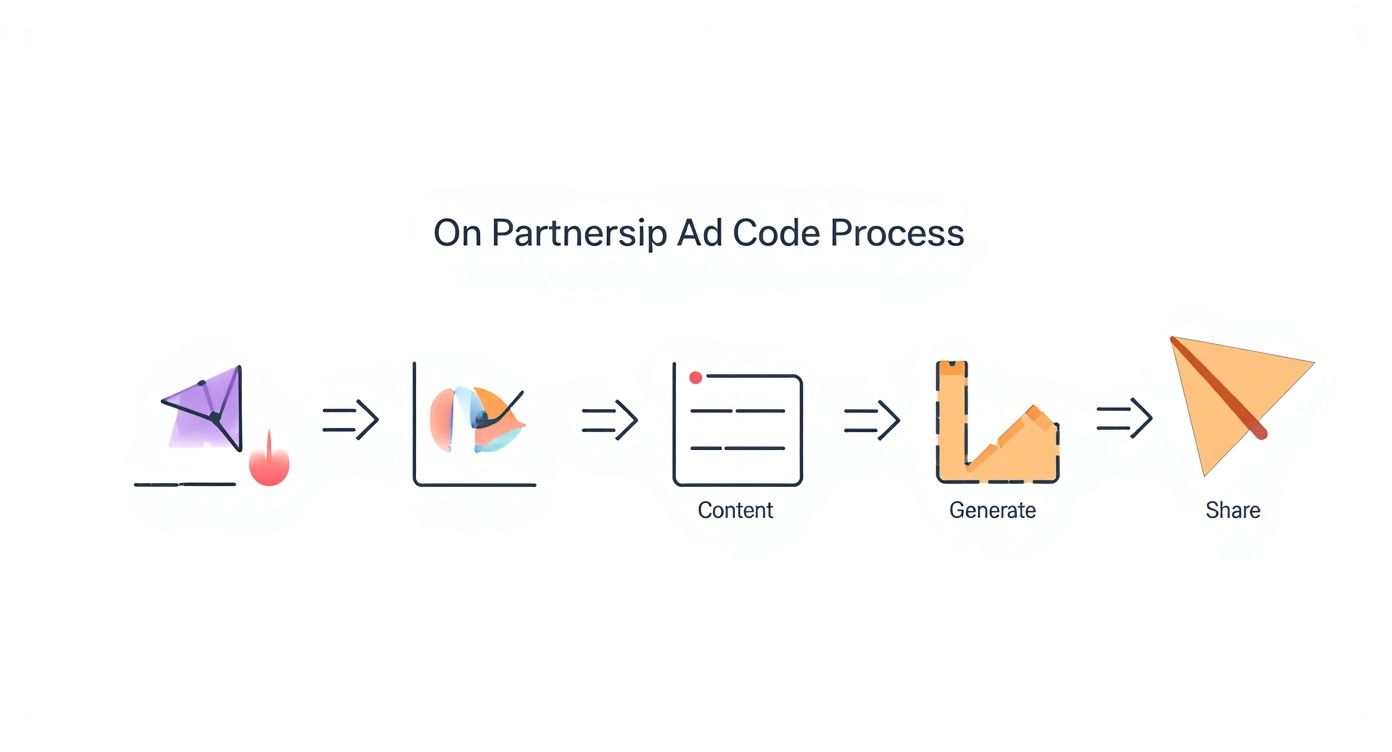
This visual gives you a sense of how easily a creator can pass along a post, a process that manual whitelisting builds on by giving you direct access to their entire library of eligible content.
Step 5: Brand Previews the Ad and Approves It!
Once you’ve picked the post you want to run, Ads Manager will pull it right into the ad preview window. Here, you can see exactly how it will look across all the different placements you selected, from a Story to a Feed post. This is your final chance to give everything a once-over.
Make sure the creator's handle and profile picture are showing up correctly. You can also add a call-to-action (CTA) button and link it to your product page or website. When it all looks good, hit "Publish." Your whitelisted ad will then go through Meta's standard review process before it goes live. That's becoming more important than ever as the percentage of influencers affected by fraud dropped from 49.2% in 2023 to 36.8% in 2024. For more insights, you can check out the latest influencer marketing trends at driveresearch.com.
Examples of Instagram Whitelisting & Branded Content
Jumping into Instagram whitelisting is exciting, but it's totally normal to have a few questions. While it’s a seriously powerful strategy, it has its own quirks and rules of the road. Let's clear the air on the technical bits, who foots the bill, and some key strategic differences.
Can You Whitelist Instagram Reels and Stories?
Yes, you absolutely can – and you should! Whitelisting isn't just for the static posts in your feed. You can easily apply the same strategy to your best-performing Reels and Stories. The process is almost identical to whitelisting a standard post. The creator can generate a Partnership Ad Code for that specific Reel or Story, or you can find it yourself through the manual setup in Meta Ads Manager.
Who Pays for Whitelisted Ads?
This is a big one: the brand always pays for the ad spend. A whitelisted ad runs directly from the brand’s Meta Ad Account. That means it’s the brand's credit card on file getting charged. The creator is never on the hook for advertising costs. Their payment is handled separately, something that should be spelled out in your partnership agreement.
What Is the Difference Between Boosting and Whitelisting?
While they both involve putting money behind a post, boosting and whitelisting are in completely different leagues. Boosting is the "easy button" with limited targeting and almost no useful performance data. Whitelisting unlocks the entire suite of tools inside Meta Ads Manager, allowing for precise audiences, A/B testing, and deep performance analytics. Simply put, boosting is for a quick hit of visibility. Whitelisting is for driving real, measurable business results.
Is a Contract Necessary for Instagram Whitelisting?
Absolutely. Having a clear, written agreement is considered an industry best practice. It’s the single best way to protect both your brand and the creator. A solid contract heads off misunderstandings by clearly defining content usage rights, campaign duration, compensation, and the full approval process.
What Are the Benefits of Influencer Whitelisting on Instagram?
Okay, let's move past the technical how-to and get to the good stuff: why Instagram whitelisting is a total major advantage for marketers. This isn't just another button to click in Ads Manager; it's a fundamental shift in how you can approach advertising, unlocking a level of performance and authenticity you just can't get with a standard boosted post.
Think of it this way: traditional brand ads are a monologue. Whitelisting turns that into a conversation. A trusted creator is in the crowd, talking with people, but with the power of your brand's resources behind them.
Squeeze More Out of Your Instagram Advertising Strategy
The biggest win with whitelisting is getting your hands on the full power of Meta Ads Manager for creator content. A simple "boost" is child's play. Whitelisting, on the other hand, opens the floodgates.
Suddenly, you can run sophisticated A/B tests on a creator's post. Want to try different headlines or calls-to-action? See how the ad performs with completely different audience segments? You can do all of it. By diving into the data, you can figure out exactly what resonates with your ideal customers and pour your budget into what's proven to work.
Give Your Creator Partners a Boost
Whitelisting is a powerful win-win for both brands and creators. While you get access to authentic, killer creative, the creators you partner with get a massive boost in visibility.
When you put ad spend behind their content, you're introducing them to thousands – or even millions – of new potential followers who are a perfect fit for their niche. This kind of exposure can seriously fast-track their growth. More than that, it builds a stronger, more transparent relationship. For any brand looking to build these long-term connections, having a solid influencer relationship management strategy is a must.
Get More Reach on Instagram
Imagine taking the loyal, fired-up audience of a creator and combining it with the massive, hyper-targeted reach of your brand’s ad budget. The result isn't just additive; it's exponential.
You can take a post that crushed it with a creator's organic followers and serve it up to lookalike audiences, interest-based segments, or custom lists of high-intent buyers. This is a fantastic way to beat ad fatigue. Instead of another slick corporate ad, potential customers see a trusted, familiar face introducing your product. This is a core reason why learning how to increase Instagram engagement is a direct outcome of smart whitelisting campaigns.
Uncover Creative New Ways to Show Off Your Products
Finally, whitelisting helps you build a scalable and diverse library of authentic ad creative. Every creator brings their own unique style, voice, and perspective. By working with a variety of creators, you generate a wide range of genuine content that shows your products in all sorts of real-world situations.
This diverse content library lets you:
- Connect with different audience segments: Different creator styles can appeal to different demographics.
- Keep your creative fresh: Avoid burning out your audience by cycling through different high-performing creator posts.
- Source powerful testimonials: Creator content is basically visual social proof, a powerful tool for building trust.
How to Get More Content for Instagram Whitelisting

Running a single, successful whitelisted ad feels great, but it's just the beginning. To really make this strategy work long-term, you need a steady stream of fresh, high-quality content. If you run the same ad for too long, you'll hit a wall called ad fatigue – that's when performance tanks because your audience is just plain tired of seeing it.
To get ahead of this, you need to shift your thinking from one-off campaigns to building a scalable content engine. The real goal is to create a library of amazing, pre-approved creator posts that you can grab and launch whenever you need them.
Your influencer contracts need to be crystal clear about Instagram whitelisting from day one. The agreement must explicitly state that your brand has the right to use the creator’s content in your paid ad campaigns, specifying the duration and compensation.
One-off projects are transactional, but long-term partnerships are where the magic happens. A creator who has a solid, ongoing partnership with you is far more likely to produce a steady flow of killer, on-brand content.
Direct partnerships are gold, but trying to scale your content library manually can quickly become a nightmare. This is where creator marketing platforms become an absolute major advantage for sourcing user-generated content (UGC). Platforms like JoinBrands connect you with a huge network of vetted creators who are ready to produce authentic content for your brand. This lets you rapidly build a diverse library of creative assets, giving you more options to test in your whitelisting campaigns.
Ready to scale your content creation and build a massive library for your whitelisting campaigns? JoinBrands connects you with over 250,000 vetted creators to produce authentic UGC at scale, streamlining your entire workflow from briefing to content approval. Start your campaign today!