




 10 Proven Mobile App Monetization Strategies for 2025
Ready to jump into a TikTok campaign but need the specs, like, yesterday? Here’s the bottom line: at a bare minimum, your video ads need to be a 9:16 aspect ratio, hit a resolution of 1080×1920 pixels, and run somewhere between 5-60 seconds.
Getting these core specs right is your first line of defense against ad rejection and the quickest way to grab a user's attention before they swipe away.
Table of Contents
Mastering TikTok Ad Creative Requirements
Look, navigating the technical details for TikTok ads can feel like a chore, but it’s absolutely essential if you want your campaign to succeed. The entire platform—from the user experience to the algorithm itself—is built around a very specific vertical video format. If you stray from those standards, you're looking at poor performance or, even worse, your ad getting flat-out rejected.
Understanding these requirements isn't just about dodging errors. It’s about making every single ad dollar and all that creative effort actually count.
This infographic gives you a quick visual rundown of the most common specs you'll be working with for standard video ads.
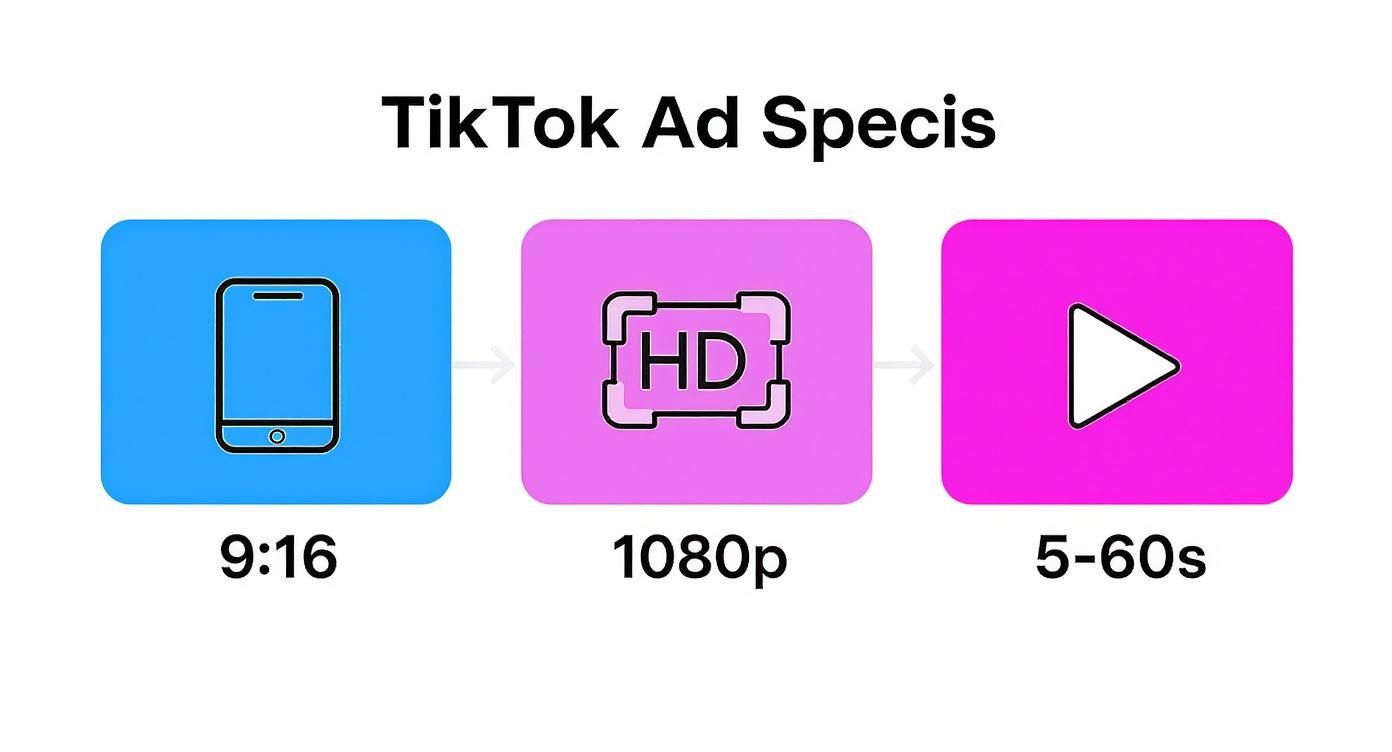
As you can see, it all starts with a vertical 9:16 video at 1080p resolution, keeping the length between 5 and 60 seconds. Think of these as the non-negotiable building blocks for any successful ad.
Why Ad Specs Are So Important
Sticking to the correct specifications is critical because it has a direct, measurable impact on your campaign's reach and how effective it is. We're talking about a platform with a potential ad reach of 1.59 billion people—it's a massive opportunity for brand exposure. To tap into that audience, your ads must feel like they belong on the "For You" page, which is where users live.
Here’s why you absolutely have to nail the specs every time:
- It’s All About the User Experience: When an ad is formatted correctly, it fills the entire screen on a mobile device. This creates a much more immersive experience, keeps users from getting annoyed, and seriously cuts down on those dreaded skip rates.
- The Algorithm Rewards You: TikTok's algorithm is designed to push content that fits its native environment. Get the specs right, and you'll likely see a lower CPM and better visibility for your campaigns.
- Your Brand's Credibility Is on the Line: An ad that shows up pixelated, cropped weirdly, or just poorly formatted makes a brand look unprofessional. That instantly undermines trust and hurts your campaign goals before your message even has a chance.
If you're looking for some inspiration on how top brands use these specs to their advantage, it's worth checking out some of the best social media advertising campaigns that have seen incredible success. For now, let’s treat this guide as your go-to checklist before we dive into the nitty-gritty of each ad type.
Before we get into the weeds of every single ad format, here's a quick reference table with the most essential specs for the major players on TikTok. This is perfect for a quick check before you export that final video file.
TikTok Ad Formats Quick Spec Sheet
| Ad Format | Aspect Ratio | Resolution (px) | Max File Size | Video Duration |
|---|---|---|---|---|
| In-Feed Ads | 9:16 | ≥ 540×960 | ≤ 500 MB | 5-60 seconds |
| TopView | 9:16 | ≥ 720×1280 | ≤ 500 MB | 5-60 seconds |
| Spark Ads | 9:16, 1:1, 16:9 | Matches original post | ≤ 500 MB | Any |
| Collection Ads | 9:16 | ≥ 720×1280 | ≤ 500 MB | 5-60 seconds |
Keep this table handy, but remember that specific campaign objectives and placements can have slightly different requirements. We'll cover all of those nuances in the detailed sections that follow.
Universal Technical Requirements For TikTok Ads
Before you get lost in the weeds of specific ad formats, let's nail down the universal technical specs. These apply to pretty much every video ad you'll run on TikTok. Getting these foundational tiktok ad specifications right from the jump is the key to avoiding common upload errors and making sure your content looks slick and professional.
Think of these requirements as the basic blueprint for any video file you're prepping for the platform. Following them saves you a ton of headaches and prevents those frustrating rejections during the ad review process.
Video And Audio Codecs
For your ad to look and sound its best, TikTok has some strong preferences on encoding. These standards hit that sweet spot between crisp, high-quality visuals and a file size that won't bog down a user's mobile connection. Smooth streaming is the name of the game.
- Video Codec: Stick with H.264. It's the industry standard for a reason, offering fantastic compression without making your video look like a pixelated mess.
- Audio Codec: For sound, AAC is the way to go. It delivers clear, high-quality audio at a low bitrate, so every word and sound effect comes through perfectly.
Using these codecs is non-negotiable if you want TikTok's systems to process your ad correctly. It's your best defense against weird compression artifacts or, even worse, playback failures. Honestly, most modern video editing software and tools that teach you how to create product videos will use these settings as the default.
File Format And Technical Details
Beyond the codecs, the video file itself has a few rules to follow. While TikTok might accept a couple of different formats, you'll have a much smoother upload experience if you stick to the most common ones.
Your best bets for file types are:
- .MP4
- .MOV
Both are universally compatible and what the platform prefers. When it comes to the nitty-gritty, a good rule of thumb is to keep your bitrate at >516 kbps and your frame rate at 30 frames per second (fps). While some high-action content might use 60 fps, 30 fps is the standard for most ad creative and performs reliably.
Designing For The Safe Zone
This might be the single most critical piece of advice: always design for the "safe zone." This is the central area of the screen where all your important stuff—logos, key visuals, text—needs to live so it isn't covered up by TikTok's own interface.
The app's UI elements, like the username, caption, and all the engagement icons, are layered over the video on the bottom and right side. If you put anything important there, it will be blocked. Your message will be lost.
Always, always keep your call-to-action, product shots, and essential text smack in the middle of that viewable area. It's a simple step, but it's a core part of effective TikTok ad specifications and ensures every single viewer sees what you need them to see.
In-Feed And Spark Ad Specifications
In-Feed ads are the workhorses of TikTok advertising. These are the ads that show up right in a user's "For You" feed while they're scrolling, designed to look and feel just like organic content. When you nail the TikTok ad specifications, they blend in so seamlessly that users see them as a cool discovery, not a disruptive ad.
Spark Ads are a special, highly effective twist on the In-Feed format. Instead of pushing out brand-new creative, Spark Ads let you promote organic posts that already exist. You can either boost your own content or promote a video from a creator who’s given you the green light. This brings a layer of authenticity and social proof that's tough to replicate with standard ads. We cover this in-depth in our complete guide on what is Spark Ads.
Core Video Requirements
Whether you’re crafting a standard In-Feed ad from scratch or boosting an existing post with Spark Ads, getting the technical details right is non-negotiable. TikTok is built for vertical video, and your creative has to play by its rules to have any chance of performing well.
- Aspect Ratio: Stick to 9:16. That’s the full-screen, native format. While you can use 1:1 or 16:9, they’ll show up with ugly black bars, killing the immersive vibe and usually tanking your ad's performance.
- Resolution: The absolute minimum is 540x960px, but you should really be aiming for 1080x1920px. Anything less just won't look sharp and professional on today's smartphone screens.
- Video Duration: Your video has to be between 5 and 60 seconds. Honestly, the sweet spot for keeping users hooked is much tighter—think 9 to 15 seconds.
- File Size: Keep it under 500 MB. You'll need to get good at video compression to maintain quality without blowing past this limit.
Pro Tip: Those first three seconds are everything. If you don't have a killer hook that stops the scroll, you've already lost.
Creative and Text Element Specifications
The video is the main event, but the text and profile elements frame the experience. These little details provide crucial context and drive the user to act, so you can't afford to ignore the character limits. Get it wrong, and your message gets cut off.
This table breaks down exactly what you need for your profile and captions.
| Element | Specification | Best Practice |
|---|---|---|
| Profile Image | Square (1:1) aspect ratio, <50 KB | Use a crisp brand logo or a recognizable headshot. |
| Display Name | 2-20 characters | Make it short, memorable, and consistent with your brand. |
| Ad Caption | 1-100 characters (hashtags included) | Write a punchy CTA and jump on relevant, trending hashtags. |
If you go over these character counts, your text will get awkwardly truncated. Don't let your CTA get chopped in half.
Call-to-Action and Landing Page Rules
Every ad needs to tell the user what to do next. TikTok offers a bunch of standard CTA buttons like "Shop Now," "Learn More," and "Sign Up" that you can slap onto your video. Just make sure the button text matches the destination. A "Shop Now" button that leads to a blog post is a big no-no.
Speaking of destinations, your landing page has to be ready for mobile traffic. That means it needs to be optimized for small screens, load lightning-fast, and work perfectly. TikTok's ad review team is notoriously picky about landing pages. A slow, broken, or irrelevant page is one of the fastest ways to get your ad rejected, so test your links before you even think about launching a campaign.
TopView And Brand Takeover Ad Specifications
If you're aiming for maximum, can't-miss impact, TopView and Brand Takeover ads are the top shelf of TikTok advertising. These formats are engineered to grab a user's full attention the second they open the app, giving your brand an incredible opportunity for massive exposure.
Unlike the standard In-Feed ads that pop up while someone is scrolling, these are interruption-based. They serve as a powerful, full-screen welcome mat to the TikTok experience. This makes them perfect for big product launches, major brand announcements, or any large-scale awareness campaign where grabbing eyeballs immediately is the name of the game.

Differentiating Brand Takeover And TopView
Although they both show up at app launch, it's really important to know how they differ. A Brand Takeover is a quick, punchy ad that runs for just 3 to 5 seconds. It can be a static image, a GIF, or a short video—a fast, high-impact message that users see right away.
A TopView ad, on the other hand, starts like a Brand Takeover but then smoothly transitions into a full In-Feed video ad. This format gives you up to 60 seconds of airtime, offering a much richer storytelling opportunity while still owning that prime, initial screen space.
Core Technical Specifications
Getting the tech specs right for these premium formats is non-negotiable. There's just no room for error when you're occupying this kind of prime real estate. The main tiktok ad specifications are all about delivering a slick, high-quality, full-screen experience.
- Aspect Ratio: A strict 9:16 ratio is mandatory to fill the entire vertical screen. No exceptions.
- Resolution: You'll want a minimum resolution of 720x1280px, but we strongly recommend going for 1080x1920px for the best possible clarity.
- File Size: Keep your file under the 500 MB maximum.
- File Format: Stick to the approved formats: .MP4, .MOV, .MPEG, and .3GP.
Key Consideration: Both TopView and Brand Takeover ads are sound-on by default. This is a huge leg up on other platforms where users often scroll in silence. Your creative has to include compelling audio from the very first second to make the most of this.
Creative Guidelines And Best Practices
Since these ads are the very first thing a user sees, your creative needs to be visually stunning and instantly captivating. Low-quality or poorly framed content will not only look bad, but it will also reflect poorly on your brand and completely waste the potential of this premium placement.
Don't forget, a user can skip these ads after just a few seconds. Those opening moments have to give them a compelling reason to stick around.
For instance, a Brand Takeover could use a single, gorgeous, high-resolution shot of a new product with minimal text. A TopView ad needs a more dramatic visual hook that pulls the viewer into a story or product demo, encouraging them to keep watching as it flows into their feed.
Branded Hashtag Challenge And Effects Specifications
Branded Hashtag Challenges, or HTCs, are a beast of their own. This isn't just another video ad; it's a full-blown interactive campaign designed to kickstart a massive wave of user-generated content (UGC). You're essentially inviting the entire TikTok community to join in on a trend centered around your brand.
The magic of an HTC lies in its unique hashtag and, more often than not, a custom Branded Effect that makes participating irresistible. But because there are so many moving parts, the TikTok ad specifications for HTCs are a lot more detailed than your standard In-Feed ad. Getting every component right is absolutely crucial for a smooth launch.
Official Challenge Video Requirements
This is your campaign's kickoff video. It's the one that introduces the challenge, shows people exactly how to do it, and gets them excited to make their own. It has to be energetic and dead simple to understand.
- Aspect Ratio: This one's non-negotiable. It must be 9:16 for that native, full-screen feel.
- Video Duration: You've got a window of 5 to 60 seconds. Honestly, the sweet spot is around 12 to 15 seconds—just enough time to hook them and explain the concept without losing their attention.
- Resolution: Minimum is 720p (720x1280px), but you should really aim for 1080p to look sharp and professional.
- File Size: Keep the video under 100 MB.
- Supported Formats: You can use .MP4, .MOV, .MPEG, .3GP, or .AVI.
This video really sets the stage for everything. Working with creators who are pros at how to make UGC that feels genuine can seriously boost how many people jump on board.
Challenge Page Asset Specifications
When someone taps on your branded hashtag, they land on a dedicated Challenge Page. Think of it as your campaign headquarters. Every single piece of this page needs to be dialed in according to TikTok’s specs.
| Asset | Specification | Best Practice |
|---|---|---|
| Hashtag | No punctuation or special characters allowed. | Keep it short, memorable, and easy to spell. Don't get clever with complicated words. |
| Challenge Banner | 1440x400px, must be a static PNG/JPG under 1 MB. | Use a bold, eye-catching graphic that screams what the campaign is all about. |
| Challenge Description | Keep it tight: 80-120 characters max. | Get straight to the point. Clearly explain the rules and what you want users to do. |
| Profile Photo | 96x96px, and keep it under 100 KB. | This should be your brand’s logo. No exceptions. It's all about recognition. |
| External Link | An optional link to your website. | Make sure this link goes to a mobile-friendly page that’s directly related to the campaign. |
Branded Effect Technical Guidelines
A Branded Effect is your secret weapon. It's a custom filter, sticker, or AR experience that makes it even easier and more fun for people to participate. These are built on TikTok’s Effect House platform, which has its own strict set of rules.
Here are the big ones to watch out for:
- Package Size: The entire bundle of assets for your effect can't be more than 5 MB.
- Asset Formats: Stick to optimized files. That means PNG for textures and FBX for any 3D models.
- 3D Model Limits: To keep things running smoothly on all phones, your 3D models need to stay under 20,000 triangles.
Important Takeaway: A winning HTC is so much more than a single viral video. It's a complete ecosystem where the main video, the Challenge Page, and the Branded Effect all work together perfectly. Stick to these specs, and you'll create a seamless experience that encourages massive participation.
Solving Common Ad Rejection Issues
So you've meticulously followed every last TikTok ad specification, and your campaign still got rejected. It’s a frustrating spot to be in, but understanding why this happens is the secret to getting your ads approved quickly and avoiding those painful delays.
Most rejections boil down to a few common culprits, from simple technical slip-ups to more nuanced policy violations that aren't always obvious.
A super common reason is just plain low-quality creative. This means blurry or pixelated videos and images that don't hit the minimum resolution, which is 720p. To be safe, always export your final ad creative at 1080x1920px. This ensures everything looks crisp and professional on today’s phone screens.
Another classic mistake is ignoring the platform’s native feel. Using anything other than a vertical aspect ratio is a huge red flag for the review team. While TikTok might technically allow square or horizontal videos, they stick out like a sore thumb, perform terribly, and often get rejected for providing a poor user experience. Stick to the 9:16 aspect ratio. No exceptions.
Common Technical And Policy Errors
Beyond the basics of resolution and aspect ratio, a handful of other issues frequently trip up advertisers during the review process. Getting ahead of these problems before you submit your ad will save you a ton of time and headaches.
Here are the most common errors we see and how to get them fixed fast:
- Key Elements Outside the Safe Zone: Placing your logo, text, or CTA button in areas that get covered up by TikTok’s interface is an instant rejection. You have to keep all your critical info centered and well away from the bottom and right edges of the screen.
- Misleading Claims or Language: Big, bold claims like "lose 10 kg in a week!" or dramatic "before and after" shots are almost always flagged. Make sure your ad copy is truthful and you're not making promises that sound too good to be true.
- Broken or Irrelevant Landing Pages: This one's a big deal. The landing page you link to must be mobile-friendly, load fast, and be directly related to what you're advertising. A slow or broken link is a guaranteed rejection.
Crucial Reminder: TikTok’s ad review team is incredibly strict about the user experience. If your ad points to a clunky, low-quality page or the destination doesn't match the ad's promise, it’ll get flagged for creating a disjointed journey. Always test every single link on a mobile device before you even think about submitting your campaign.
Answering Your Top TikTok Ad Spec Questions
Once you start digging into the details of TikTok's ad specs, a few common questions always seem to pop up. Let's tackle them head-on so you can get your creative finalized and your campaigns out the door without any second-guessing.
What Is The Best Resolution For TikTok Ads?
You should absolutely aim for 1080×1920 pixels. This is the gold standard for full-screen ads like In-Feed and TopView, making sure your creative looks crisp and professional on today's smartphones. While the platform might accept lower resolutions, anything less than 1080p will look noticeably softer and less polished.
Can I Use A Square Video For A TikTok Ad?
Technically, yes, you can upload a square (1:1) video for an In-Feed ad. But you really shouldn't.
TikTok's entire experience is built around immersive, full-screen vertical video. When you upload a square ad, the platform just slaps ugly filler bars above and below it to make it fit. It immediately screams "ad that wasn't made for this platform," which is a surefire way to hurt your performance. Stick to native 9:16 content.
Of course, hitting the technical specs is only half the battle. If you want your campaign to truly take off, it's worth understanding the creative strategies behind how to go viral on TikTok.
What about the 'safe zone'? You'll see this term a lot. It’s simply the central part of the screen where you need to keep your most important text and visuals. This is to stop them from being blocked by TikTok's own interface elements, like the profile name, caption, and the like/comment/share icons. As a rule of thumb, just keep critical info away from the bottom and right edges of the screen.