




 Top 16 Micro-Influencer Platforms for Enhancing Your Brand Visibility in 2025
Nailing your TikTok ad specs is the very first, non-negotiable step toward a successful campaign. Think of it this way: the platform is built for a very specific, native user experience, and your ads need to fit right in. That means prioritizing a 9:16 vertical aspect ratio, keeping video durations between 5-60 seconds, and ensuring a minimum resolution of 720×1280 pixels.
Table of Contents
Why TikTok Ad Specs Are So Critical for Your Campaign
Look, you can have the most brilliant creative concept in the world, but if it gets cropped awkwardly, looks pixelated, or gets outright rejected by TikTok's review process, it's dead on arrival. Understanding the core technical requirements isn't just about ticking boxes; it's fundamental to maximizing your campaign's reach and impact.
Mastering the official TikTok ad specs ensures your content looks professional and, more importantly, integrates seamlessly into a user’s "For You" page. That’s the whole game—capturing attention without screaming "I'm an ad!"
Of course, technical perfection is only half the battle. To truly maximize your ad's impact, you also need to understand the best times to post on TikTok, making sure your campaigns align with when your audience is actually scrolling. Combining that strategic timing with technically flawless creative is how you set yourself up for a win.
Key Specs to Remember
TikTok's ad guidelines have really doubled down on favoring native-style, vertical videos that feel just like the user-generated content surrounding them. While you technically can use a 1:1 or 16:9 aspect ratio, the platform strongly recommends the 9:16 format for that authentic, full-screen experience.
Your creative assets should have a resolution of at least 720×1280 pixels, with file sizes capped at 500 MB. Stick to common formats like .mp4 or .mov. As for length, you have a window of 5 to 60 seconds, but from what we've seen, shorter, punchier clips almost always perform better at holding attention.
This image boils it down to the three most critical specs you can't afford to get wrong: aspect ratio, resolution, and duration.
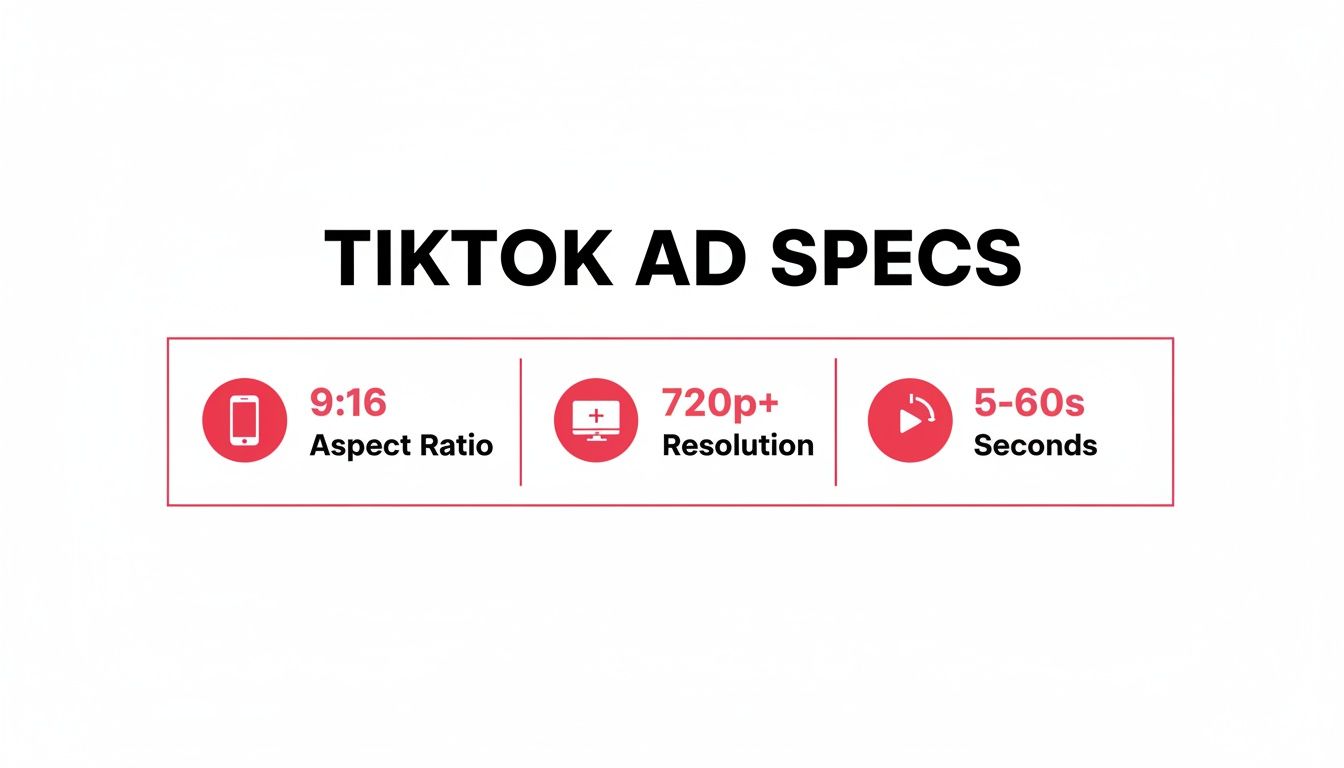
Keeping these core elements front and center ensures your video is perfectly optimized for TikTok’s immersive, full-screen environment. Sticking to these specs is the baseline for any effective campaign, helping you sidestep those frustrating technical issues that can kill performance before an ad even goes live.
For a deeper dive into the strategy behind setting up your campaigns, check out our complete guide on how to get the most out of https://joinbrands.com/blog/tiktok-business-ads/.
Key TikTok Ad Specs At a Glance
Feeling overwhelmed by all the numbers? Don't be. Most of the time, you'll be dealing with a handful of core ad formats. I've put together this quick-reference table to cover the absolute essentials you'll need 99% of the time.
| Ad Format | Aspect Ratio | Resolution (Minimum) | Duration | Max File Size |
|---|---|---|---|---|
| In-Feed Ads | 9:16 (recommended), 1:1, 16:9 | 720x1280px (for 9:16) | 5-60 seconds | 500 MB |
| TopView Ads | 9:16 (full-screen vertical) | 720x1280px | 5-60 seconds | 500 MB |
| Spark Ads | Same as organic post (usually 9:16) | Matches original video | No limit (uses existing post) | N/A |
| Collection Ads | 9:16 | 720x1280px | 5-60 seconds | 500 MB |
Bookmark this page or save this table. It's a lifesaver when you're in the middle of a campaign launch and just need a quick confirmation on file size or resolution. Getting these fundamentals right from the start saves a ton of headaches later.
When you're running ads on TikTok, In-Feed and TopView are your go-to formats. Think of them as the bread and butter of any solid TikTok ad strategy, designed to grab a user's attention right where they live: the "For You" feed.
While they're built on the same technical foundation, they have some key differences. Nailing these specs is crucial if you want your ad to blend in, look native, and get approved by TikTok without any headaches. Both are all about that full-screen, vertical experience.
Primary Video Requirements
Let's start with the basics. The core video specs for both In-Feed and TopView ads are almost identical. Getting these right is non-negotiable.
- Aspect Ratio: You absolutely want to stick to a 9:16 ratio. This ensures your video fills the entire screen for that immersive feel. While TikTok technically supports 1:1 and 16:9, they just don't look right and can make your ad stick out in a bad way.
- Resolution: The minimum here is 720×1280 pixels. I'd recommend going higher if you can—a crisp, high-quality video always performs better.
- File Format: No need to get fancy. Standard formats like .mp4, .mov, .mpeg, or .avi are all good to go.
- File Size: Keep your final video file under 500 MB. If it's larger, you'll need to compress it before uploading.
If you're looking to pump out compliant video assets quickly, checking out some of the AI video generator tools can be a real time-saver.
Duration and Format Nuances
This is where things get interesting and the two formats really start to show their differences. In-Feed ads are built for flexibility, while TopView is all about that initial, high-impact blast.
An In-Feed ad can be anywhere from 5 to 60 seconds long. From my experience, the sweet spot is usually between 9 and 15 seconds. That’s just enough time to get your message across without losing the viewer's notoriously short attention span.
TopView ads also have a duration of 5 to 60 seconds, but their power comes from the unskippable 3-5 second full-screen takeover that happens the moment a user opens the app. This makes them perfect for big brand moments, like a product launch or a major announcement, where you need to guarantee that initial visibility.
Key Takeaway: Use In-Feed ads for your everyday, versatile campaigns that feel like organic content. Save the premium TopView format for those high-stakes moments when you need maximum reach and immediate brand recall.
Text and Call to Action Specs
The video is the main event, but the text elements are what drive people to actually do something.
- Brand or App Name: Your display name is pretty tight on space. You get 2-20 characters for a brand name or 4-40 characters for an app name, though this can vary by language. Keep it short and instantly recognizable.
- Ad Description: You have up to 100 characters for your caption. This text overlays the bottom of your video, so make it punchy and put the most important info right at the start.
- Call-to-Action (CTA): TikTok gives you a list of pre-set CTAs to choose from, like "Shop Now," "Learn More," or "Sign Up." Pick the one that most clearly tells the user what you want them to do next.
How to Leverage User Content with Spark Ad Specs
Spark Ads are a fantastic way to tap into genuine, authentic content by promoting organic posts that already exist on TikTok. Instead of building an ad from the ground up, you get to boost a video that's already hitting the mark—either from your own brand’s account or, more powerfully, from a creator's profile.
One of the best parts about this format is that it pretty much bypasses the rigid technical TikTok ad specs. Because you're using a post that's already live, the video's original dimensions, resolution, and length just carry over into the ad. That immediately removes a ton of common technical headaches.
This frees you up to focus less on production and more on strategy. Your main job becomes spotting high-performing user-generated content (UGC) that really clicks with your brand and then getting the permission to put some ad spend behind it. This approach is gold for building trust because the ad shows up as a native post from a real person's account.
The Spark Ad Authorization Process
Before you can run a Spark Ad with a creator's video, you need their green light. This is all handled through a simple authorization process inside the TikTok Ads Manager, which spits out a unique code for that specific video.
- Creator enables ad settings: First, the creator has to jump into their video's privacy settings and flip the switch on the "Ad authorization" option.
- Generate and share the code: They can then generate a unique video code and choose how long you're allowed to use it (like 30, 60, or 365 days). They'll need to send this code directly to you.
- Enter the code in Ads Manager: When you're setting up your campaign, you’ll just select "Spark Ad" as the format and paste the code they gave you to link the video as your creative.
Once it's all linked up, you can add your own call-to-action button and tracking links. The real magic? All the likes, comments, and shares the ad gets are credited straight back to the original organic post, which pumps up its social proof even more. Building out a solid user-generated content strategy is absolutely key to finding videos that are worth this kind of investment.
Strategic and Creative Specs
While the technical specs are pretty relaxed, the strategic ones are everything. The content you pick has to feel authentic and line up perfectly with what you want your campaign to achieve.
There’s been a huge shift in how TikTok works, with the platform heavily favoring native-style content over polished, traditional ads. This trend has really reshaped the advertising game since 2018. It helps explain why revenue is on track to jump from $13.2 billion in 2023 to as much as $32 billion by 2025. Spark Ads are designed to ride this wave by using real UGC, making ads far more relatable on a platform where an incredible 67% of users actually find ads entertaining. You can read more about how advertising on TikTok continues to boom on electroiq.com.
Creative Specs for Branded Hashtags and Effects
If you really want to get people talking and creating, Branded Hashtag Challenges and Branded Effects are where the magic happens. These aren't your standard video ads; they're TikTok's most interactive formats, built from the ground up to spark a tidal wave of user-generated content (UGC).
Success here isn't about pushing a polished video. It's about giving the community creative tools and a playground they genuinely want to use. This means your TikTok ad specs shift from a single video file to a whole collection of assets designed to fuel participation and make your campaign feel native to the platform.
Asset Requirements for Hashtag Challenges
When you launch a Branded Hashtag Challenge, you’re basically building a mini-campaign hub right inside TikTok. To make it feel immersive and official, you need to provide a whole suite of creative assets that come together on your dedicated challenge page.
Here's the breakdown of what you'll need to get a challenge off the ground. Getting these specs right is crucial for a smooth launch and a professional look across all devices.
- Hashtag: This is your campaign's identity. It needs to be short, memorable, and unique to your brand. Keep it clean—no special characters or punctuation.
- Challenge Page Banner: This is the big, bold visual at the top of your official page. The specs are 1200 x 628 pixels in JPG or PNG format, with a file size under 500 KB.
- Discovery Page Banner: Think of this as the thumbnail for your challenge. It shows up on TikTok's main discovery page to draw people in. You'll need a 96 x 96 pixel image, also in JPG or PNG.
- Official Videos: You need to kick things off yourself! Provide 3 to 5 official videos that demonstrate the challenge. These follow the standard In-Feed ad specs we covered earlier (think 9:16 aspect ratio, 720p+ resolution).
- Official Music: A custom track can make a challenge unforgettable. You can provide your own in MP3 format, and it should be between 15 and 60 seconds long.
All these pieces work together to build a branded environment that feels both professional and inviting, encouraging users to hit that record button and join in.
Specifications for Branded Effects
Branded Effects go a step beyond challenges by letting you create custom AR filters, stickers, and lenses using TikTok's own Effect House software. Suddenly, your brand isn't just something people watch; it's a creative tool they can use to express themselves.
The technical specs here are less about simple file uploads and more about the nitty-gritty of the creation process inside Effect House.
A great Branded Effect doesn't feel like an ad at all. It feels like a cool new feature that just dropped on the app. The secret is to make something so visually interesting or fun that people would use it even without your logo attached.
Here are the key technical points to keep in mind:
- 2D vs. 3D Assets: You can build your effect using 2D elements like PNG sequences for animations, or go fully immersive with 3D models using FBX files.
- File Size Limit: This is a big one. The entire effect package—including all textures, models, and logic—must be under 8 MB. This is non-negotiable and ensures the effect loads quickly for everyone.
- Platform Compatibility: What looks great on an iPhone might glitch on an Android. You have to test your effect rigorously on both iOS and Android devices to guarantee it works and looks the way you intended.
- Policy Compliance: Every effect gets reviewed and must follow TikTok's strict creative policies. This means no content related to violence, hate speech, or anything that could be seen as deceptive.
For any e-commerce brand on TikTok, the real magic happens when views turn into actual sales. This is exactly what TikTok's shopping-focused ad formats are built for. Collection Ads and Video Shopping Ads are your secret weapons for creating a super smooth path from a user discovering your product to hitting "checkout"—all without ever leaving the app. Getting the specific TikTok ad specs for these formats right is non-negotiable if you want a seamless experience that drives those impulse buys.
These ads are designed to shrink the buyer's journey by mixing engaging video with a shoppable, interactive product gallery. It's a direct-to-consumer approach that works surprisingly well. In fact, some reports show that these types of shoppable ads can pull in conversion rates as high as 4.6%. You can dig into more stats about how smart ad specs lead to great ROI in this TikTok marketing statistics guide.
Collection Ad Specifications
Think of Collection Ads as a hybrid experience. They start with a standard In-Feed video but then open up into a browsable product gallery, which TikTok calls an "Instant Gallery Page." When a user taps your call-to-action (CTA), they're instantly transported to a curated collection of your products, making it incredibly easy to explore and shop on the spot.
Here’s what you need to get them right:
- In-Feed Video: The video part of your ad follows the usual rules: a 9:16 aspect ratio, a minimum resolution of 720x1280px, and a runtime between 5-60 seconds.
- Product Images: Make sure your product catalog images are perfectly square (1:1 aspect ratio). This ensures they look clean and professional inside the gallery. High-quality product shots are an absolute must here.
- Product Details: You get up to 100 characters for each product title in your catalog and 300 characters for the description. Keep it punchy and focus on the key selling points that will grab a buyer's attention.
Pro Tip: Your Instant Gallery Page is basically your mini-storefront inside TikTok. Treat it that way. Curate it thoughtfully, showing off a mix of your best-sellers and maybe some new arrivals to create a shopping experience that feels fresh and exciting.
Video Shopping Ad Specs
Video Shopping Ads are even more direct—they make the video itself shoppable. You can overlay product links and info right onto your video content. When a user sees an item they like, they can tap it to get more details or add it to their cart immediately. This creates what TikTok calls an "Instant Experience" page, which is perfect for capturing those in-the-moment purchase decisions.
The video creative uses the same core technical specs as any other In-Feed ad, like the 9:16 aspect ratio and a max file size of 500 MB. The real difference is how you integrate your product catalog.
To run this format, you absolutely must have a product catalog synced up with your TikTok Ads Manager. This is critical because it ensures all your pricing, stock availability, and product links are always current. It’s what guarantees a reliable and smooth shopping journey from the very first tap all the way to the final purchase confirmation.
When you're prepping your e-commerce ads, it's easy to get tangled up in all the different requirements. Some are hard technical rules you can't break (like file size), while others are creative best practices that just help your ad perform better. This checklist breaks down the difference.
Creative vs Technical Specs Checklist
| Specification Type | Requirement Detail | Ad Format Application |
|---|---|---|
| Technical | File Size | Must be under 500 MB for most video formats. |
| Creative | Caption Length | Keep ad copy under 150 characters for better engagement. |
| Technical | Aspect Ratio | Stick to 9:16 for a full-screen, native experience. |
| Creative | CTA Text | Use strong, action-oriented words like "Shop Now" or "Get Yours." |
| Technical | Product Image Ratio | Use 1:1 (square) images for Collection Ad galleries. |
| Creative | Video Hook | Grab attention within the first 1-2 seconds to stop the scroll. |
| Technical | Resolution | Minimum 720x1280px for clear, high-quality video. |
Remember, hitting the technical specs gets your ad on the platform, but mastering the creative specs is what gets you the sale. Make sure your team understands both sides of the coin before launching any shopping campaigns.
Getting Your Head Around Ad Creative Safe Zones and Text Rules
You can create a technically perfect video that still bombs if crucial elements get hidden by TikTok’s interface. To stop that from happening, you absolutely have to design your ads with safe zones in mind. Think of these as the parts of the screen where your text, logos, and important visuals will always be fully visible, never blocked by profile info, captions, or those interactive buttons on the side.
Ignoring these zones is one of the most common reasons ads get rejected or just don't perform. Imagine spending your budget on an ad where the discount code is completely covered by the caption—it’s a simple mistake, but it costs you conversions. Sticking to the right TikTok ad specs for safe zones makes sure your message actually gets seen.
Mastering On-Screen Text and Display Names
Beyond just the visual layout, the text you add to your campaign also has to play by some strict rules. These guidelines are in place to keep the user experience clean and prevent anyone from feeling misled.
- Display Name: Your brand or app name has pretty tight character limits. Brands get 2-20 characters, while apps are allowed 4-40. Your goal here is instant recognition.
- Ad Description (Caption): You've got up to 100 characters to play with in your caption. For standard (non-Spark) ads, TikTok uses a uniform font, and you can't drop in clickable elements like hashtags or user mentions.
- Call-to-Action (CTA): TikTok gives you a standard list of CTAs to choose from, like "Shop Now" or "Learn More." You have to pick one from their approved list; custom text isn't an option.
Crucial Insight: The golden rule for any on-screen text is clarity and relevance. Your ad’s visuals, caption, and landing page must all tell the same story. Any kind of bait-and-switch, like showing one product but linking to another, is a fast track to getting your ad rejected.
A Quick Guide to Safe Zone Placement
To make this super simple, just picture your 9:16 video with invisible borders where all the TikTok UI elements live. All your must-see information needs to be tucked safely inside the central area of the screen.
Keep your critical elements away from these specific spots:
- The very top of the screen, where system notifications from the phone can pop down.
- The right-hand side, which is home to the profile picture, like, comment, and share buttons.
- The bottom portion of the screen, where the caption, display name, and audio track details are overlaid.
Always, always preview your creative on an actual mobile device before submitting it for review. This one final check can be the difference between a successful campaign and a costly, frustrating rejection.
Actionable Checklist and Creative Brief Template
Alright, you've got all the technical TikTok ad specs down. But knowing the rules and actually winning the game are two different things. This is where you translate that knowledge into flawless execution.
I've found that a simple checklist can be a lifesaver, preventing those tiny, costly mistakes that get ads rejected. On top of that, a rock-solid creative brief ensures everyone—from your in-house team to freelance creators—is on the exact same page. Think of these tools as your pre-flight check before launching a campaign.
Quick Verification Checklist
Before any creative file gets uploaded, give it a final once-over with this checklist. Seriously, it takes 30 seconds and can save you hours of headaches. These are the most common slip-ups I see that lead to rejection or just plain bad performance.
- Aspect Ratio: Is it 9:16? (The classic vertical phone screen.)
- Resolution: Is it at least 720x1280px? Higher is better, but this is the minimum.
- File Size: Did you keep it under the 500 MB limit?
- Duration: Is the video between 5-60 seconds? (Remember, the sweet spot is usually 9-15 seconds.)
- Safe Zones: Are your logos, text, and important visuals clear of TikTok's UI overlays?
- CTA: Is the call-to-action crystal clear and does it match what you want people to do?
Creative Brief Template for Creators
A vague brief is a recipe for disaster. It leads to unusable content, wasted time, and frustrated creators. A detailed, well-thought-out brief, on the other hand, is the foundation for amazing content that actually hits your goals.
A strong creative brief is more than a list of instructions; it's a strategic document that aligns creative vision with business goals, ensuring every piece of content serves a clear purpose.
To make this easy, we’ve put together a comprehensive guide on crafting the perfect creative brief template that you can literally copy and paste. It covers every single thing a creator needs to know—key messages, target audience, brand voice, and, of course, the specific TikTok ad specs for their deliverables. Using a structured brief like this is the single best way to guarantee you get high-quality, compliant content that works.
Your Top TikTok Ad Spec Questions, Answered
Jumping into TikTok advertising can feel a bit overwhelming, and a few common, yet critical, questions always pop up. Getting these details right from the start is the key to avoiding rejected ads, wasted budget, and campaigns that just don't perform.
Think of this as your cheat sheet. We're cutting through the noise to give you practical, data-backed answers to the most frequent queries we hear about TikTok ad specs.
What Is the Best Video Length for a TikTok Ad?
This is probably the number one question we get. While TikTok technically allows In-Feed video ads up to 60 seconds long, our experience—and the data—shows that shorter is almost always better. The real sweet spot for grabbing attention and getting a click is between 9 and 15 seconds.
That short window is just enough time to hook the viewer, present a clear benefit or solve a problem, and hit them with a strong call-to-action before they swipe away. If you're running a broader brand awareness campaign, you can sometimes stretch that to 21-34 seconds to tell more of a story. But for any campaign focused on direct response or conversions, keep it quick and punchy.
Can I Use a Square 1:1 Video on TikTok?
Technically, you can run a square (1:1) or even a horizontal (16:9) video on TikTok. But honestly, you really shouldn't. It's a classic rookie mistake that immediately screams "this is an ad!" to users.
TikTok is built for an immersive, full-screen vertical experience. When your ad doesn't fill the screen, it breaks that seamless flow and sticks out like a sore thumb. Using the platform's native 9:16 vertical aspect ratio is non-negotiable if you want your ad to blend in with organic "For You" page content. That native feel is everything for capturing attention and looking authentic.
Why Was My Ad Rejected for Creative Reasons?
Getting that "ad rejected" notification is frustrating, but it's usually because of a few common, easily avoidable spec issues. If your ad got flagged for creative reasons, it's almost certainly one of these culprits:
- Wrong Dimensions: Your video wasn't in a supported aspect ratio like 9:16, 1:1, or 16:9. As we said, stick to 9:16.
- Text in Unsafe Zones: You placed your logo, text, or CTA in an area that gets covered up by TikTok's own interface—like the username, caption, or the buttons on the side.
- Low Resolution: The video quality was just too low. If it looks pixelated or blurry on a phone, it's going to get rejected.
- Misleading Content: The ad promised one thing (like a specific discount), but the landing page said something totally different. The user experience has to be consistent.
Actionable Solution: Before you even think about uploading, always check your video against a safe zone template. You can find these online easily. Preview the ad on an actual phone to make sure nothing important is cut off and that the creative message matches the landing page perfectly. This one simple step will save you a world of headaches.
Ready to stop worrying about specs and start getting amazing ad content? JoinBrands is an all-in-one platform connecting you with a network of over 250,000 talented creators who live and breathe this stuff. Find the perfect creator, manage your campaigns, and get high-performing UGC that's built for TikTok from the ground up. https://joinbrands.com