




 Your Guide to Winning User Generated Campaigns
Getting your TikTok ad specs right can feel like trying to hit a moving target, but the basics are actually pretty simple. For almost any ad you run, you're going to be working with a vertical 9:16 aspect ratio, shooting for high-res video (think 1080x1920p as the gold standard), and keeping your file size under 500MB. Nail these fundamentals, and you're already halfway to a campaign that looks and feels right on the platform.
Table of Contents
Mastering TikTok Ad Specs for Peak Performance
Look, understanding TikTok's advertising specs isn't just about checking a technical box—it's a massive strategic advantage. When your creative is formatted correctly, it blends right into the user's feed, creating a seamless experience that keeps them watching.
On the flip side, ads that ignore the rules—like clunky horizontal videos or grainy, low-res clips—stick out like a sore thumb. They scream "AD!" in the worst way, leading to instant skips and wasted budget. Plus, let's be real: TikTok's algorithm rewards high-quality, properly formatted content, which can lead to better placements and even lower costs.
Think of this guide as your go-to cheat sheet. It’s here to make sure every single creative you upload is dialed in for maximum impact.
Core Technical Requirements
For anyone in a hurry, let's cut to the chase. This infographic breaks down the three absolute must-haves for most video ads on the platform.
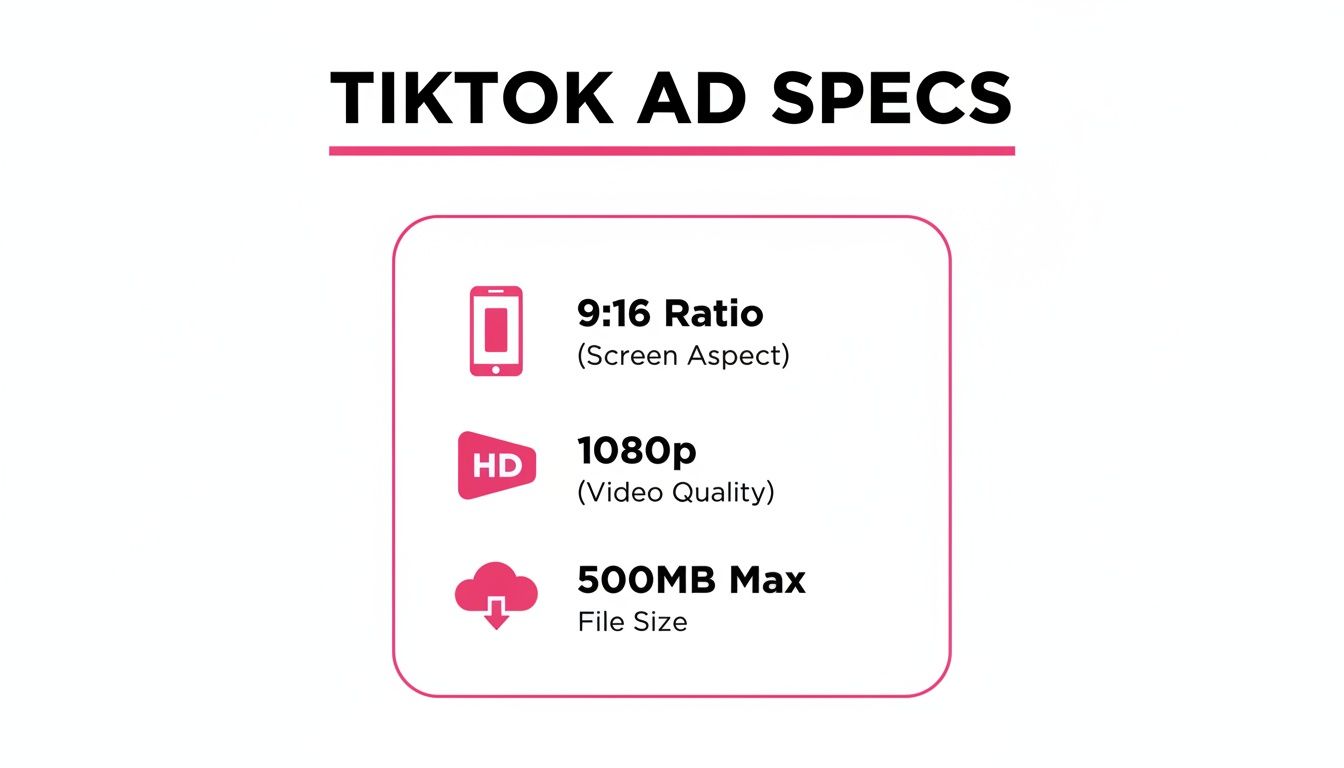
These three pillars—aspect ratio, resolution, and file size—are the bedrock of any technically solid TikTok ad. Get these right, and you'll avoid the most common pitfalls.
TikTok Ad Specs at a Glance
To make things even easier, I've put together a quick-reference table that breaks down the essential requirements for the most common ad types. Keep this handy before you launch any campaign to dodge those frustrating rejection errors and make sure your content always looks professional.
| Ad Format | Aspect Ratio | Resolution | Duration | Max File Size |
|---|---|---|---|---|
| In-Feed Ads | 9:16 | ≥720x1280p | 5-60 sec | ≤500 MB |
| Spark Ads | Inherited | Inherited | Inherited | Inherited |
| TopView Ads | 9:16 | ≥720x1280p | Up to 60 sec | ≤500 MB |
| Collection Ads | 9:16 | ≥720x1280p | 5-60 sec | ≤500 MB |
Bookmark this page or save this table. It’s the kind of resource you’ll find yourself coming back to again and again.
Why Mastering Ad Specs Is a Game-Changer for Your Campaigns
Getting your TikTok ad specs right is about so much more than just keeping your ads from getting rejected. Honestly, that's just table stakes. Nailing the technical details is a core strategy for squeezing every last drop of performance out of your ad spend, because it directly feeds into both the user experience and how the algorithm treats your content.
Think about it. When your ad creative perfectly fits the 9:16 aspect ratio and uses the right resolution, it feels like it belongs there. It fills the whole screen, looks professional, and blends right into the "For You" feed. This is huge. Anything less—like a poorly cropped video or a pixelated mess—looks amateurish and screams "ad," which is an instant recipe for a scroll-past. That's your budget getting wasted in real-time.
Get on the Algorithm's Good Side and Lower Your Costs
TikTok's algorithm is built to push engaging, high-quality content. And yes, that absolutely includes ads. When you follow all the technical rules—from file size and type to video length—you're basically telling the algorithm, "Hey, this is good stuff."
This simple act of compliance can earn you better ad placements, which often translates into lower CPMs (Cost Per Mille). In other words, your budget goes further. On the flip side, ignoring these specs handicaps your campaign from the get-go, limiting its reach and making you pay more for less as the algorithm works against you.
The platform's explosive growth makes this non-negotiable. TikTok’s ad revenue smashed $23 billion in 2024 and is projected to hit a massive $33.1 billion in 2025. That’s a giant audience you can’t afford to get wrong. Want more numbers? You can explore more about these powerful TikTok advertising statistics on electroiq.com.
The Link Between Specs and Authentic Performance
At the end of the day, mastering the specs is the first step to creating ads that feel authentic and actually connect with people. There's a reason creator-generated content performs so well; it feels native to the platform. By making sure that authentic content is also technically perfect, you create a powerful one-two punch of relatability and professionalism. That's what drives real results.
For a deeper look at turning those views into sales, exploring different conversion optimization strategies is a great next step. And if you're just getting started, be sure to check out our complete guide on launching your first TikTok business ads.
Technical Specifications for In-Feed Ads
In-Feed ads are your bread and butter on TikTok. They show up natively as people scroll through their "For You" page, making them feel like a natural part of the experience. But to get that seamless, native feel, you have to nail the tiktok advertising specs. This isn't just a recommendation; it's essential. Getting these details right from the start saves you from the headache of rejected ads and makes sure your creative looks exactly how you envisioned it.
Think of these specs as the blueprint for an ad that doesn't just run on TikTok but actually belongs there. We're talking about everything from the video file itself to the text that goes along with it.
Core Video Requirements
The video is the star of the show, so its technical quality can make or break your ad. TikTok's algorithm—and its users—heavily favor content that's crisp, clear, and formatted correctly for a mobile-first experience.
Here’s the checklist you need to follow for your video files:
- Aspect Ratio: Stick to a strict 9:16. This is non-negotiable. It's the vertical format that fills the entire phone screen, creating that immersive view you're after.
- Resolution: The bare minimum is 720×1280 pixels, but for truly professional quality, you should be exporting at 1080×1920 pixels.
- File Types: You've got options. TikTok accepts .mp4, .mov, .mpeg, .3gp, and .avi.
- Duration: You can go from 5 up to 60 seconds. But let's be real—the sweet spot for keeping someone's attention is usually between 9 and 15 seconds.
- File Size: Keep your video file under 500MB.
Pro Tip: Just because you can use 60 seconds doesn't mean you should. TikTok is all about speed. If you don't hook your audience in the first three seconds, they're gone. Keep your ads short, punchy, and to the point.
Text and Profile Specifications
Your video doesn't exist in a vacuum. The text elements and your profile info are just as important for setting the context and telling people what to do next.
Your profile name and ad caption need to be just right.
- Profile Name: You have between 2-20 characters. This is the name people will see associated with your ad.
- Ad Caption: Your caption can be anywhere from 1-100 characters. This text sits right at the bottom of the screen, so make every character count with a clear and compelling message.
Understanding and Using Safe Zones
This is one of the most critical—and most frequently ignored—specs. The "safe zone" is the area in the center of the screen where you need to place all your important visual elements. We're talking logos, product shots, or any key text overlays.
Why is this so important? Because the edges of the screen get covered up by TikTok's own UI elements, like the profile name, caption, likes, and comments. If you put crucial info too close to the edge, it's going to get cut off or hidden. Always design your creative with these overlays in mind, keeping your main message front and center to guarantee it gets seen.
Definitive Specifications for Spark Ads
Spark Ads are a game-changer on TikTok. They let you take an existing, organic video—either from your own profile or a creator's—and put ad spend behind it. Instead of building an ad from scratch in the Ads Manager, you're essentially boosting a post that's already live. This means you get to keep all the likes, comments, and shares that have already piled up, which is incredibly powerful social proof.
This whole approach leans into the raw, genuine feel of user-generated content, which is exactly what performs best on the platform. It's why this format often crushes it with engagement and builds trust way faster than a traditional ad ever could.

By blending paid and organic strategies, Spark Ads feel native to the user's feed. It's a big reason why TikTok campaigns can be so cost-effective. We're talking an impressive average CPC of just $0.22 and a solid 2:1 return on ad spend. If you want to dive deeper into the numbers, check out the powerful performance metrics of TikTok ads on bind.media.
How Spark Ad Specs Differ
Here's the key thing to understand: since you're using a pre-existing video, the main technical tiktok advertising specs are already set in stone. You're simply inheriting the specs from the original organic post, which really simplifies the process on the creative side.
- Aspect Ratio, Resolution, Duration & File Size: All of these are pulled directly from the original video. You don't have to worry about uploading a new file or meeting specific creative requirements for the ad itself.
- Ad Caption & Profile Name: The ad automatically uses the caption from the original post—text, emojis, @mentions, and all. The profile name and handle are also locked to the original creator's account.
This shifts your job from video production to content curation. Your primary task is to find organic content that's already popping off and get the right permissions to put some budget behind it.
The Authorization Workflow and Key Specs
To get a Spark Ad running, you need to follow a specific authorization process that links your ad account with the creator's video. It's a straightforward workflow, but you have to get the steps right.
- Get Creator Authorization: First, the creator needs to head into their video's settings, find the Ad Settings, and enable ad authorization. This will generate a unique video code. They'll also set a permission window for you (usually 7, 30, or 60 days) during which the code is active.
- Use the Video Code: Jump into your TikTok Ads Manager, choose the Spark Ad format, and plug in the video code the creator sent you. This is what connects the organic post to your campaign.
- Set Your Landing Page URL: Even though the creative is locked, you still control where users go when they click. You'll need to provide a destination URL. Make sure it's working, optimized for mobile, and is a perfect match for what the ad is showing.
- Choose a Call-to-Action (CTA): While the caption is locked, you do get to add a CTA button. Standard options like "Shop Now," "Learn More," or "Sign Up" are available to drive users to your landing page.
This process makes it incredibly easy to launch authentic campaigns that already have proven engagement, all without having to create a single new piece of content.
Specs for TopView and Brand Takeover Ads
If you're looking for maximum, can't-miss-it impact, Brand Takeover and TopView ads are TikTok's premier placements. These formats are engineered to grab a user's complete attention the second they launch the app, making them perfect for big product launches or massive brand awareness campaigns. While people often group them together, they play slightly different roles.
A Brand Takeover is literally the first thing a user sees. It’s a short, full-screen ad that runs for just 3 to 5 seconds right after the app opens. A TopView ad takes that initial splash and extends it, starting like a Brand Takeover but then smoothly transitioning into the very first In-Feed video on the "For You" page, where it can last for up to 60 seconds.
Strict Technical Requirements for Premium Placements
Because these ads occupy such valuable real estate, the TikTok advertising specs are way more stringent than for your typical In-Feed ad. TikTok is dead serious about maintaining a seamless, high-quality experience, so there's practically no wiggle room on your creative assets. Following these rules isn't a suggestion—it's a requirement for getting your ad approved.
Here’s what you need to have locked down for your video:
- Aspect Ratio: It has to be a perfect 9:16 vertical format. This ensures it fills the entire screen with no weird black bars or cropping.
- Resolution: The absolute minimum is 720×1280 pixels, but I always tell clients to aim for 1080×1920 pixels. It just looks crisper and more professional.
- File Type: Standard video formats are your friend here. TikTok accepts .mp4, .mov, and .avi.
- Duration: No exceptions here. Brand Takeovers must be 3-5 seconds. TopView ads can run all the way up to 60 seconds.
- File Size: Keep your video file under 500MB.
- Sound: You can run them without sound, but I wouldn't. These ads autoplay with audio on, and designing for a sound-on experience makes a huge difference in engagement.
Linking and Creative Guidelines
Unlike regular ads, TopView and Brand Takeovers offer some unique linking options. You can send users to an external landing page or keep them inside TikTok by linking to something like a Branded Hashtag Challenge page. This is a great way to build a cohesive campaign—use a high-impact TopView ad to get their attention, then funnel them directly into an experience where they can participate.
Important Takeaway: These premium ad slots are sold on a reservation basis and are a serious investment. You absolutely have to get your creative assets polished and perfectly on-spec well ahead of your launch date. A low-quality or incorrectly formatted ad won't just get rejected; it'll burn a valuable, high-impact opportunity that you can't easily get back.
When you're designing the creative, make sure your core message lands within the first three seconds. A user can't skip a Brand Takeover, but their attention span is still short. For TopView, think about the transition—it should feel like a natural continuation of the story from the initial takeover into the In-Feed video.
Branded Hashtag Challenge and Effect Specs
When you want to go beyond a standard ad and spark a massive wave of user-generated content (UGC), you turn to TikTok's most interactive formats: Branded Hashtag Challenges and Branded Effects. These aren't just ads; they're multi-asset campaigns designed to get users involved and drive viral brand awareness.
Getting the tiktok advertising specs dialed in for these campaigns is absolutely critical. Unlike a simple video upload, you’re coordinating multiple pieces that need to work together perfectly to create a seamless user experience.
The potential here is huge. Think about it: TikTok's advertising audience hit 1.59 billion monthly active users as of early 2025. That's a staggering 13.6% of the entire world's population ready to engage. This is the engine that powers UGC campaigns. For a deeper look at the numbers, you can explore more insightful TikTok statistics on proxidize.com.
Hashtag Challenge Asset Specifications
A Branded Hashtag Challenge is really a mini-hub for your campaign, built from several distinct creative assets. Each one has its own technical rules you need to follow.
- Official Video: This is your kickoff video, the one that introduces the challenge. It needs to follow all the standard In-Feed ad specs. That means a 9:16 aspect ratio, 1080x1920p resolution, and a runtime between 5-60 seconds.
- Challenge Page Banner: This is the hero image at the top of your official hashtag page. It must be a static 1440×288 pixel image, saved as a .jpg or .png. Keep the file size under 150 KB.
- Hashtag: The hashtag itself is a creative asset. Keep it clean—no special characters or emojis. The character limit can vary by region, but it's generally around 75 characters.
- Official Music: If you're using custom audio, you must have the commercial rights. The track should be an .mp3 or .wav file, usually between 15-60 seconds to match the video length.
Branded Effect Technical Requirements
Branded Effects are the AR filters, stickers, and lenses that users can add to their own videos, and they're often the fuel for a Hashtag Challenge. Building one is a technical process that happens in TikTok’s Effect House software.
The goal is pretty straightforward: create an effect that's fun, looks great, and is incredibly easy to use. If your effect is buggy or confusing, participation will drop to zero before it even gets started. The entire effect package, which includes all 2D/3D models, textures, and logic, has a hard limit of 8 MB.
You also have to think about device compatibility. Your effect needs to run smoothly on a whole range of phones, from the latest iPhone to older, lower-end Androids. This is non-negotiable if you want to maximize reach. Given the creative and technical hurdles, working with an experienced creator or agency is a smart move to make sure your effect is optimized for viral sharing.
TikTok Shopping and Collection Ad Specs
For e-commerce and direct-to-consumer brands, TikTok has rolled out some incredibly powerful ad formats designed to close the gap between a user discovering your product and actually buying it. Collection Ads and Video Shopping Ads are built to create a fluid, interactive storefront experience right inside a user's feed, which makes getting their unique specs right absolutely critical.
These formats work by pairing a standard In-Feed video with a direct shoppable element. When someone taps on your call-to-action, they’re immediately taken to an Instant Gallery Page. Here, they can browse and buy products without ever leaving the TikTok app, which is a game-changer for reducing friction and boosting conversion rates for online stores.
Collection Ad Video and Product Image Specs
The main video you use in a Collection Ad has to follow the same core rules as a standard In-Feed ad. But—and this is a big but—the Instant Gallery Page it links to has its own strict set of asset requirements you need to meet to get your products looking their best.
Here’s what you’ll need to have ready:
- Main Video: This follows all the usual In-Feed video specs (9:16 ratio, 1080p recommended, 5-60 seconds).
- Product Images: These are the images that will show up in your Instant Gallery. They absolutely must be a square 1:1 aspect ratio. For the best clarity, we recommend using a 1000×1000 pixel dimension.
- Product Titles: Keep your product names clear and to the point, as you'll be working with character limits.
- Product Descriptions: You can add essential details, but always keep in mind you're working with limited mobile screen space.
Think of your video as the hook and the gallery as your shop window. The video's job is to grab their attention, and the high-quality, crisp product images in the gallery are what will seal the deal. For a deeper dive into building out your e-commerce strategy, our guide on how to sell products on TikTok is packed with valuable tips.
Requirements for TikTok Shop Catalogs
To even run these shoppable ads, you first need a properly set up TikTok Shop catalog. All the product info—from images to text—is pulled directly from this catalog to build the dynamic, shoppable cards in your ads. A well-maintained catalog isn't just a nice-to-have; it's the very foundation of successful TikTok Shopping Ads. If you have bad info or blurry images, you're going to see it hurt your ad performance and erode user trust.
Here’s a detailed breakdown of the key assets you'll need for your Collection Ads and catalog.
TikTok Shopping Ad Asset Requirements
| Asset Type | Format/Ratio | Recommended Dimensions | Character Limits |
|---|---|---|---|
| Product Image | Square 1:1 | 1000×1000 pixels | N/A |
| Product Title | Text | N/A | Max 34 characters (for best display across all devices) |
| Product Desc. | Text | N/A | Varies by layout, but keep it concise (under 100 characters) |
| CTA Button | Text | N/A | Typically 12-36 characters depending on ad objective |
Getting these specs perfect ensures a smooth, professional look for your Instant Gallery Page. Remember, the goal is to make it as easy as possible for someone to go from "that looks cool" to "I'm buying it."
To really make your shopping campaigns pop, you can also bring creator content into the mix. By running a Spark Ad on a creator's video that already features your products, you can add that shoppable layer on top. This blends authentic UGC with direct-response functionality, creating a seriously powerful sales driver.
Ad Creative Best Practices and Policy Guidelines
Nailing the technical TikTok advertising specs is only the first step. To really see results, you need a smart creative strategy and a solid grasp of the platform's rules. TikTok’s entire philosophy is built on one simple but powerful idea: "Don't make ads, make TikToks." This means your content has to feel like it belongs on the "For You" page—it should be authentic, engaging, and genuinely entertaining.
The ads that truly kill it on TikTok are the ones that lean into the platform's unique culture. This means working with creators who feel real and relatable, using trending sounds and music to grab attention right away, and keeping your editing fast-paced. Your text overlays need to be short and sweet, adding value without making the screen feel cluttered. The real goal is to make something people would want to watch and share anyway, not something that feels like an interruption. If you need a creative spark, checking out different TikTok content ideas can be a huge help.
Navigating TikTok’s Advertising Policies
Beyond just being creative, you absolutely have to follow TikTok's advertising policies to the letter. Getting your ad rejected is a common headache, so it’s critical to double-check everything before you hit submit.
A rejected ad isn't just a minor hiccup—it's lost time and wasted budget. Being proactive about compliance is a core part of running an efficient ad campaign.
Here are some of the most common reasons ads get flagged:
- Misleading Claims: Watch out for exaggerated "before and after" shots, health claims you can't back up, or promises of guaranteed results. These are a fast track to rejection.
- Low-Quality Visuals: Ads that are blurry, pixelated, or use watermarked videos from other platforms just won't fly. TikTok will almost always disapprove them.
- Improper Branding: Your landing page has to be fully functional and directly related to whatever you're promoting. If there's a disconnect, your ad will get rejected.
- Restricted Content: Trying to promote prohibited stuff like tobacco, weapons, or certain supplements is an obvious violation and will get your ad shut down immediately.
By combining a native, TikTok-first creative approach with a solid understanding of these rules, you can create campaigns that not only stay compliant but are also incredibly effective at capturing your audience’s attention and driving real results.
Your TikTok Ad Spec Questions, Answered
When you're deep in the trenches of campaign setup, a few nagging questions about TikTok's ad specs can pop up. Troubleshooting these on the fly is crucial. Getting the right answers fast keeps your creative process moving and helps you dodge those simple mistakes that can put your launch on hold.
Think of this section as your quick-reference guide for those last-minute checks and common "what ifs" before you hit publish.
Why Do TikTok Ads Get Rejected?
Ad rejection on TikTok usually boils down to a few common culprits. More often than not, it's a simple technical mismatch—think uploading a video with the wrong aspect ratio or a resolution that's too low for the platform's standards.
Another huge one is music. Using a trending track is great for organic posts, but for ads, you absolutely need to have the proper commercial licensing, or TikTok will shut it down. Ads also get flagged for making wild, unsubstantiated claims or for linking to a landing page that’s broken or doesn’t work properly. Finally, remember the platform's vibe; if your ad feels too much like a polished, hard-sell TV commercial and not like a native TikTok video, it’s likely to get disapproved.
How Can I Check My Video Specs Before Uploading?
You can actually check your video’s technical specs without any fancy software, right from your computer. Taking a few seconds to do this can save you a world of headaches by making sure you're compliant before you even start the upload process in Ads Manager.
- On a Mac: Just open the video file using QuickTime Player. Once it's open, hit Command-I, and the Inspector window will pop up with all the details.
- On Windows: Find your video file, right-click on it, and select "Properties." From there, click over to the "Details" tab.
This little trick will show you everything from resolution and file type to frame rate, so you can quickly confirm that your video lines up with TikTok’s requirements.
Can I Use a Horizontal 16:9 Video for a TikTok Ad?
Technically, yes, you can upload a 16:9 video. But you absolutely shouldn't. It's strongly discouraged for a very good reason.
TikTok is a vertical-first world. When you upload a horizontal video, it gets sandwiched between massive, ugly black bars to make it fit the screen. This instantly breaks the user experience, feels completely out of place, and almost guarantees people will scroll right past it. For your ad to perform well and look like it belongs on the platform, always stick to the native 9:16 vertical aspect ratio.
Ready to connect with authentic creators and streamline your entire TikTok ad workflow? JoinBrands offers an all-in-one platform to find talent, manage campaigns, and launch high-impact content effortlessly. Discover how JoinBrands can elevate your marketing strategy today.