




 8 High-Converting Influencer Outreach Email Templates for 2025
So, you're ready to start selling on TikTok Shop? Smart move. Before you get lost in the application process, let’s talk about what you actually need to get approved. Getting your ducks in a row before you start is the single best way to avoid frustrating delays and rejections.
Think of it like this: you wouldn't start baking a cake without knowing you have flour, sugar, and eggs. This is the same idea. We're going to make sure you have all your "ingredients" ready so the setup process is as smooth as possible.
This section is your roadmap. Whether you're a creator finally monetizing your audience or a full-fledged brand opening a new sales channel, we’ll cover exactly what TikTok needs from you.
Core Eligibility Pillars
At the end of the day, TikTok just needs to know you're a real, legitimate seller they can trust. Their whole verification process is built around confirming your identity and ensuring you operate legally. It all boils down to three main things:
- Geographic Location: You have to be based in a country where TikTok Shop is officially open for business, like the United States or the United Kingdom.
- Seller Type: Are you signing up as a person or a company? The path for an individual (like a creator) is different from a business (an LLC, corporation, etc.), and the required paperwork changes completely.
- Verification Documents: This is where you prove who you are. For individuals, that means a government-issued ID. For businesses, it's your official registration and tax documents.
Getting these three things right from the start is half the battle. A surprising number of sellers get stuck simply because they pick the wrong account type or aren't ready for the document requests.
Key Insight: The most common reason for getting your application delayed is a mismatch between the seller type you choose and the documents you upload. A classic example is applying as a business but providing a personal bank statement instead of a corporate one.
Quick Guide to TikTok Shop Seller Eligibility
To lay it all out simply, I've put together a quick-reference table. Use this as your go-to checklist to make sure everything is in order before you even open the TikTok Shop Seller Center to sign up.
| Requirement Category | Individual Seller Requirements | Business Seller Requirements |
|---|---|---|
| Identity Verification | Government-issued ID (e.g., Driver's License, Passport) | Business registration documents (e.g., Certificate of Incorporation, LLC Articles of Organization) |
| Tax Information | Social Security Number (SSN) or Individual Taxpayer Identification Number (ITIN) | Employer Identification Number (EIN) or equivalent business tax ID |
| Bank Account | Personal bank account details for payouts | Corporate bank account details matching the registered business name |
| Contact Information | Valid phone number and email address | Official business phone number and email address |
Having these items collected and ready to go will make the entire onboarding process much faster. Now, let's get into the specifics for each seller type and region.
Table of Contents
Understanding Who Is Eligible to Sell on TikTok Shop
Before you even think about uploading documents or designing your storefront, the very first step is making sure you actually qualify to sell. This isn't just a box to tick; it's the foundation for your entire TikTok Shop.
Think of it like getting into the right lane before a big race. Picking the correct seller type from the get-go saves you from hitting unnecessary roadblocks and dealing with frustrating delays down the line. TikTok’s rules are there to build a marketplace people trust, which means they need to verify that every seller is legit—whether you're a solo creator or a registered company.
Individual Sellers vs. Business Sellers
The first big choice you’ll make is whether to apply as an individual seller or a business seller. This decision shapes the whole verification process, dictating which documents you need and what kind of bank account you can link for payouts.
- Individual Sellers: This path is designed for creators, sole proprietors, or anyone not officially registered as a business. It’s the more direct route if you're just starting out.
- Business Sellers: This is for legally registered companies like LLCs, corporations, or partnerships. It requires more paperwork but is essential for established brands.
Get this choice wrong, and your application could be rejected right away. For example, if you sign up as a business but only provide a personal ID instead of your company registration certificate, the system will immediately flag the mismatch.
Geographic and Regional Requirements
Location, location, location. TikTok Shop hasn't rolled out everywhere yet, so where you're based is a massive factor. You have to be in a country where TikTok Shop has officially launched its seller program. Right now, that includes major markets like the United States, the United Kingdom, and a growing list of countries across Southeast Asia and Europe.
TikTok's whole approach is built on trust, which means making sure every merchant is verifiable. In key markets, this means providing government-issued business documents, a matching bank account for payouts, and identity verification for the account owner. As highlighted in AMZ Scout's analysis of TikTok Shop, these steps are crucial for cutting down on fraud and managing payments across different currencies.
It’s also worth noting that the fine print can change slightly from one region to another based on local laws. For instance, tax ID requirements in the UK (a VAT number) are different from what's needed in the US (an EIN or SSN). Always double-check the specific guidelines for your country in the TikTok Shop Seller Center.
Why This Distinction Matters
So, why does TikTok care so much about separating individual and corporate sellers? It all comes down to legal and financial accountability.
For businesses, TikTok needs to confirm the legal entity responsible for sales, taxes, and any customer issues. For individuals, they need to verify the actual person behind the account. It's a simple distinction that protects buyers, the platform, and you.
Getting a handle on these eligibility rules is the most critical first step. It makes sure you start on the right foot with the correct documents in hand, paving the way for a much smoother approval process.
How to Navigate the Document Verification Process
Alright, you've confirmed you're eligible to sell on TikTok Shop. Now comes the verification stage—a step where, frankly, a lot of sellers get hung up. This isn't just TikTok throwing up bureaucratic red tape for the fun of it; this is a critical security measure for the entire marketplace.
Think of it like the security check a bank runs before letting you open an account. TikTok needs to know you are who you say you are to keep the platform safe and trustworthy for everyone. It ensures payments go to the right place and helps shut down fraud before it starts. Nail this part, and you'll go from application to selling in no time.
This screen is your starting line. Getting your documents ready before you even get here is the single best thing you can do for a smooth setup.
Required Documents for Individual Sellers
If you're a creator, a sole proprietor, or anyone signing up as an individual, the documents are all about personal identification. TikTok wants to tie the shop directly to you. A heads-up: the name on your ID must be an exact match to the name you put in the registration form.
Here’s what you’ll likely need to provide:
- A Government-Issued Photo ID: This can be a valid driver's license, passport, or a state-issued ID card. Make sure it’s not expired and the photo is crystal clear.
- Bank Account Details: You'll need a personal bank account for your payouts, and—you guessed it—the name on this account must match your government ID.
- Tax Information: In the U.S., this means your Social Security Number (SSN) or Individual Taxpayer Identification Number (ITIN).
These three pieces work together to create your verified seller profile. Mismatched names and expired IDs are the top reasons for rejection here, so check them carefully.
Required Documents for Business Sellers
Applying as a registered business like an LLC or corporation? The focus shifts from you personally to your company's legal identity. TikTok needs proof that your business is a legitimate, registered entity. If you're still in the early stages, our guide on how to create a TikTok business account can walk you through the setup.
Get these documents ready for your business application:
- Business Registration Documents: This could be your Articles of Organization (for an LLC), Certificate of Incorporation, or whatever official paperwork your state provides.
- Federal Tax ID Number: For U.S. businesses, this is your Employer Identification Number (EIN). It must be issued to your official business name.
- Corporate Bank Account Details: Your business needs its own dedicated bank account. The name on the account must perfectly match the name on your business registration papers.
Crucial Tip: A surprisingly common mistake is trying to use a personal bank account for a business application. The system will flag and reject this mismatch automatically. The business name on your registration, your EIN letter, and your bank statement must be identical, down to the last comma.
As you get everything in order, it also helps to have a basic understanding of the legal requirements for electronic signatures to make sure all your digital submissions are compliant.
Common Mistakes That Lead to Rejection
Having the right documents is only half the battle. How you submit them is just as important. Simple technical errors are a frustratingly common reason for getting delayed.
Steer clear of these classic pitfalls to get approved on your first try:
- Blurry or Unreadable Images: Take high-resolution photos or scans. Make sure they're well-lit and that you can see all four corners of the document.
- Incorrect File Formats: Check the accepted file types (it's usually JPEG, PNG, or PDF) and pay attention to any file size limits.
- Cropped or Edited Documents: Don't crop, edit, or alter your document images in any way. Submit the full, original picture.
- Mismatched Information: This is the big one. Triple-check that every single detail—names, addresses, and numbers—is perfectly consistent across all documents and your application form.
Understanding Product Restrictions and Category Rules
Getting your seller account approved is a huge milestone, but it’s not a free pass to sell anything and everything. Think of it like getting a driver's license. You’re approved to be on the road, but you still have to follow the traffic laws.
TikTok Shop’s product policies are those laws, designed to keep the marketplace safe and trustworthy for everyone involved.
Ignoring these rules is one of the fastest ways to get your product listings rejected—or worse, your entire shop suspended. Understanding what you can and can't sell is a critical part of the TikTok Shop seller requirements and ensures your business runs smoothly from day one.
Prohibited Products You Can Never Sell
TikTok draws a hard line on certain types of products. These are items that are universally banned from the platform due to legal, safety, or ethical concerns. When it comes to these categories, there are simply no exceptions or special permissions.
Attempting to list items from this list is a serious violation. The platform uses both automated systems and human review to catch these, so trying to sneak one past them is a really bad idea.
A few key examples of prohibited goods include:
- Weapons and Ammunition: This covers everything from firearms to knives and explosives.
- Counterfeit Products: Selling fake or knock-off goods is illegal and strictly forbidden.
- Illegal Drugs and Paraphernalia: This is a zero-tolerance category.
- Hate Speech and Discriminatory Items: Products promoting violence or discrimination are banned.
- Adult Products and Services: Explicit content and related items are not allowed.
This isn't a complete list, of course, but it gives you a good idea of the major no-go zones. Always check the official TikTok Shop Prohibited Product Guidelines for the most current information before you list anything.
Navigating Restricted Categories and Extra Steps
This is where many new sellers get tripped up. Unlike prohibited items, restricted products can be sold, but only if you jump through some extra hoops and provide specific documentation. This is where TikTok needs more proof that your products are safe, authentic, and compliant with local laws.
Think of it like applying for a special permit. You can do the activity, but you need to prove you have the right qualifications first. These categories often involve products that could impact a user's health or safety.
Key Takeaway: The more sensitive the product category, the more documentation you'll need. TikTok's goal is to protect consumers, so they place a higher burden of proof on sellers in areas like skincare, supplements, and electronics.
For instance, the health and beauty category is enormously popular but also highly regulated. It's a massive market—some reports show U.S. TikTok Shop sales hit $1.34 billion and represented roughly 79% of all sales. Because of this, sellers in this space must provide things like certificates of authenticity, detailed ingredient lists, and proof of local regulatory approvals before a product can go live. It definitely adds some friction to the process, but it’s a crucial step for building consumer trust.
Common Restricted Product Categories and Their Requirements
To give you a clearer picture, it helps to see what this looks like in practice. Many popular product types fall under restricted categories, and knowing what to expect can save you a ton of time and headaches.
Here’s a breakdown of some of the most common restricted categories and the kind of extra paperwork you might need to get your products approved.
| Product Category | Common Examples | Potential Required Documentation |
|---|---|---|
| Beauty & Personal Care | Skincare, makeup, hair products | Certificates of analysis, ingredient lists, proof of FDA registration (or equivalent), brand authorization letters. |
| Supplements & Food | Vitamins, protein powders, packaged snacks | Food safety certifications (e.g., GMP), lab test results, nutrition fact labels, claims substantiation. |
| Electronics | Chargers, headphones, small appliances | Safety certifications (e.g., UL, CE), compliance documents for battery safety, proof of authenticity. |
| Jewelry | Items made with precious metals or gems | Appraisals, certificates of authenticity for materials, proof of sourcing compliance for precious stones. |
When you're dealing with different product types, especially if you're shipping across borders, it's a good idea to consult a guide to cross-border restricted goods documentation to make sure you have all your bases covered.
The best approach? Get all of your documentation organized and ready before you even start listing your products. This simple step is the best way to avoid frustrating delays and rejections down the road.
Meeting the Performance and Fulfillment Standards
Passing the document verification stage feels like crossing the finish line, but it’s really just the starting gate. Getting approved as a seller is one thing; staying active and successful on TikTok Shop means you have to consistently hit the platform’s operational standards. These aren't just arbitrary rules—they're the very foundation of a trustworthy marketplace.
Think of these standards as the rules of the road for e-commerce on TikTok. They exist to make sure every customer who buys from your shop has a smooth, predictable, and positive experience. Meeting these metrics isn't optional; it's a core part of the TikTok Shop seller requirements that directly impacts your store's visibility, reputation, and whether you even have a future on the platform.
Why Performance Metrics Matter
TikTok’s entire commercial ecosystem is built on a fast-paced relationship between creators, brands, and viewers—and that relationship is built on trust. A bad post-purchase experience, like a package that shows up two weeks late or an order that gets canceled out of the blue, can shatter that trust in an instant. To keep that from happening, TikTok keeps a close eye on a few key performance indicators (KPIs) for every single seller.
Letting these metrics slide can lead to penalties, from getting less visibility in the "For You" feed to temporary suspensions or even getting kicked off the platform for good. On the flip side, consistently high performance can actually boost your store's ranking and help you build a loyal customer base that keeps coming back.
Key Fulfillment Metrics You Must Track
To keep your shop in good standing, you’ll need to get very familiar with a few critical metrics. These numbers tell TikTok exactly how reliably you're managing and shipping your orders. The specific targets might change slightly depending on your region, but the core principles are the same everywhere.
Here are the main metrics you need to have on your radar at all times:
- Late Dispatch Rate (LDR): This is the percentage of your orders that are shipped after the required fulfillment window. You have to pack and hand over your parcels to the shipping company within a set timeframe, which is typically 72 hours. A high LDR tells TikTok your fulfillment process is too sluggish.
- Seller Fault Cancellation Rate (SFCR): This tracks the percentage of orders you cancel because of an issue on your end. The most common reason? Selling an item that’s actually out of stock. A high SFCR points to poor inventory management and creates a terrible customer experience.
- Valid Tracking Rate (VTR): This metric checks whether your shipped orders have valid, scannable tracking information from one of TikTok's approved logistics partners. It’s how you and the customer can both see where the package is.
Important Takeaway: The acceptable threshold for these negative metrics is extremely low. For many categories, TikTok requires sellers to maintain a Seller Fault Cancellation Rate below 2.5% and a Late Dispatch Rate below 4%. Going over these numbers, even for a short period, can trigger warnings and penalties.
Strategies for Meeting Fulfillment Standards
Staying within these tight margins isn’t about luck—it's about having solid operational processes locked in. Nailing your fulfillment requires a proactive approach to your inventory, shipping, and order management. Even sellers using platforms like Shopify need to make sure their workflows are dialed in, and our guide on the TikTok Shopify integration has some great tips for streamlining everything.
Here are a few actionable strategies to help you meet and beat TikTok’s standards:
- Implement Smart Inventory Management: Use real-time inventory tracking to avoid overselling. If you see a product's stock is running low, either get more on the way immediately or just deactivate the listing until you're restocked.
- Establish an Efficient Packing Workflow: Set up a dedicated station just for packing and shipping. Have your boxes, mailers, and tape ready to go so that when an order pops up, you can process it and print the label straight from the Seller Center without any delay.
- Schedule Regular Pickups: Don't let orders pile up until the end of the day. Work with your shipping carrier to schedule daily pickups. This ensures your packages get scanned into the system well within that 72-hour dispatch window.
Your Step-by-Step Onboarding and Launch Plan
Alright, let's pull all of this together. Think of this as your game plan, a simple checklist that breaks down every requirement into manageable phases for a smooth launch. We've designed this to be your practical toolkit, walking you through the entire journey from getting your ducks in a row to finally going live.
Following these steps will help you sidestep common roadblocks and get your shop up and running without a hitch.
Phase 1: Pre-Application Prep
Before you even think about opening the Seller Center, you need to get your foundation solid. This part is all about gathering your materials ahead of time to prevent annoying delays later. Trust me, a little organization here saves a ton of headaches down the road.
- Determine Your Seller Type: First things first, decide if you're signing up as an Individual (if you're a creator or sole proprietor) or a Business (like an LLC or corporation). This single choice shapes all the documents you'll need.
- Gather Verification Documents: Now, collect the necessary paperwork. For individuals, this means a valid, government-issued photo ID. For businesses, you'll need your official registration certificate and your federal EIN.
- Prepare Financial Information: Make sure you have a bank account that lines up with your seller type. Use a personal account if you're registering as an individual, and a corporate account if you're signing up as a business.
Phase 2: Account Setup and Verification
With your documents in hand, you're ready to create your account. Accuracy is everything here. You have to double-check every single entry to ensure it perfectly matches what's on your official paperwork. Even a tiny typo can get you rejected.
- Complete the Online Application: Head to the TikTok Shop Seller Center and fill out all the required fields. Be meticulous—every name and address must be an exact match to your documents.
- Upload Your Documents: Submit crystal-clear, high-resolution images or PDFs of your ID and business registration. Whatever you do, don't crop or edit the files.
- Link Your Bank Account: Securely connect the bank account you prepared earlier. This is how you'll get paid, so make sure it's set up correctly.
Key Insight: Staying on top of your performance metrics from day one is non-negotiable. Consistently meeting standards for shipping, order fulfillment, and customer service is essential for maintaining good standing and visibility on the platform.
This process flow visualizes the core seller standards you'll need to maintain after launch.
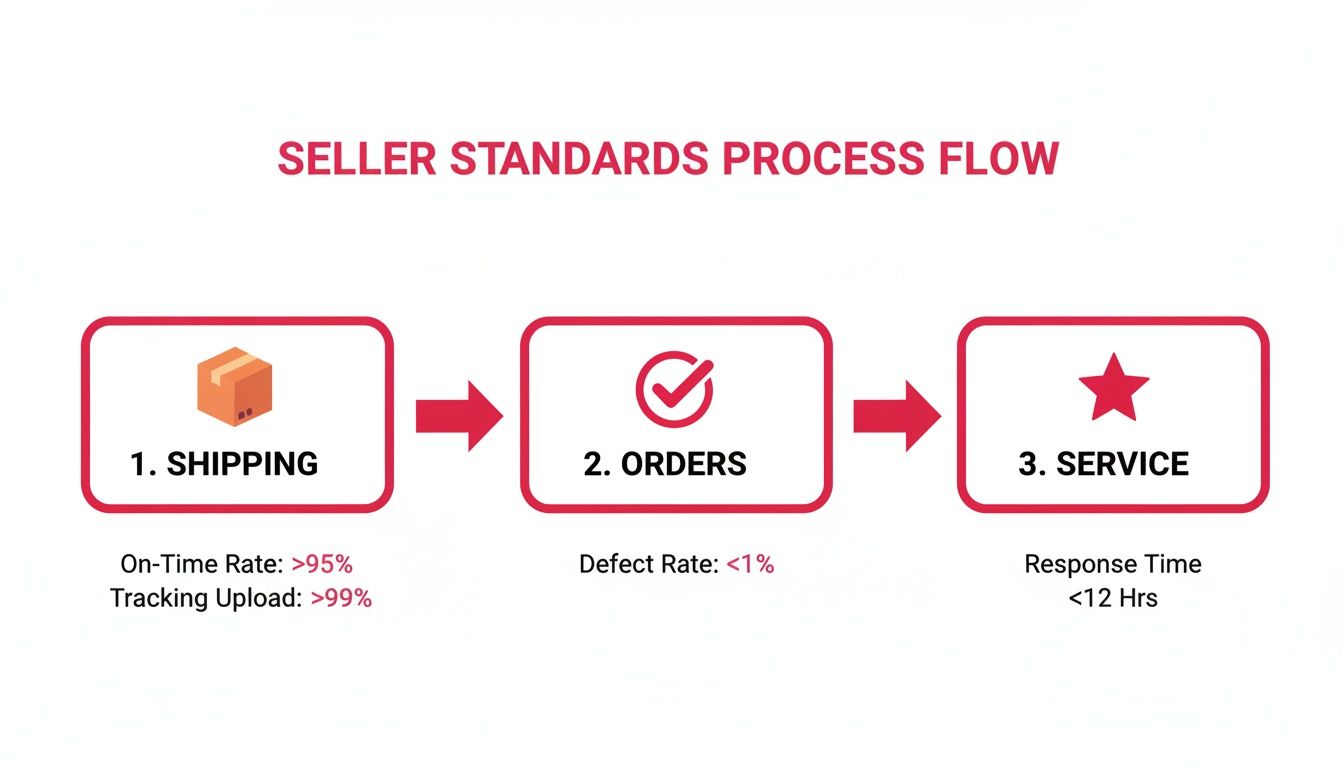
This just goes to show that your job doesn't end at setup. Your daily operations are what will truly define your long-term success on TikTok Shop.
Phase 3: Storefront and Launch
Once you get that sweet approval email, it's time for the final steps: getting your shop ready for customers. For a deeper dive into this stage, check out our complete guide on how to sell products on TikTok, which is packed with more advanced strategies.
- List Your First Product: It's time to add your products! Use high-quality images and make sure your descriptions are compelling and compliant with TikTok's rules.
- Configure Shipping Options: Finally, head into the Seller Center to set up your shipping templates and decide how you'll handle fulfillment.
Frequently Asked Questions About TikTok Shop Requirements
Jumping into TikTok Shop usually brings up a handful of questions. Getting the right answers can be the difference between a smooth approval and getting stuck in a frustrating loop. Let's tackle the most common things people ask about TikTok Shop's seller requirements.
How Long Does the Approval Process Take?
This is probably the number one question on everyone's mind. While TikTok moves fast, the seller verification process isn't instant. Think of it like a security checkpoint—the platform needs a moment to carefully check your documents to make sure everything's legit.
Generally, you can expect the whole thing to take anywhere from 24 to 72 hours. But, if there are any hiccups with your submission, it could stretch out to a week or more. The fastest approvals always happen when every piece of information lines up perfectly and your documents are crystal clear from the get-go.
Can I Sell on TikTok Shop Without a Business License?
Yes, you absolutely can. This is a huge deal and a key part of the TikTok Shop seller requirements. The platform basically gives you two paths to choose from: selling as an Individual or as a Business.
If you don't have a formal business setup like an LLC or corporation, you can just sign up as an Individual seller. This option is perfect for creators, sole proprietors, or anyone just dipping their toes in the water. Instead of business paperwork, you'll just need to verify who you are with a government-issued ID (like a driver's license or passport) and your Social Security Number (SSN) for tax stuff.
Key Insight: Going the Individual route doesn't hold you back or limit what you can sell. It just changes the paperwork you need to submit. The golden rule is consistency—your personal ID, bank account, and tax info must all have the exact same name you register with.
Why Was My Application Rejected and What Can I Do?
Getting rejected is a bummer, but it's almost never the end of the road. Most of the time, it's because of a few common, totally fixable mistakes. Figuring out why you were denied is the first step to getting it right on the next try.
Here are the top reasons applications get flagged:
- Mismatched Information: This is the big one. Your legal name on the application has to be an exact match to what's on your ID, bank account, and tax documents. Even a tiny typo or a forgotten middle initial can trip up the system.
- Ineligible Product Listings: If you try to list products from prohibited or restricted categories right out of the gate without the proper certifications, your application can be denied. Always, always check TikTok's product policies before you list anything.
- Poor Document Quality: Blurry, cropped, or expired documents are an automatic no-go. Make sure your submissions are high-resolution, easy to read, and show all four corners of the document.
If your application gets rejected, TikTok will usually tell you why. Read their feedback carefully, fix the specific problem they pointed out, and you can apply again. Most sellers who sort out the initial issue get approved on their second attempt.
Ready to connect with creators who can drive sales on your new TikTok Shop? JoinBrands offers an all-in-one platform to find and collaborate with over 250,000 TikTok Shop Affiliates and influencers. Streamline your campaigns, manage content, and amplify your brand's presence with our powerful tools. Learn more and get started today!