




 Social Media Manager Agency – Top 30 Agencies, FAQs & More
Whitelisting on Instagram is when a creator gives a brand the keys to run paid ads using their content, straight from their own social media handle. It's how a brand can put real ad spend behind a creator's authentic post, turning a trusted recommendation into a powerful ad that can reach entirely new audiences.
Table of Contents
What Whitelisting on Instagram Actually Means

Let's paint a picture. A creator you partnered with posts a fantastic review of your product. Their followers love it, the engagement is through the roof, and you're seeing some great organic buzz.
Now, imagine you could take that exact post – the creator’s genuine voice, their photo, their caption – and show it to a million more people who look just like your ideal customer. That’s the magic of whitelisting on Instagram.
Think of it like this: the creator built a high-performance race car (the amazing content). By whitelisting, you're just adding the fuel (the ad budget) to take it way beyond the creator's immediate followers. The best part? The ad shows up in people's feeds directly from the creator’s handle, not your brand’s account. This is a major advantage.
The Power Of Authenticity At Scale
This isn't your typical, polished brand ad. Instead of an ad coming from a corporate account that people are trained to ignore, the audience sees a recommendation from a person they already know and trust. For DTC brands and agencies battling ad fatigue, this is the perfect way to build instant social proof.
The benefits are immediate and clear:
- Boosted Credibility: Ads from a creator feel like a genuine tip from a friend, not a sales pitch. Trust is built-in.
- Higher Engagement: Authentic, user-generated content just performs better. It’s more relatable and feels less like an interruption in the feed.
- Better Performance: When you combine authentic content with precise ad targeting, you often see a much higher Return on Ad Spend (ROAS).
When you run an ad through a creator's account, you're not just buying media space; you're borrowing the trust and connection that creator has spent years building with their community.
Whitelisting vs. Traditional Ads vs. Boosting Posts
It's easy to get these terms mixed up, but they offer very different levels of control and effectiveness. Whitelisting is far more than just "boosting" a post. While boosting gives a post a little extra reach, it offers very limited targeting and control.
Whitelisting, on the other hand, plugs the creator's content directly into Meta’s powerhouse Ads Manager.
This unlocks the entire suite of advanced advertising tools. Suddenly, you can A/B test different captions, target hyper-specific audiences, and run campaigns optimized for conversions, leads, or traffic – all using the creator's original post as your creative.
Here’s a quick breakdown of how these three methods stack up against each other:
| Feature | Whitelisting | Traditional Brand Ad | Boosting a Post |
|---|---|---|---|
| Ad Appears From | The Creator's Handle | The Brand's Handle | The Creator's/Brand's Handle |
| Authenticity Level | Very High (looks like organic content) | Low (clearly a corporate ad) | Medium (organic post with "Sponsored") |
| Targeting Options | Full Meta Ads Manager Suite | Full Meta Ads Manager Suite | Limited, basic options |
| Optimization Goals | Conversions, Leads, Traffic, etc. | Conversions, Leads, Traffic, etc. | Engagement, Reach, Profile Visits |
| Creative Control | Use existing post, edit copy/CTA | Full control to build from scratch | Limited to the original post |
| Best For | Scaling proven UGC, building social proof | Driving direct sales, brand awareness | Increasing reach on a specific post |
As you can see, whitelisting gives you the best of both worlds: the authenticity of a creator's post combined with the powerful, data-driven tools of a traditional ad campaign.
This strategic control transforms a simple organic post into a sophisticated marketing asset that still feels human. You can dive deeper into the broader concept in our guide on what is whitelisting in social media.
Why Whitelisting Creator Content Is a major advantage
Whitelisting on Instagram isn't just some technical box-ticking exercise; it's a strategic pivot that completely changes how brands talk to their audience. Top-tier brands now consider it a core part of their advertising playbook because it solves one of marketing's oldest problems: how to earn trust in a space that’s bursting at the seams with ads.
Think about it. When a brand runs an ad, our skepticism alarm bells immediately go off. But when that same message pops up from a creator we already follow and trust? The entire dynamic flips. It stops feeling like a sales pitch and starts feeling like a genuine recommendation from a friend who knows their stuff. This "borrowed trust" is the magic ingredient for brands.
This authenticity isn't just a warm and fuzzy feeling – it delivers cold, hard results. Ads that look and feel like native, organic content are way less jarring and do a much better job of grabbing and holding attention. This almost always leads to higher engagement, lower ad costs, and, most importantly, better conversion rates than your typical polished, brand-produced creative.
Unlocking Higher Returns for Brands
The psychology here is pretty straightforward: social proof is incredibly powerful. By whitelisting a creator's post, you're putting your ad budget behind a piece of content that has already proven it connects with a real audience. Instead of throwing creative at the wall and hoping something sticks, you're betting on a sure thing.
This approach brings a few key advantages to the table:
- Instant Credibility: The ad comes directly from the creator’s handle, immediately tapping into the relationship and trust they've spent months or years building with their followers.
- Sky-High Engagement: Authentic content naturally pulls in more likes, comments, and shares. This tells the Instagram algorithm your ad is high-quality, which can in turn lower your Cost Per Mille (CPM).
- Serious Ad Performance: A skincare brand, for example, could easily see a 3x higher Return on Ad Spend (ROAS) by running whitelisted creator ads. These ads work like powerful video testimonials, crushing the performance of glossy, big-budget commercials because they feel raw and relatable.
While brands often keep the specific data from their whitelisting campaigns under lock and key, the overall trend is undeniable. Engagement rates on Instagram are always in flux, making truly authentic, high-performing content more valuable than gold. Brands that nail this creator-led paid strategy are just in a much better position to win. You can get a broader sense of platform statistics and learn about general Instagram trends on meltwater.com.
Fueling Growth for Creators
Here’s the best part: the benefits of whitelisting aren't a one-way street. For creators, this kind of partnership is a massive launchpad for growth and a huge step up in their career. It’s a true win-win that builds stronger, more collaborative relationships.
When a brand puts serious ad dollars behind a creator's post, that creator's content suddenly gets blasted out to thousands, sometimes millions, of new people. This isn't just a fleeting moment of fame; it's a powerful engine for growing their audience. New users who discover the creator through a whitelisted ad and like what they see are very likely to hit that follow button, organically expanding their community.
Whitelisting transforms a one-off collaboration into a long-term partnership. The brand gets high-performing ads, and the creator gains massive, targeted exposure funded by the brand's budget.
This setup also seriously boosts a creator's professional reputation. Being trusted by a brand to this extent is a huge vote of confidence, opening up doors for bigger and better partnerships down the road. It sends a clear signal to the industry that this creator produces content that not only engages but actually converts, making them a much more attractive partner for other brands. It moves the whole dynamic from a simple transaction to a real partnership where everyone is invested in each other's success.
Your Step-by-Step Whitelisting Setup Guide
Alright, now that we’ve covered the "why" behind whitelisting, let's get into the "how." This is your hands-on playbook for getting a creator's post approved and running as a killer ad. We've laid out the entire process in three simple stages, taking all the guesswork out of the equation for both you and your creator partners.
Think of it as a secure, digital handshake between the brand and the creator, all handled safely within Meta's world. The brand asks for permission, the creator gives the thumbs-up, and then the brand can launch the ad using their content. Simple as that.
Stage 1: The Brand Kicks Things Off
The first move is always the brand's. This whole process starts inside the Meta Business Suite, which is the command center for all your ad assets. Your goal here is to send a formal request to the creator for permission to use their account for advertising.
Here’s how you get the ball rolling:
- Head to Business Settings: Log in to your Meta Business Suite and find the Business Settings section.
- Find the Partners Tab: In the menu on the left, look under "Users" and click on "Partners." This is where you'll manage all your collaborations.
- Add a New Partner: Hit the blue "+ Add" button and choose "Ask a partner to share their assets." Since you're the one asking for access, this is the option you want.
This will pull up the partner request form, where you'll get specific about who you're working with and exactly what kind of access you need.
This flowchart breaks down how a brand's need for authentic content directly creates growth opportunities for the creator, making it a true win-win.
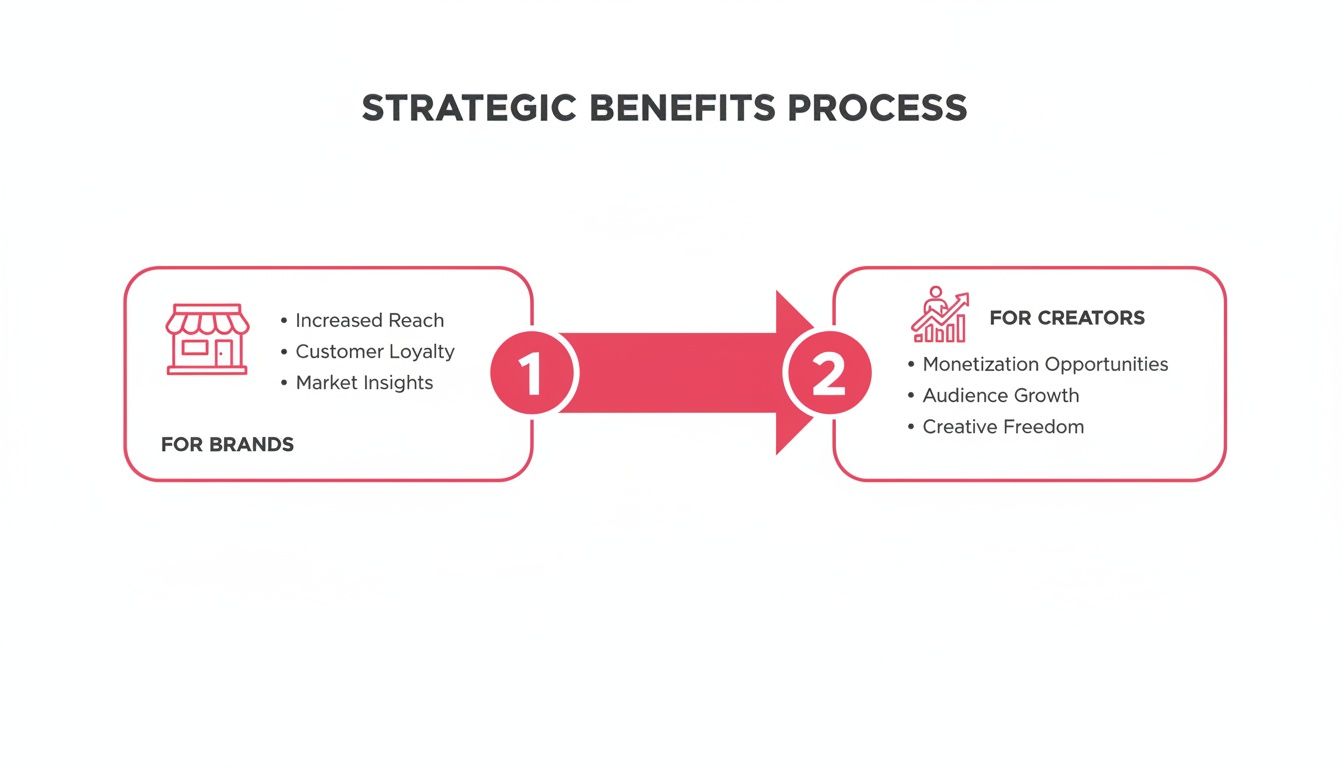
As you can see, the brand's goals and the creator's growth are totally connected, which is what makes whitelisting so effective.
From here, you’ll just need to plug in the creator's Business ID and request the specific permissions you need to run your whitelisting on Instagram campaigns.
Stage 2: The Creator Gives the Green Light
Once you send the request, the ball is in the creator's court. They’ll get an email and a notification from Meta asking them to review and approve the partnership. This is a super important step – it keeps everything transparent and ensures the creator stays in complete control of their account.
For the creator, it’s a piece of cake:
- Review the Request: They'll log in to their own Meta Business Suite, go to the "Partners" section, and see your request waiting for them.
- Confirm Permissions: The request will spell out the exact permissions you're asking for, like the ability to run ads with their content.
- Approve: With a quick click, they approve the partnership. That's it. Their account is now officially linked to your Business Suite for advertising.
This approval is the digital handshake that makes it all official. Just remember, this only works if the creator has a Business or Creator account on Instagram; personal accounts can't be connected for whitelisting.
Key Takeaway: This approval process is designed to protect everyone. Creators give explicit consent for their content and handle to be used in ads, and brands get the documented permission they need to run campaigns legally and without any hiccups.
Stage 3: The Brand Puts the Content to Work
With the partnership approved, you're ready for the fun part: turning that authentic creator post into a high-performing ad. This is all done inside Meta Ads Manager, where you’ll now find a whole new library of incredible creative ready to go.
Here's how to find and use the creator's content:
- Create a New Campaign: Jump into Ads Manager and start a new campaign like you always do, picking your objective (like Conversions or Traffic).
- Set Up Your Ad Set: Dial in your budget, schedule, and, most importantly, your target audience.
- Select the Ad Creative: Now, at the ad level, things change a bit. Under the "Identity" section, you'll now be able to select the creator's Instagram account from a dropdown menu.
- Use an Existing Post: Choose the "Use Existing Post" option. From there, you can browse the creator's feed and pick the exact post you want to turn into an ad.
Once you’ve selected the post, Ads Manager will pull it in as your ad creative. You can't change the original photo or video, but you can customize the call-to-action (CTA) button and the link it goes to.
Give it a final preview, hit publish, and you’ve just launched your first whitelisted campaign. Congratulations
Managing Permissions and Brand Safety
Successful Instagram whitelisting is built on a bedrock of trust and crystal-clear agreements. The tech setup is the easy part. The real work is in managing the permissions and protecting your brand’s reputation every step of the way.
Jumping into a campaign without these guardrails is like handing over your company credit card with no spending limit. It’s a recipe for confusion, miscommunication, and serious risk. This whole process lives and dies by the creator’s explicit, documented consent. A quick "sure, go for it" in the DMs won't cut it.
The Non-Negotiable Influencer Contract
Before you even think about requesting access through Meta Business Suite, you need a rock-solid contract. This legal document is your single source of truth and the most important tool you have for brand safety. It eliminates any gray areas and sets clear expectations for everyone involved.
Think of the agreement as a detailed playbook for the partnership, leaving zero room for interpretation. To keep the collaboration smooth and avoid major headaches down the road, your contract needs to cover a few key areas.
Here are the essential clauses you can't skip:
- Content Usage Rights: Spell it out clearly. The brand gets permission to use specific content from the creator's handle for paid advertising. No surprises.
- Whitelisting Permissions: Use the term "whitelisting" or "Partnership Ads" directly. The contract must state that the creator agrees to grant the necessary permissions through Meta's platform.
- Campaign Timelines: Define the exact start and end dates for the ad campaign. Be specific about how long the brand can run ads with the creator’s content.
- Exclusivity Clauses: If it applies, outline any rules that prevent the creator from teaming up with your direct competitors while your campaign is live.
Getting this right is crucial for your legal protection. For a complete breakdown, check out the key components of a strong influencer agreement contract to make sure you've covered all your bases.
Setting the Right Level of Access
When you ask a creator for access, you’re not asking for the keys to their entire account. Meta’s system is designed for granular control, so you only need to request the permissions you absolutely need to run the ads. The best practice is always to request the minimum level of access required.
The goal is to gain advertising capabilities, not administrative control. You need permission to create ads from their existing content and access performance insights – nothing more. This limited access protects the creator’s account security and reinforces a relationship built on trust.
And once the campaign is over, your job isn't done. It’s critical to keep your Business Manager clean and secure by promptly revoking the creator's permissions. This "offboarding" step is a sign of a professional, respectful partnership, showing that access is only active when necessary.
Maintaining Brand Safety with Approval Workflows
Even with a contract in place, brand safety is an ongoing process. The last thing you want is an ad going live that clashes with your brand's voice or messaging. This is where a clear content approval workflow becomes your best friend.
Before any content gets whitelisted and backed by ad spend, it has to go through a formal review. The creator should submit their organic post – the visual, the caption, the tags, everything – to you for approval first.
This simple checkpoint ensures the content is 100% on-brand and hits all your campaign goals before it ever sees the light of day. It’s the final safety check that prevents costly mistakes and guarantees your whitelisting campaign is smooth, effective, and perfectly aligned with your standards.
How to Measure and Optimize Whitelisted Campaigns
Getting your whitelisted campaign live is really just the starting line. The real magic happens when you start digging into the data, figuring out what’s actually working, and making smart tweaks to squeeze every last drop of value from your ad spend. This is how you turn a good campaign into a great one.
Unlike your standard brand ads, the data you get from whitelisted creator content tells a completely different story. You’re not just looking at basic ad performance; you're measuring the raw impact of authenticity, but at scale. Nailing this means knowing which metrics truly matter and how to turn those numbers into profitable decisions.
Identifying Your Key Performance Indicators
Your command center for all this is Meta Ads Manager. It can feel like you're drowning in a sea of metrics, but focusing on just a few key performance indicators (KPIs) will give you the clearest picture of your campaign's health and its impact on your bottom line.
Here are the essential metrics you should be glued to for your whitelisted campaigns:
- Return on Ad Spend (ROAS): This is the holy grail. For every single dollar you put into the campaign, how many dollars are you getting back in revenue? A high ROAS is the clearest sign you’ll get that a creator's content is genuinely driving sales.
- Cost Per Acquisition (CPA): How much is it costing you to land a new customer? Creator content often builds trust much faster, which can lead to a lower CPA compared to traditional ads that have to work a lot harder to win over a cold audience.
- Click-Through Rate (CTR): This tells you how many people who saw the ad actually clicked on it. A high CTR on a whitelisted post means the creator’s content was compelling enough to stop the scroll and spark real interest.
These core metrics give you a solid foundation. But if you want to go deeper, you can explore a wider range of content performance metrics to paint an even more complete picture of what’s happening.
Turning Data Into Actionable Optimizations
Once you’ve found your top-performing creative – those posts with the highest ROAS or the lowest CPA – it's time to double down. Data is completely useless if you don't act on it. The goal here is to constantly refine your strategy based on what the real-world results are telling you.
Don't treat a whitelisted campaign as a "set it and forget it" activity. The real ROI comes from ongoing optimization, where you treat each piece of creator content as a variable you can test and scale.
Think of your best-performing creator post as your new champion, your control creative. Now, you can start running experiments to make it even more powerful.
Smart Tactics for Campaign Improvement
Optimization isn't about guesswork; it's about methodical, deliberate testing. The key is to isolate single variables so you can clearly understand their impact. This approach lets you build on your successes and systematically improve your results over time.
Before diving into the metrics, it's crucial to know what you're tracking. The right data points will tell you if the creator's authentic voice is translating into actual business results.
Key Metrics for Whitelisted Ad Campaigns
This table breaks down the most important metrics to watch. Monitoring these will give you a clear view of your campaign's performance and help you make data-driven decisions to improve your return on investment.
| Metric | What It Measures | Why It's Important for Whitelisting |
|---|---|---|
| ROAS (Return on Ad Spend) | The total revenue generated for every dollar spent on advertising. | This is your ultimate profitability indicator. It directly shows if the creator's content is effectively converting viewers into customers. |
| CPA (Cost Per Acquisition) | The average cost to acquire one new customer through the ad campaign. | Authentic creator content often builds trust faster, which should lead to a lower CPA compared to standard brand ads. A low CPA means efficient spending. |
| CTR (Click-Through Rate) | The percentage of people who saw the ad and clicked on the call-to-action. | A high CTR signals that the creator's content is engaging and compelling enough to make people stop scrolling and take the next step. |
| Conversion Rate (CVR) | The percentage of users who completed a desired action (e.g., purchase, sign-up) after clicking the ad. | This metric tells you how persuasive the landing page and offer are once the creator has driven traffic. It shows the quality of the clicks. |
| Engagement Rate | The total number of likes, comments, shares, and saves relative to the ad's reach or impressions. | High engagement shows that the content resonates with the audience, which builds social proof and can amplify the ad's organic reach. |
By keeping a close eye on these numbers, you're not just running ads; you're building a scalable system for creator-led growth. Now, let's put that data to work.
Here are a few powerful optimization tactics you can try:
- A/B Test the Copy: Take that winning video or image from a creator and run two separate ads with different captions. Test a short, punchy caption against a longer, more descriptive one. You might be surprised to find that a different angle dramatically lifts performance.
- Target New Audience Segments: If a specific creator's ad is killing it with your core demographic, duplicate that ad set and test it against a new lookalike audience or an interest-based group you haven’t touched before. Authentic content often has a much broader appeal than you'd expect.
- Reallocate Your Budget: This is the most critical move you can make. If you have five creators in a campaign and one of them is driving 80% of the conversions, don't hesitate to shift the majority of your budget to that top performer. Starve the campaigns that aren't delivering and feed the ones that are.
Common Whitelisting Mistakes to Avoid
Jumping into a whitelisting campaign is about more than just flipping a switch in Ads Manager; it's about building a real partnership. And while the upside is huge, a few common stumbles can quickly turn a great collaboration into a costly mess.
Learning from the mistakes others have made is the fastest way to get your campaigns on solid ground from day one. By sidestepping these all-too-common pitfalls, you can protect your ad spend, keep creator relationships strong, and actually get the results you're after.
Mistake 1: Failing to Formalize the Agreement
This is probably the most dangerous mistake you can make. Relying on a verbal "okay" or a casual back-and-forth in the DMs is a recipe for disaster. It leaves way too much open to interpretation – things like content usage rights, how long the campaign will run, and payment terms can all get messy, fast.
Without a signed contract, you're flying blind with no legal protection if a disagreement pops up.
The Solution: Always, always get a detailed influencer contract signed before any permissions are granted. This document needs to spell out the terms of the whitelisting on Instagram partnership in plain English. It should cover which specific posts you can use, the exact length of the ad campaign, and the full scope of usage rights. This single document becomes the source of truth that protects both you and the creator.
Mistake 2: Choosing the Wrong Creator Partner
It’s easy to get wowed by a creator’s follower count or a slick-looking feed. But if their audience isn't your target customer, you're just lighting money on fire. Advertising to the wrong crowd is one of the biggest reasons whitelisted campaigns flop.
You can have the most amazing creator content in the world, but if it's shown to people who have zero interest in your product, your Return on Ad Spend (ROAS) will be dismal.
The Solution: You have to dig deeper than just surface-level metrics. Before you even think about partnering up, use creator analytics tools to look at their audience demographics, engagement patterns, and interests. You need to be sure their followers actually line up with your ideal customer profile. It’s the only way to guarantee your ads are reaching people who might actually buy.
A creator with 10,000 highly engaged, niche followers is worth way more than a creator with 100,000 followers who don't care. When it comes to whitelisting, audience quality beats audience quantity every single time.
Mistake 3: Over-Editing Authentic Content
Here’s the thing: the magic of whitelisting comes from the creator’s genuine voice and unique style. A classic blunder is for brands to get their hands on the content and start tweaking the ad copy or CTA until it sounds like it came from a corporate marketing department.
This completely strips the ad of its personality. What was once a real recommendation from a trusted person becomes just another generic ad that people have been trained to scroll right past.
The Solution: Trust the creator you chose to partner with. You can (and should) test out different calls-to-action, but do it collaboratively. Make sure any changes to the ad copy still sound like something the creator would actually say. Your goal is to amplify their authentic message, not smother it with your own marketing-speak. That's how you hold onto the trust and relatability that makes these ads work so well.
Got Questions About Instagram Whitelisting? We've Got Answers.
When brands and creators start digging into Instagram whitelisting, a few questions always pop up. It's a powerful strategy, but the details can feel a bit fuzzy at first. Let's clear the air and tackle the most common questions head-on.
Does The Creator Need a Special Account Type?
Yes, this is non-negotiable. For whitelisting to work, the creator’s Instagram profile absolutely must be a Business or Creator account.
A standard personal account just doesn't have the backend connections needed to link up with Meta Business Suite, which is where all the ad magic happens. Making sure your partner has the right account type is the very first box you need to tick before sending any permission requests.
Can We Edit the Creator's Whitelisted Post?
You can’t touch the original creative – the photo or video is locked. And honestly, that’s the whole point. The power of these ads comes directly from the creator’s authentic work.
But you do get a ton of flexibility inside Ads Manager to fine-tune other parts of the ad for better performance. Brands can easily test and optimize crucial elements like:
- The ad copy or headline
- The call-to-action (CTA) button
- The link people click on
This lets you sharpen the ad's effectiveness and drive results, all while keeping the creator's trusted content front and center.
What Happens After The Campaign Ends?
Once you stop putting ad spend behind the whitelisted post, it simply vanishes from people's feeds as an ad. The original organic post, however, will stay right where it is on the creator's profile unless your agreement says otherwise.
It's so important to have a contract that clearly outlines how long you can use the post for ads. Once that time is up, the best practice is to immediately remove the creator’s advertising permissions from your Business Manager. This is just good housekeeping – it keeps both accounts secure and shows you're a professional partner, setting you up for smooth collaborations in the future.
Ready to scale your creator campaigns and streamline your whitelisting process? With JoinBrands, you can connect with over 250,000 creators, manage partnerships, and launch high-performing ads all from one platform. Find your next top-performing creator today at JoinBrands.