
 Build Your Campaign Performance Dashboard: 2026 Guide
You've got a creator video that feels right for the brand, but the next decision is less obvious: should the ad run from the creator's account, or should you build unpublished versions in your own account? The answer changes what shoppers see, what permissions you need, and how cleanly you can test creative.
The practical distinction is whose identity delivers the ad and whether it's tied to a public post. Treat creator authorization as a specific media-rights decision, not a checkbox. Then choose the format that fits the campaign and test it against a fair control.
Table of Contents
Whitelisting and Dark Posting Side by Side
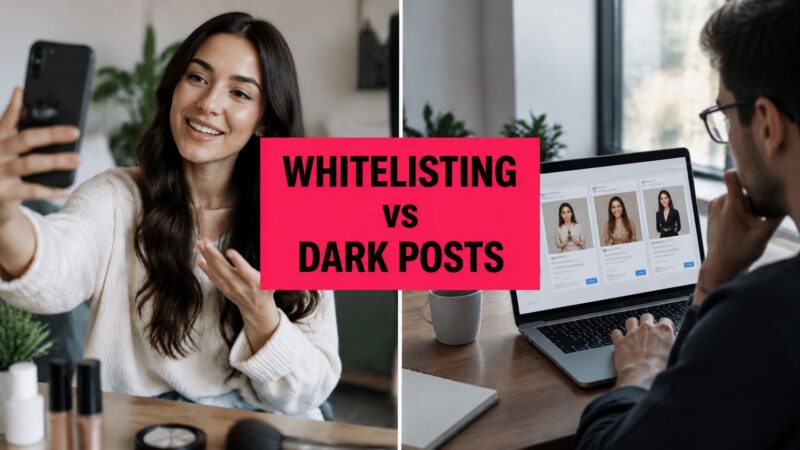
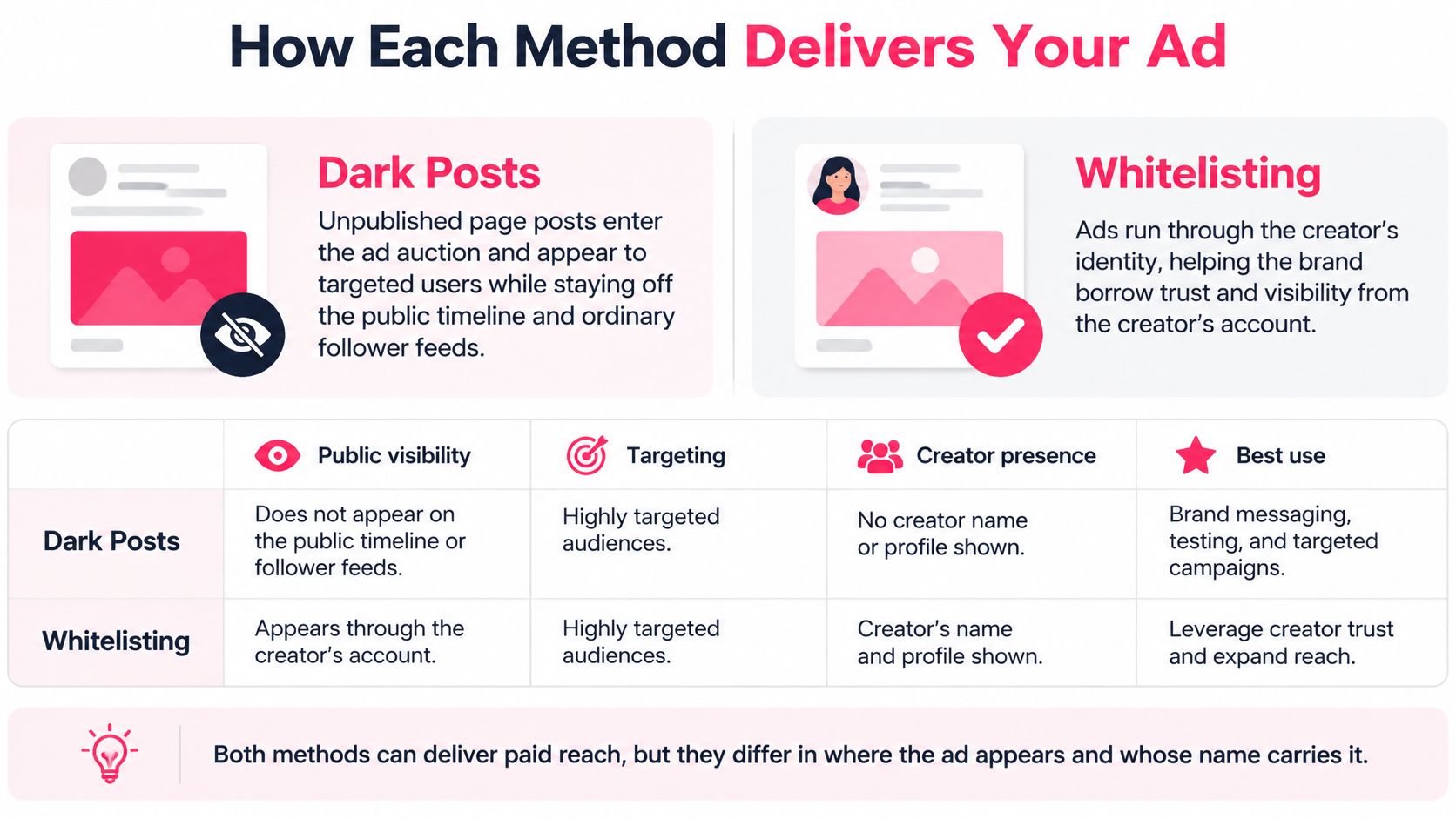
Whitelisting puts paid media behind a creator's identity; dark posting delivers an ad to selected people without adding it to a public page or feed. In whitelisting, the creator's name and profile image appear, and the ad can use an existing post with its accumulated engagement. A dark post can run from the brand account or, with creator authorization, under a creator identity without appearing as a public post.
The terminology gets blurry because identity and visibility are separate choices. A creator-authorized ad can run without being published on the creator's public profile, while an ad tied to an existing creator post can be tested against other creative. The formats you'll most often encounter are Meta Partnership Ads, TikTok Spark Ads, and brand-run dark posts. For a useful primer on how the TikTok format works, see this guide to Spark Ads on TikTok.
| Factor | Whitelisting | Dark Posting |
|---|---|---|
| Identity shown | Creator name, handle, and profile image | Brand account, or creator identity without a public post |
| Creator's original post | Kept, with its existing likes, comments, and shares | Not needed; the ad exists only as paid placement |
| Permission needed | Creator authorizes the brand to advertise through their account or post | Advertiser controls delivery; creator consent is still needed when creator identity is used |
| Authorization window | 7, 30, 60, or 365 days on TikTok Spark Ads, as TikTok's Spark Ads guide describes | Set by the media plan; no creator-profile dependency |
| Strongest use | Creator identity and social proof drive conversion | Rapid testing of hooks, offers, and audiences |
| Effect on public profile | Creator post stays visible on their profile | None; brand page and creator feed stay unchanged |
For teams managing creator access and ad versions, Exerta's overview of simplifying creator advertising offers context on the permissions and workflow involved. The decision itself is straightforward: if the creator's identity and existing post are part of why buyers convert, choose whitelisting; if you need many variants under brand control, choose dark posting.
Performance and Cost Trade-Offs to Weigh
Whitelisting can make an ad feel native to a creator's account, while dark posting gives the media team a controlled way to test variations. Neither guarantees lower acquisition costs. The reported figures below can help form a hypothesis, but platform, audience, offer, and campaign setup all affect the result.
| Metric | Reported Figure | Source Type | Caveat |
|---|---|---|---|
| Spark Ads completion rate | 30% higher than non-Spark in-feed ads | TikTok internal data, Q4 2020 to Q2 2021 | Platform-reported, not independently audited |
| Spark Ads engagement rate | 142% higher | TikTok internal data, same period | Check against your own audience |
| Spark Ads conversion rate | 43% higher | TikTok internal data, same period | Depends on offer and objective |
| Spark Ads CPM | 4% lower | TikTok internal data, same period | Small gap; auction conditions vary |
| Completion rate | 134% higher than standard in-feed ads | Separate TikTok-reported comparison | Platform-reported comparison |
| Six-second view-through rate | 157% higher than standard in-feed ads | Separate TikTok-reported comparison | Measures attention, not sales |
| 30-day whitelisting fee uplift | Roughly 20% to 50% above base creator fee | Industry pricing references | Longer rights cost more; get quotes for your own deals |
| Cost per incremental purchase | 45% lower when at least 30% of campaign assets were Partnership Ads | Industry report, 20 EMEA conversion-lift studies | Reported result, not a guarantee |
| CPA for Partnership Ads | Roughly 20% lower than brand-only creative | Meta-related reporting | Varies by platform and category |
TikTok's reported comparisons are internal platform findings, not independent audits; the TikTok-reported Spark Ads comparisons include results from Q4 2020 to Q2 2021 as well as a separate comparison against standard in-feed ads. Read the completion and engagement figures as reasons to test creator identity, not as a forecast for your account.
On the commercial side, Gigapay's overview of influencer usage rights and whitelisting fees describes a common 30-day paid-usage or whitelisting uplift of roughly 20% to 50% over a creator's base fee, with longer licensing periods priced higher. It also cites a 45% lower median cost per incremental purchase when at least 30% of campaign assets were Partnership Ads, based on 20 EMEA conversion-lift studies. That's a reported study result, not a universal outcome.
Meta-related reporting also describes roughly 20% lower CPA for Partnership Ads than comparable brand-only creative, a benchmark discussed in ContentGrip's guide to whitelisting and dark posting. These estimates aren't standardized. Treat creator authorization as a performance variable and validate it with split tests before committing budget.
How Each Method Delivers Your Ad
A dark post starts as an unpublished page post, enters the advertising auction, and reaches selected users without appearing on the public timeline or ordinary follower feeds. That lets a brand test different hooks, formats, offers, and calls to action without filling its profile with near-duplicates. The dark-posting overview explains the operational distinction: this is a distribution and testing method, not automatically a creator-rights arrangement. If creator footage is uploaded and run from the brand account, the ad still appears as a brand-account ad.
This separation is useful when you want paid-media testing to run independently of the editorial calendar. If you're deciding whether to handle the account in-house or get outside support, this guide to choosing a Facebook advertising agency can help frame that decision.
Meta Partnership Ads
Meta implements whitelisting through Partnership Ads, formerly called branded content ads. A creator can authorize a brand to boost an existing post, Story, or Reel, or the brand can build a Partnership Ad from creator content in Ads Manager. A creator-issued partnership ad code can allow promotion even when the advertiser isn't tagged in the post.
Request permission for the specific post you plan to use, then check that it remains eligible before launch. Meta's Partnership Ads permissions guidance also sets an important operational limit: creators can't edit content while it's being used as a Partnership Ad. Deleting the post stops the ad; archiving it can remove it from the creator's profile while allowing the ad to continue.
TikTok Spark Ads
Spark Ads preserve the original TikTok post and its engagement history. Use this sequence to launch one:
- Confirm the post is live and eligible. An organic post's availability doesn't guarantee ad approval.
- Request authorization for that specific post. Confirm the creator is approving the asset you intend to promote.
- Choose the authorization duration. Match it to the planned campaign, rather than asking for broad access by default.
- Launch the ad in TikTok Ads Manager. Check the selected account, post, and creative before publishing.
- Monitor the ad and manage its status. Keep an owner responsible for pausing the campaign or addressing access changes.
For a deeper look at how creator authorization works across Instagram, see this explainer on Instagram whitelisting.
Permissions and Disclosure to Lock In First
A generic "30-day whitelisting" clause leaves too much unsettled. Separate the agreement into account access, paid distribution, editing rights, and audience data or retargeting use. Permission to advertise doesn't automatically grant permission to edit a caption, reuse the asset on another platform, or retain audience data for later targeting. Each of those needs its own line in the agreement.
On TikTok, Spark Ads authorization runs for a fixed window that the creator sets when granting access. Match that window to the media plan: a short test can use a brief authorization, while evergreen creative may justify a longer one. The original post also has to stay eligible, since posts that violate platform rules can't be promoted in Ads Manager. Don't let an authorization outlast the campaign without a reason.
Disclosure remains necessary even when an ad isn't visible on the creator's public profile. The FTC's guidance on disclosures for social media influencers says endorsements must clearly disclose material connections, including payment or free or discounted products, and the disclosure should appear with the endorsement message. Treat the label as part of the creative. A "Paid partnership with" tag can appear on the post, but check that it survives every placement and edited variation. These FTC guidelines for influencer disclosures break down how the rules apply to creator campaigns specifically.
Use this preflight before launch:
- Verify the post is live and compliant. Posts that break platform rules can't be promoted, so check standing before requesting access.
- Match authorization duration to the media plan. Set an end date that reflects the campaign, not an open-ended convenience.
- Name the platforms and territories. A platform-specific permission shouldn't expand into other channels or markets.
- Check disclosure in every placement. Confirm the label or disclosure stays visible in feed, Stories, and any other planned format.
- Get creator approval for edits. Permission to advertise isn't permission to rewrite or re-cut without approval.
- Record approval and expiration. Keep the approved version, disclosure language, and access end date with the campaign record.
Say a skincare brand requests a 30-day Spark authorization for one approved video. It confirms "Paid partnership with" appears in both feed and Stories placements, then records the expiry date and the creator's written approval of any caption change. With JoinBrands, brands approve content before it's posted; for Content Only campaigns, creators deliver the UGC asset directly to the brand, which owns it and can post it wherever it likes.
How to Measure Each Method Fairly
A single campaign can't tell you whether results came from the creator's identity, the brand's targeting, the creative edit, or the platform's delivery algorithm. Separate those variables into treatment groups and hold the important settings steady. Otherwise, a better result may reflect a different audience or more favorable delivery.
| Test Group | Identity Shown | Delivery Method | Held Constant |
|---|---|---|---|
| Creator-handle ad | Creator name and profile | Partnership Ad or Spark Ad | Audience, placement, budget, frequency, optimization event, attribution window |
| Brand dark post | Brand page identity | Non-public paid ad from brand account | Audience, placement, budget, frequency, optimization event, attribution window |
| Organic-amplified ad | Creator's original post | Boosted existing post | Audience, placement, budget, frequency, optimization event, attribution window |
Keep spend pacing consistent as well. The guide to attribution modeling is useful when deciding how the campaign's conversion credit should be assigned. Audience overlap can distort results, so exclude overlapping groups where the platform allows it, or at least document the overlap before drawing conclusions.
Say a skincare brand runs all three groups at equal budgets for two weeks. It should compare cost per incremental purchase, not click-through rate alone. If the creator-handle ad earns more clicks but fails to generate more incremental sales, shift budget toward the group with the better cost per incremental purchase.
Dark posts are especially useful for comparing hooks, offers, thumbnails, and calls to action without changing a creator's public profile. Whitelisted creator ads may carry more social context, but your test should reveal whether that translates into sales for this offer and audience. Keep the control design stable, then let incremental outcomes decide where the budget goes.
Which Method Fits Each Campaign
The right method depends on what the campaign needs to borrow: creator trust, testing volume, or media life. Match the situation to the format:
| Campaign Situation | Better Fit | Why It Holds |
|---|---|---|
| New product with no social proof | Whitelisting | Creator identity and existing engagement can build trust before the brand has reviews |
| Testing 20 or more hooks, offers, or audiences | Dark posting | Variants run without filling the brand page |
| Short 7-day creator test | Whitelisting on a 7-day authorization | A short window limits commitment and gives a clean read on the creator |
| Evergreen best seller with long-running creative | Whitelisting on a 365-day authorization | The fee premium can be spread across a longer media life |
| Brand page must stay consistent | Dark posting | No extra posts appear on the public profile |
For a new product, the creator's face and voice supply context that the brand hasn't yet earned through customer reviews. For a mature product with a proven message, the priority shifts toward volume testing or a longer-running creator ad. Pro tip: use whitelisting to identify a promising message, then adapt the proven hook into brand-controlled dark-post variants for further testing.
Teams should also separate the asset from the placement. With Content Only, creators film and deliver the UGC file, the brand owns it, and the brand can post it wherever it likes, so it works as source material for dark posts or whitelisted ads. With Content + Posting, the creator also publishes on their own social accounts, which means authorization windows and disclosure wording apply to a public post, not just a paid placement. JoinBrands offers those campaign types alongside Retainers, Social Blast, Lives, Local Jobs, and Digital Products (Apps & Websites), so the format can match whether you need an asset, a post, or a longer collaboration.
One pitfall is choosing a dark post to make a paid relationship less visible. The disclosure obligation doesn't disappear because the ad isn't on a public profile. Paid partnership labels still apply to dark posts, so confirm the disclosure survives caption edits, placement changes, and creative variations. Permission to advertise also doesn't automatically mean permission to edit.
Choose Your Method and Confirm the Brief
Make the choice in three steps:
- Name the goal. Are you trying to borrow creator trust, or do you need a high volume of controlled creative tests?
- Choose the format that fits the campaign. Use creator identity when the creator and existing post are central to the message; use dark posting when testing many brand-controlled variations.
- Write the rights and measurement terms before production. Specify platform, duration, paid-media rights, edit approval, disclosure wording, and the test groups you intend to run.
Put the details in the creator brief before filming. If the campaign includes an organic post, confirm disclosure placement and posting dates as well. Use direct chat to share brand guidelines, clarify the brief before filming, give revision feedback, coordinate posting dates for Content + Posting campaigns, and handle creator questions.
Take one action today: send the creator a brief that lists the permissions, disclosure requirements, and test design, then hold media budget until the creator confirms those terms in writing. Whitelisting vs dark posting is first a media-rights and measurement decision, and only second an ad-format choice. Settle the permissions and test design before the budget moves.
JoinBrands connects brands with creators for Content Only and Content + Posting campaigns, with workflows for content approval and creator collaboration. If you're planning creator ads, visit JoinBrands to find collaborators and organize the brief, content, and paid-amplification permissions before launch.