
 College UGC Creator Guide: Hire, Brief and Measure Students
You've exported the video, uploaded it to Meta Ads Manager, and checked the preview. The product looks tiny in Reels, the captions sit behind the button, and the version collecting cheap views isn't producing more orders. Another shoot won't necessarily fix that. You need a clearer production brief and a better definition of a winning ad.
A Facebook advertising video is a paid video creative designed for a specific placement and business outcome. For ecommerce teams, the important question isn't whether people watched. It's whether the video persuaded people to buy who otherwise wouldn't have.
Table of Contents
Facebook Video Ad Specs by Placement
Say a media buyer exports a polished file formatted for display and sends it straight into Reels. The platform accepts the upload, but the composition doesn't work: the creator's face is small, the product demonstration loses detail, and the text becomes hard to read. An accepted file isn't necessarily a usable ad.
For a 2026 production workflow, start with a short vertical Reels and Stories cut, plus a separate Feed cut. This is an editorial starting point, not a new platform requirement: Meta's advertising guidance recommends videos under 15 seconds, vertical formats such as 4:5 or 9:16, and the main product or brand message within the first three seconds, because shorter videos are more likely to be completed and qualify for more placements.
Choose placements before opening the timeline
Use this lookup table to plan exports. The Reels production dimensions are detailed in the editing guidance below; the Feed formats are practical composition choices rather than an exhaustive list of accepted assets.
Facebook video ad specs by placement
| Placement | Aspect ratio | Duration | Export note |
|---|---|---|---|
| Facebook Reels | 9:16 at 1440 × 2560 | Under 15 seconds preferred | Export settings in the edit section |
| Facebook Feed | 4:5 or 1:1 | Under 15 seconds preferred | Product and main message in first 3 seconds; captions for sound-off |
| Facebook Stories | 9:16 | Short vertical cut | Build a placement-specific crop; never center-crop a Feed file |
| In-stream mobile | Flexible, confirm in placement preview | 5 seconds to 10 minutes | A long cut will not also fit desktop in-stream |
| In-stream desktop | Flexible, confirm in placement preview | 5 to 15 seconds | Needs its own short cut |
| Audience Network native and interstitial | 9:16 to 16:9 | 0 to 120 seconds | Confirm the placement before locking one master |
| Audience Network rewarded | Use the selected placement's accepted ratio | 3 to 60 seconds | Cannot be skipped |
Meta's placement specifications list Audience Network native and interstitial at 9:16 through 16:9 and 0 to 120 seconds, rewarded video at 3 to 60 seconds without skipping, and Facebook in-stream at 5 seconds to 10 minutes on mobile versus 5 to 15 seconds on desktop.
Reels and Stories need a composition that fills a phone screen without making the viewer search for the product. Feed needs its own framing, especially when hands, packaging, and captions compete for space. Don't assume that a centered crop preserves the demonstration.
The in-stream rows explain why an editor shouldn't deliver a long asset and call it finished. A mobile-compatible version can exceed desktop's allowance. Audience Network also needs an explicit decision, particularly for rewarded placements where viewers can't skip.
Turn the placement list into an export brief
Give the editor a destination for each deliverable:
- Export the short vertical first. Compose around the product, not around rescuing a widescreen recording.
- Build the Feed version separately. Reposition text and reframe hands or packaging instead of squeezing the whole composition.
- Add desktop in-stream only when selected. Don't pay for unnecessary deliverables.
- Check every placement preview. Confirm cropping and playback before launch; handle caption placement and interface clearance during the edit.
Practical rule: Choose where the ad will run before deciding what the camera needs to capture.
These specifications prevent production waste. They don't establish commercial success. A view is still not a sale.
How to Storyboard the First Fifteen Seconds
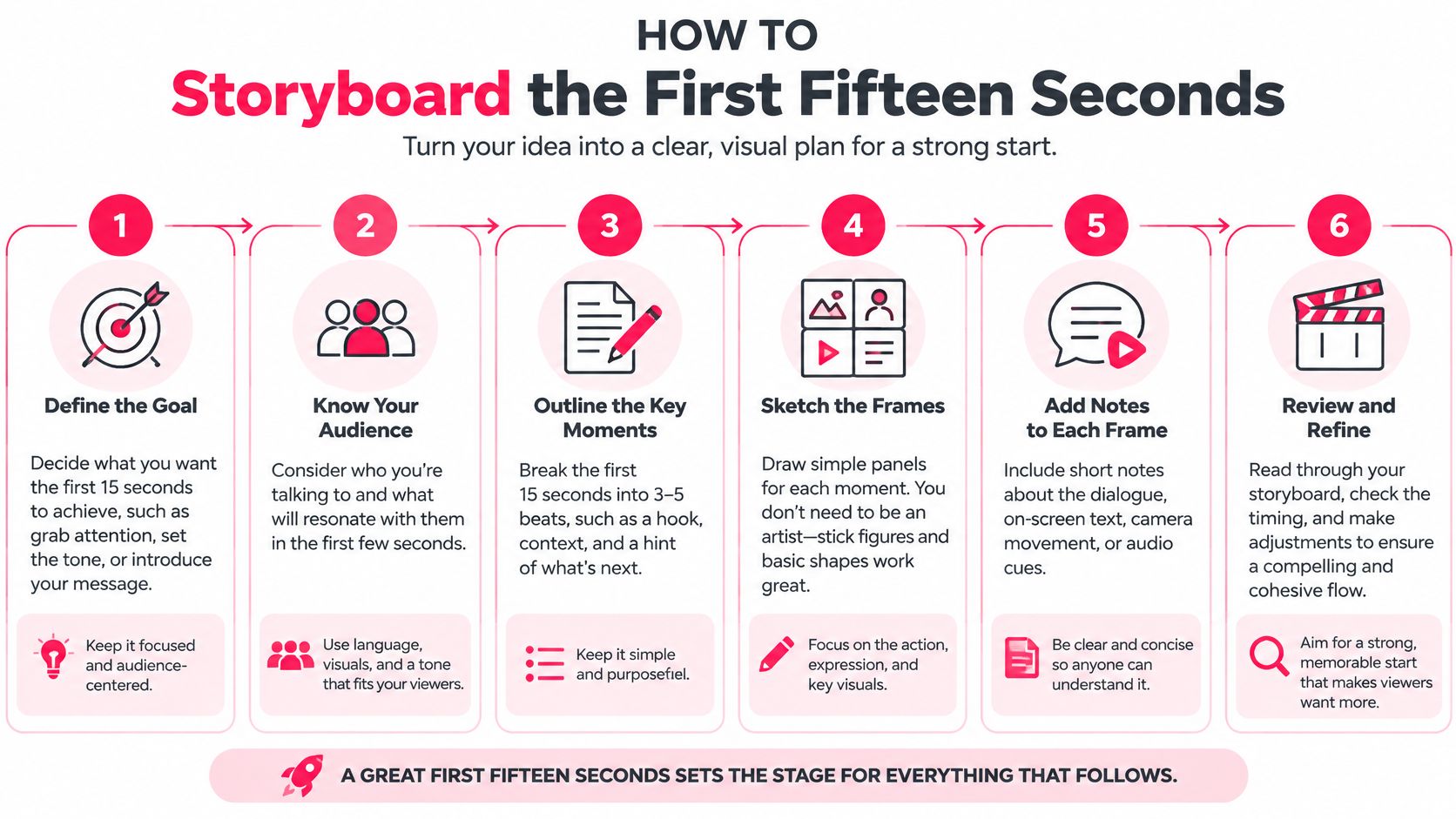
A creator should be able to read your storyboard and know what to film without a planning call. Keep it to a page, write in buyer language, and distinguish the opening promise from the evidence supporting it.
The process below turns that brief into shootable decisions.
Build the storyboard around a buyer's question
Write the benefit a customer would repeat.
For a hypothetical serum, that might be a more even-looking complexion. A claim such as fading dark spots within two weeks belongs in the script only if the brand can substantiate that exact outcome. Don't turn a creative example into an unsupported product promise.Storyboard the opening in detail.
Choose a product demonstration, problem statement, creator testimonial, or visual action. Nielsen's analysis of 173 Facebook digital-video BrandEffect studies, described in Meta's value-of-video guidance, found that viewers watching fewer than three seconds generated up to 47% of total campaign value, and those watching fewer than ten seconds generated up to 74%, depending on the measured outcome; the same guidance reports that 65% of people watching the first three seconds continue to ten seconds, and 45% continue to thirty seconds. These are attention and brand-value findings, not purchase guarantees.In a hypothetical 12-second serum storyboard, second 0 could show a cheek close-up revealing the supported result. Don't animate a spot disappearing if that would imply an instant effect the product doesn't deliver.
Put proof or the main objection in the middle.
In that example, seconds 3 to 9 could show two application swipes and a genuine before-and-after comparison. Label the elapsed treatment period accurately, keep lighting consistent, and avoid retouching that exaggerates the outcome. If suitable evidence isn't available, show texture and application instead.Reserve the final frame for one action.
By second 12 in the hypothetical edit, hold the approved price and a clear Shop now instruction. If you're selling a bundle, Shop the kit is more specific. Match the instruction to the destination and the ad button rather than asking viewers to shop, follow, comment, and subscribe.List shots, text, and mute-viewing requirements.
Write what the camera sees, what appears on screen, and what the creator says in separate columns. Mark any meaning that currently depends on audio, then give that meaning a visual equivalent.
Keep the storyboard separate from test settings
Store the offer, audience, budget, and landing-page settings in the campaign test sheet, not as editable options inside the storyboard. The creator still needs the approved offer and price, but shouldn't improvise commercial changes between opening variants.
For help turning spoken lines into a shootable document, use our guide to writing video scripts. Read every line aloud before approving it. A sentence that looks concise on a page can still sound unnatural from a creator.
Editor handoff checklist
- Opening selected: Identify the exact first shot and approved benefit.
- Proof supplied: Attach the demonstration, comparison, or evidence the edit may use.
- Text approved: Include captions, product names, price, and claim wording.
- Action aligned: Match the end frame to the button and destination.
- Assets organized: Label alternative openings clearly so the editor doesn't change the body accidentally.
Edit for Mute Viewers and Safe Zones
Keep important content away from approximately the top 14%, bottom 35%, and 6% on each side, following Meta's Facebook Reels video guidance. That guidance recommends a 9:16 asset at 1440 × 2560 pixels, with H.264 video, square pixels, progressive scan, a fixed frame rate, and stereo AAC audio at 128 kbps or higher.
Say an editor places a hypothetical $28 price in the bottom third. It looks balanced in the editing application, but the ad button covers it in the placement preview. Move the price and essential product detail into the middle band, then keep the last caption line above the interface area.
Export for the placement, not just the editing application
Use MP4 or MOV for the working export. Check the container and codec rather than assuming a familiar filename means the file is correctly encoded. Unsupported metadata can create problems even when the footage itself looks normal.
Keep this checklist beside the timeline.
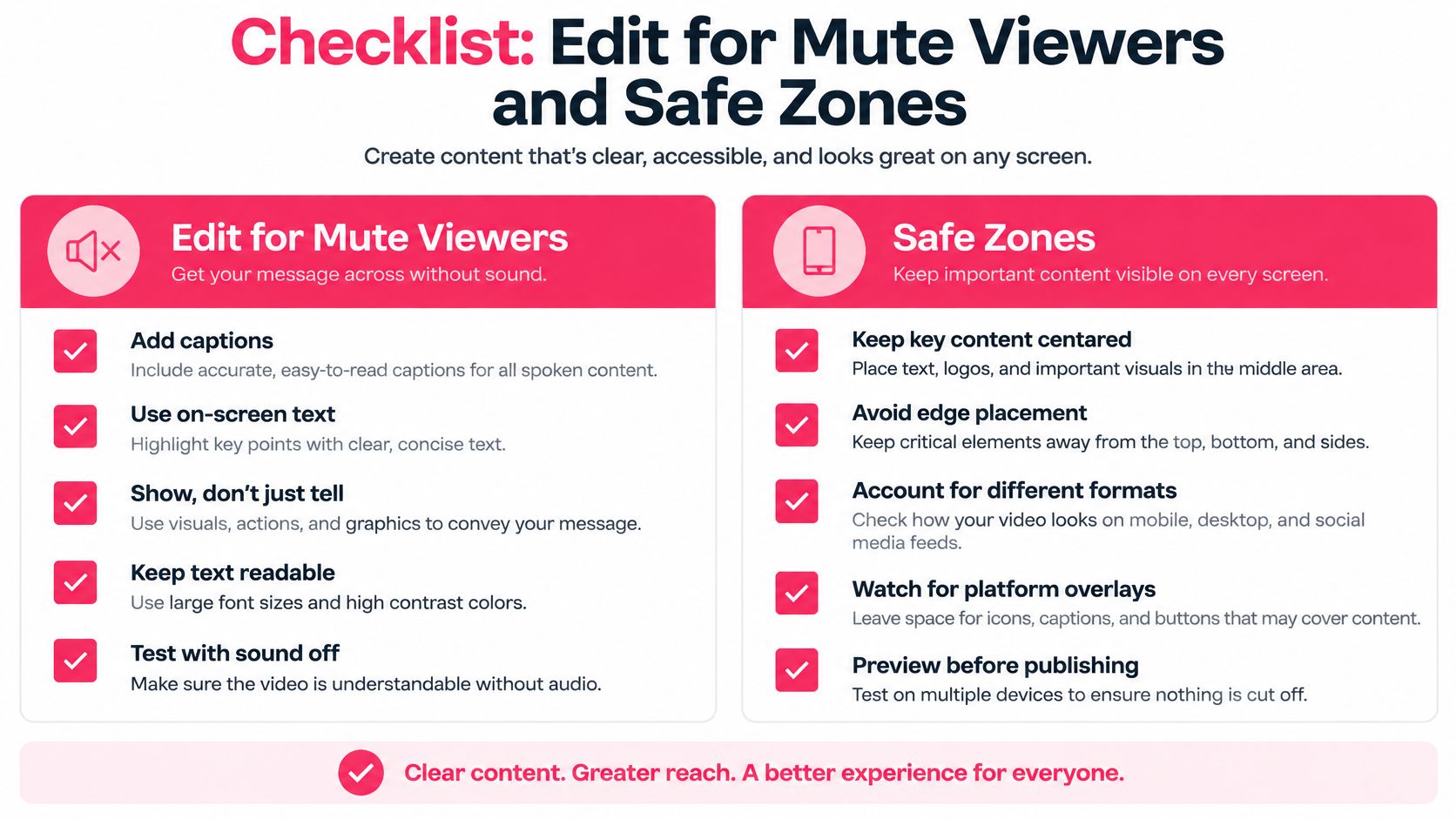
Burn captions into the creative when you need predictable display across placements. Don't depend on automatic captioning being available everywhere. Check spelling, product names, and timing manually, especially when the creator speaks quickly or uses an unfamiliar brand name.
Sound-off readability doesn't mean sound is unnecessary. Let the picture and text carry the essential meaning, while speech, product sounds, or music add context for people listening. The spoken line and on-screen text should reinforce the same benefit rather than competing for attention.
Review the edit on an actual phone
For a skincare launch, pause the opening frame on a phone with the sound off. Can someone identify the product and understand the benefit without reading a dense paragraph? If not, simplify the frame before adding more animation.
Build the Feed cut independently. Adjust the scale of the product, reposition the creator, and rewrite line breaks for the narrower composition. Our Instagram Story specifications guide is useful when preparing related vertical deliverables, but still inspect the actual Facebook placement preview.
Watch for these common failures:
- Tiny type: Increase text size or cut words rather than asking viewers to squint.
- Covered claims: Move prices, benefits, and disclaimers away from interface controls.
- Competing visuals: Don't place a dense caption over the hand movement that explains the product.
- Technical mismatches: Re-export with supported settings instead of repeatedly uploading the same problematic file.
- Forced crops: Use placement-specific assets rather than accepting a cut-off demonstration.
If the buyer has to choose between reading the caption and understanding the demonstration, simplify the edit.
Meta allows asset customization by placement. Use that control to preserve meaning, not merely to fill every available slot.
Test Creative and Ship the Winning Cut
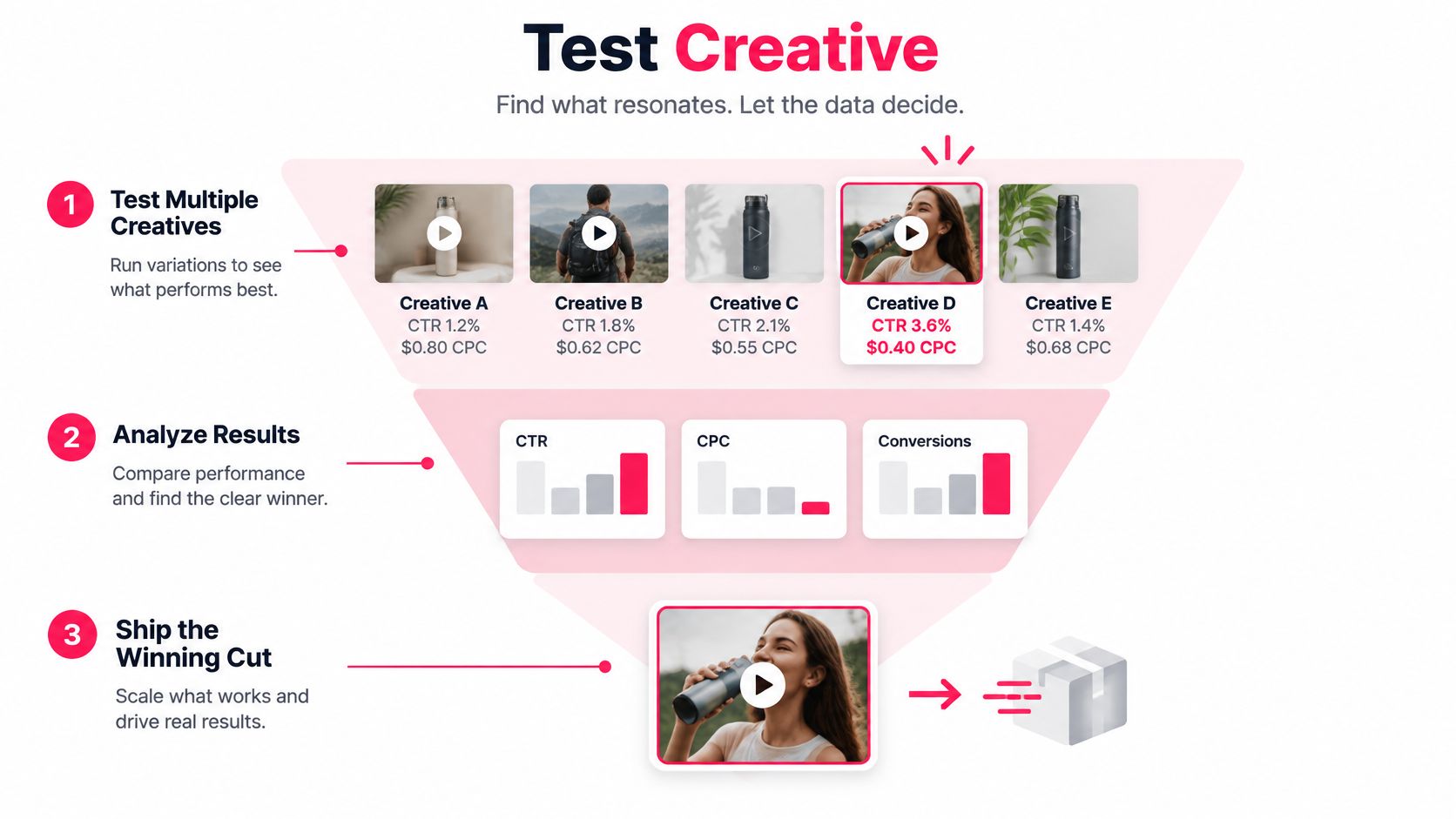
Keep the offer, audience, budget, and landing page fixed. Change the opening or the concept, not both at once. Otherwise, a better result won't tell you whether the creator's delivery, the discount, or a different destination caused it.
Separate two questions. An opening test compares different ways into the same argument, with the body unchanged. A concept test compares different arguments, such as a demonstration against a testimonial, while commercial conditions stay stable. Don't describe a concept test as a single-shot experiment.
Use this sequence to organize the decision.
Read attention first, but decide on purchases
Start with the demonstration, problem statement, testimonial, and visual-action openings from the storyboard. Where possible, use Meta Ads Manager's A/B testing controls rather than uploading everything together and assuming uneven delivery constitutes a fair experiment.
What to change in each Facebook video test
| Concept | Change only this | Read first |
|---|---|---|
| Product demonstration | First shot of the product in use | 3-second view rate, then CPA |
| Problem statement | Opening claim about the pain | Thumb-stop, then landing-page view rate |
| Creator testimonial | Speaker for an identity test, or proof line for a message test, not both | 10-second hold, then conversion rate |
| Visual action | Motion in frame one with no setup | 3-second view rate, then add-to-cart |
| Objection handling | Middle proof, after a winning hook | Conversion rate and CPA |
Read the funnel in order: thumb-stop or three-second view rate, ten-second retention, landing-page view rate, conversion rate, then cost per acquisition. Use the opening and hold measures as diagnostics, not as reasons to promote a cut before you understand its purchase performance.
A weak opening suggests the first image or promise isn't earning attention. Strong attention with weak landing-page visits suggests that people may understand the entertainment but not the buying reason. Strong visits with weak conversion calls for a check of price, page experience, delivery terms, and message consistency.
Keep test budgets equal when comparing controlled variants, and allow enough conversions to assess CPA. There isn't a universal waiting period that makes a sparse result reliable. If purchase volume remains low, call the finding directional instead of declaring a winner.
Our guide to content performance metrics can help organize that reporting. Keep the dashboard focused enough that the team can explain why each metric changes the next production decision.
Separate measured exposure from incremental demand
Meta's video measurement definitions count a two-second continuous play when at least 50% of the video player is visible, while impressions can register when only a pixel appears in the viewport. A video play begins when playback starts. These definitions explain why a reported exposure isn't evidence of deliberate attention, let alone a purchase caused by the ad.
Attribution assigns credit under a reporting rule. Incrementality asks what happened because the advertising ran. A shopper who was already returning to complete checkout can become an attributed conversion without representing new demand.
Decision standard: A persuasive ad changes buying behavior. An entertaining ad may only change how long someone watches.
Split prospecting from retargeting so existing intent doesn't obscure your acquisition results. When conversion volume supports it, optimize for purchases or value rather than asking the system to find inexpensive viewers.
Use complementary evidence to judge commercial contribution:
- Holdout tests: Compare eligible people who receive advertising with a comparable group withheld from it.
- Geo tests: Compare matched locations with different advertising exposure, accounting for promotions, seasonality, and other media.
- Post-purchase surveys: Ask buyers how they discovered the brand, while recognizing that memory isn't a controlled experiment.
- Platform-reported conversions: Use them for campaign management, not as standalone proof of causation.
- Blended CAC and new-customer revenue: Check whether overall acquisition economics improve as spending changes.
For blended customer acquisition cost, divide the acquisition spending you've defined by new customers acquired during the same period. Keep that definition consistent. Also examine contribution after product costs, shipping, discounts, and returns so an apparent purchase improvement doesn't conceal weaker profit.
Promote, revise, or stop
Suppose a kitchen-tool demonstration attracts viewers who enjoy the transformation but don't need the product. A less dramatic creator explanation might retain fewer people yet answer the cleaning objection that prevents likely buyers from ordering. The second cut deserves promotion if credible purchase and profit evidence supports it.
Use a clear decision rule:
- Promote: The variant improves qualified purchases or contribution, with supporting incrementality evidence where feasible.
- Revise: Attention is promising, but a specific objection or destination mismatch remains.
- Stop: Completion improves while acquisition economics don't, or the apparent gain disappears when you examine new customers.
Public claims about platform conversion improvements also need context. Without a clear baseline, advertiser sample, and explanation of whether the result is incremental, don't treat a platform-wide summary as a forecast for your store.
For a supplementary video resource, use the player below.
Ship the commercial winner
Once a variant earns promotion, export its Reels and Stories version and its dedicated Feed version. Preserve the approved offer, readable captions, and landing-page promise. Avoid changing the message while adapting the composition, or you'll no longer be deploying the version you tested.
For activation, all UGC videos from JoinBrands can be used as Meta, Google, or programmatic ad creative. Every completed Instagram post comes with a Partnership Ad code, letting the brand run that creator's content as a paid Instagram or Facebook ad through Meta Ads Manager. Brands approve content in their library and can use approved videos directly as TikTok Spark Ads, Meta ad creative, YouTube pre-rolls, or App Store preview content.
Save the winning hypothesis alongside the asset. “Answered the price objection with a visible demonstration” is a useful learning. “Creator video performed well” isn't specific enough to guide the next brief.
Refresh Creative Before Fatigue Sets In
Refresh a Facebook advertising video when several signals deteriorate together: frequency rises, thumb-stop or hold rate falls, CPA increases, and the remaining conversions look less valuable. Don't replace a profitable ad just because the team is tired of seeing it. Check tracking, stock availability, checkout changes, and promotions before blaming fatigue.
A meaningful refresh changes the buyer's reason to pay attention or believe the claim. A new caption color usually doesn't.
Change the argument before multiplying the files
Meta's Advantage+ Creative tools can generate or enhance variations and personalize creative across formats. That's useful production support, but generating more files doesn't automatically generate more learning.
Choose the variable that matches the problem:
- Creator: Change the person or perspective when the current delivery no longer connects.
- Opening claim: Address a different buyer priority instead of restating the same promise.
- Proof: Replace a broad assertion with a demonstration, comparison, or explanation.
- Offer: Test a commercial change separately from a creative change.
- Demonstration or rhythm: Make the use case clearer without disguising the same argument as a new concept.
- Audience problem: Brief around a different situation the product solves.
Use this refresh protocol to keep production focused.
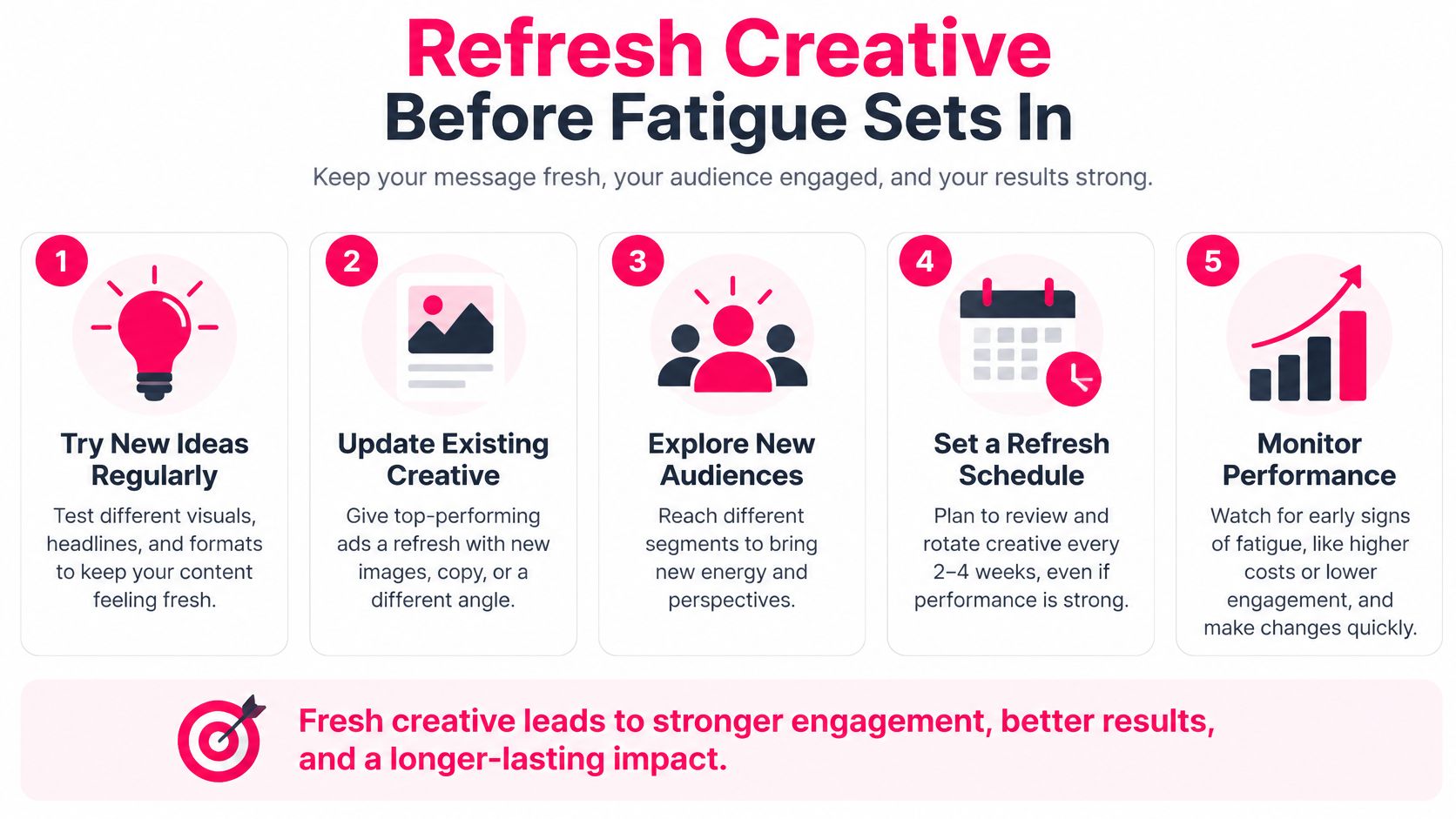
Say that, in a hypothetical third week, the demo still earns cheap short views but CPA has risen 30%. If buyer feedback points to price, brief a different creator to explain value and answer that objection. Another crop of the same demonstration won't test that explanation.
Commission distinct testimonials, objection-handling videos, comparisons, tutorials, and unboxings. Use AI for captions, localization, aspect-ratio adaptation, and controlled cutdowns. Our content repurposing strategies guide can help organize those adaptations without confusing them with new concepts.
Check standards before release
Meta's Advertising Standards prohibit disruptive tactics such as flashing screens and require prior written permission for certain movie, television-show, and video-game trailer ads, with targeting restricted to people 18 or older. Ordinary ecommerce teams should favor a clean product demonstration or truthful customer testimonial rather than borrowing restricted entertainment footage.
Keep a useful spoken explanation when it adds meaning. Hootsuite's summary of Meta's 2025 statistics reports that vertical Facebook video ads with speech or voiceover produced 3% higher conversions per dollar. That's supporting evidence for testing voice, not a promised lift for your campaign.
Creators supply distinct consumer insight. AI adapts the winner. Keep those responsibilities separate, and your refresh system will produce better hypotheses rather than a larger folder of nearly identical edits.
JoinBrands connects brands with creators who can produce product demonstrations, testimonials, tutorials, and objection-handling videos for paid campaigns. Visit JoinBrands to brief distinct creator concepts, approve the content, and build your next Facebook video test around incremental purchases rather than views.