
 How to Draw on Instagram Stories: The Complete Guide
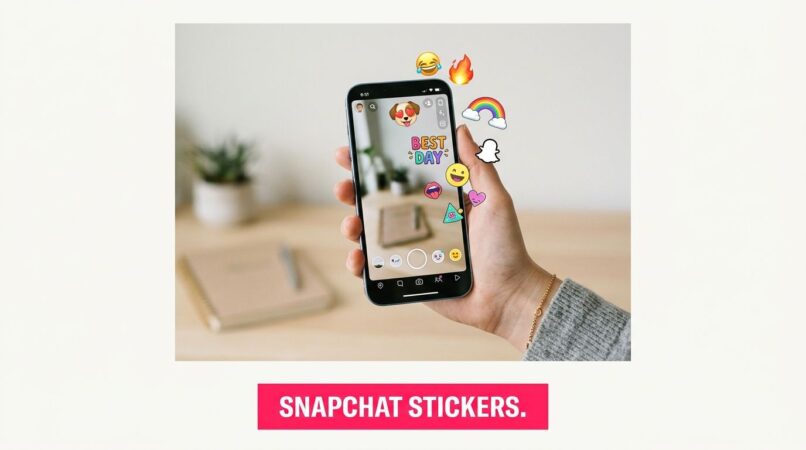
Your audience's attention on Snapchat is fleeting. While flashy lenses usually get the spotlight, stickers often do the essential work. They add context fast, make creator content feel native, and give product snaps a visual cue that's easier to read than a line of text. If you're posting daily and still getting content that looks interchangeable, your sticker system is probably too random.
That matters on a platform operating at huge scale. Snapchat reached 483 million daily active users in Q1 2026, with over 5 billion Snaps created daily, and that kind of volume rewards tools that communicate instantly. Stickers do exactly that. They help a creator flag a launch, frame a reaction, turn a product into a visual motif, or make a brand asset reusable without rebuilding the same design every time.
For brands trying to build repeatable creative systems, stickers sit in the same practical bucket as lenses and overlays. If you want a broader visual strategy, these augmented reality marketing examples are a useful companion.
Here are the Snapchat stickers you need if you want faster production, stronger recall, and snaps that feel native instead of overdesigned.
Table of Contents
1. Snapchat Custom Stickers (native)
If speed is the whole game, start here. Snapchat's native custom stickers are still the fastest way to turn a product shot, founder selfie, event moment, or UGC frame into a reusable asset without opening another app.

The workflow is simple inside Snapchat's custom sticker help page. Take a photo, tap the scissors icon, trace the object, and save it for future use. In practice, that's perfect for brands covering pop-ups, trade shows, restocks, or creator trips where no one has time to wait for polished design files.
What works best
The native tool works when your subject has clear separation from the background. A tutorial on the scissors workflow notes that high contrast helps Snapchat's autodetection isolate the image more accurately, and you need to trace the entire area for a clean result in the first place, not just the obvious edges, as shown in this YouTube walkthrough of Snapchat's scissors tool.
Practical rule: Shoot the object against a plain wall, tabletop, tote bag, or hoodie. Don't try your first cutout on a cluttered warehouse shelf.
This is one of the best Snapchat stickers you need for low-friction campaign execution. A skincare brand can cut out a serum bottle, save it, and use the same sticker across launch-day snaps from multiple team members. A food brand can cut out the plated dish and drop it onto behind-the-scenes kitchen clips without asking design for assets every hour.
Trade-offs
The upside is speed and zero extra software. The downside is control.
- Best for quick reuse: Product cutouts, reactions, team faces, mascots, and event moments work well.
- Weak for precision edits: Fine hair, translucent packaging, and reflective objects often need cleanup the app can't really handle.
- Limited asset management: You can save and reuse stickers, but you're not getting a real brand library, naming structure, or approval workflow.
Use native custom stickers when your team needs content today, not when you're building a long-term visual system.
2. GIPHY for Brands/Artists
If native stickers are your quick-turn tool, GIPHY is your distribution play. It's where branded sticker systems become searchable, reusable, and much easier for creators to find inside Snapchat.

Snapchat pulls animated sticker content from GIPHY, so a properly tagged and approved GIPHY sticker pack can show up in Snapchat search. That makes GIPHY's Snapchat sticker submission process important if you want reach beyond your own team's phones.
Why brands should care
Searchable stickers solve a common creator problem. A brand sends a brief, but the creator doesn't have the right branded reactions, motion graphics, or quick CTA overlays inside Snapchat. A verified GIPHY channel gives them a searchable set of assets that already feel native to social content.
That's especially useful if you manage campaigns through JoinBrands, where multiple creators may need the same visual language across different products, offers, or seasonal pushes.
A practical example: a beverage brand can build a pack with “first sip,” “chill,” “weekend drop,” animated cans, and simple branded arrows. Those aren't just cute assets. They become prompts creators can use in real time while filming.
What works and what doesn't
GIPHY works when you think like a search engine, not like a brand book.
- Strong approach: Name stickers with terms creators type, such as “unboxing,” “sale,” “obsessed,” “new drop,” or the product category.
- Weak approach: Upload logo-only animations with vague file names and no practical tags.
- Best use case: Short looping reactions, transparent product animations, emphasis graphics, and mood words.
- Main drawback: Once public, those stickers can appear in contexts you don't control.
Search intent matters more than internal naming. “Blue launch animation v3” helps your team. “new drop” helps creators find the asset.
This is one of the Snapchat stickers you need when scale matters more than exclusivity.
3. Bitmoji
A creator is posting a casual shipping update, a founder wants to react to a sellout, or two collaborators need a quick visual cue that says “we're in this together.” Bitmoji handles those moments better than a polished sticker pack because it already matches how people talk on Snapchat.

That native feel is a distinct advantage. Bitmoji is built for personality, reaction, and relationship-driven content. It gives brands and creators a fast way to add a human layer without designing a new asset every time.
Where Bitmoji fits in a brand playbook
Bitmoji works best as a community tool, not a branding tool. Use it for founder updates, creator check-ins, giveaway reminders, team banter, collab announcements, and low-stakes product reactions. Those formats benefit from warmth more than visual precision.
For teams running creator campaigns through JoinBrands campaign collaboration workflows, Bitmoji can also help briefs feel more usable. Instead of asking for “authentic energy,” give creators a prompt they can apply right away: use Bitmoji for the intro reaction, the handoff between clips, or the final “would you try this?” frame. That turns a vague style note into a repeatable content move.
A simple framework works well here:
- Use Bitmoji for: reactions, casual updates, collabs, countdowns, and conversation starters.
- Pair it with: product cutouts, native text, or simple CTA stickers so the snap still points to the offer.
- Avoid using it for: premium launches, detailed product education, or campaigns that need tight visual consistency.
Real trade-offs
Bitmoji creates affinity fast, but it gives you less control than a designed sticker system.
Creators already understand it, which reduces friction. The downside is consistency. One snap may feel playful and on-brand, while the next looks too cartoonish if the campaign needs a more refined finish. That trade-off is worth it for community content, behind-the-scenes posts, and creator partnerships. It usually is not worth it for luxury positioning, packaging detail, or strict art direction.
The best results come from treating Bitmoji as a flavor layer. Keep the role narrow. Use it to signal mood, chemistry, or humor, then let your product visuals and message do the selling.
4. Picsart Sticker Maker
Picsart is the middle ground tool I recommend most often to non-design teams. It's easier than a pro illustration app, more flexible than Snapchat's native cutout feature, and fast enough for daily social use.

With Picsart Sticker Maker, you can create transparent PNG stickers, use AI background removal, and build simple assets on web or mobile. For teams making Snapchat creative at volume, that matters because you can prep reusable sticker packs without needing a dedicated designer for every small edit.
Best practical use
Picsart works well for campaign packs. Instead of sending creators a vague note like “make it playful,” send a mini system: product cutouts, reaction words, arrows, ingredient icons, rating-style stars, and branded textures.
That's a smarter workflow for anyone managing creators through JoinBrands campaign collaboration, because it reduces revision loops. The creator isn't guessing what style of embellishment fits the brief. They already have a pack to work from.
A simple DTC example looks like this:
- Launch pack: Product PNG, “new,” “back in stock,” and “selling fast” stickers.
- UGC pack: “my routine,” “before work,” “late-night snack,” or “gym bag essential.”
- Offer pack: Clean percentage-free sale messaging like “limited drop” or “bundle it.”
Where Picsart falls short
The strength is speed with enough polish. The weakness is depth. If you need refined frame-by-frame animation or an ownable illustrated system, Picsart starts to feel thin.
It's also easy to overuse the built-in visual effects and end up with sticker packs that look more trend-driven than brand-driven.
Keep one master style rule. Same outline weight, same shadow logic, same text treatment. That matters more than having dozens of sticker variations.
Among the Snapchat stickers you need, this is the best fit for lean marketing teams that want better-looking assets without building a full design pipeline.
5. Kapwing Sticker Maker
Kapwing is a practical choice for teams that work in browsers, pass files around often, and don't want to install anything. It's not the most artistic option on this list. It is one of the easiest to operationalize.

The Kapwing sticker maker supports transparent PNGs and animated GIFs, includes background removal tools, and keeps work in the cloud. That makes it useful when social managers, paid teams, and freelance editors all need access to the same sticker files.
When Kapwing is the right pick
Use Kapwing when collaboration is the actual bottleneck. A lot of sticker projects don't fail because the design is weak. They fail because the current asset is trapped on one person's laptop, revisions aren't tracked well, or the social team can't access the latest version before a campaign goes live.
Kapwing is good for:
- Shared asset creation: Multiple people can review or tweak stickers without local file chaos.
- Quick social adaptation: One product sticker can be resized for Story use, short video overlays, and Snapchat uploads.
- Simple motion: Pulsing, looping, or lightly animated CTAs work fine here.
The honest downside
The free plan watermark can be a deal-breaker if you're trying to ship polished brand assets. And if your brand leans hard into expressive animation, Kapwing's motion tools will feel limited compared with pro animation software.
That said, not every team needs expressive animation. A lot of branded Snapchat sticker packs only need clean product cutouts, bold text labels, and simple motion cues to work.
One useful workaround is to use Kapwing for assembly, resizing, and team review, then reserve heavier illustration or animation work for another tool. That split keeps the workflow fast without forcing one platform to do everything.
6. Procreate (iPad)
If your brand wants stickers that look ownable instead of assembled, Procreate is where that identity gets built. This is the tool for illustration-led brands, mascots, signature product icons, and hand-drawn systems that don't look like they came from a social template pack.

Procreate on the App Store gives designers precision brush control, layers, masking, and transparent PNG export. It can also handle simple animated GIF output when you need motion without moving into a heavier animation stack.
What Procreate does better than the quick tools
Procreate is where you build a real sticker language. Not just isolated assets.
A snack brand could create a full illustrated set around flavor characters, bite marks, ingredient doodles, and comic-style reaction bubbles. A beauty brand could create uniform line-drawn applicators, sparkle motifs, swatches, and skin routine icons. Those systems make creator content feel connected even when different people are filming in different places.
That consistency matters because today's audience expects personalized creative. One market trend summary notes that 73% of consumers expect hyper-personalized content in social ads. A hand-built sticker system won't solve personalization by itself, but it gives your creators a branded toolkit that can still flex to different hooks, moods, and audiences.
The real limitation
Procreate takes skill. If no one on your team can draw, the app won't magically create a distinctive system for you.
A rough but original sticker style usually outperforms a polished generic one, if the brand voice is clear and repeatable.
It also requires iPad-based hardware, which isn't ideal for every workflow. But if visual identity is a competitive edge for your brand, Procreate gives you the strongest creative upside on this list.
7. remove.bg
Sometimes the sticker problem isn't design. It's cleanup. remove.bg is the tool I'd use when the core job is extracting a clean subject quickly and consistently.
With remove.bg pricing and product details, you're getting automatic background removal, transparent PNG output, and workflows that can scale into desktop or API usage. That makes it useful for brands processing lots of product images, creator stills, or catalog assets that need to become sticker-ready.
Best use cases for brand teams
remove.bg shines when you need volume and edge consistency. Think apparel flat lays, supplement tubs, candles, kitchen tools, or pet products with predictable shapes. It's also helpful for creator programs where multiple people are shooting in inconsistent environments and you still want cutouts that feel standardized.
If you're coordinating campaigns through JoinBrands creator workflow support, a remove.bg step can turn incoming creator photos into a cleaner sticker pack before those assets get recycled into future snaps, stories, or ad edits.
Here's where it works best:
- Product extraction: Cleanly isolate items for reusable branded overlays.
- Logo prep: Turn logo marks or packaging panels into transparent PNGs.
- Batch pipelines: Process many images without hand-cutting each one in a design app.
Where remove.bg stops being enough
It isn't a full creative environment. It removes backgrounds well, but it won't give you a finished branded sticker system by itself.
If Snapchat itself can't generate the exact sticker you need from scratch, an external workflow is often necessary. One guide points out that users can create a custom PNG or GIF in an editor like Filmora and then upload that asset into content for Snapchat, which is a practical workaround when a branded reaction or unique meme doesn't already exist in-app, as explained in this Filmora Snapchat sticker workflow guide.
This is one of the Snapchat stickers you need when production speed depends on clean cutouts, not hand-built illustration.
Top 7 Snapchat Sticker Tools: Feature Comparison
| Tool | Implementation Complexity 🔄 | Resource Requirements ⚡ | Expected Outcomes ⭐ / 📊 | Ideal Use Cases 💡 | Key Advantages |
|---|---|---|---|---|---|
| Snapchat Custom Stickers (native) | Very low, in-app cutout & save | Smartphone app only; no extra tools | Fast, on-brand stickers for Snaps; quality: ⭐ | Live events, quick UGC turnarounds | Native, zero cost, instant reuse |
| GIPHY for Brands/Artists | Medium, channel verification & tagging | Brand assets, animated GIFs, account setup | Scalable discoverability across platforms; impact: 📊⭐ | Brand campaigns, wide distribution, trends | Broad reach, searchable GIF stickers |
| Bitmoji | Low, user avatar system, built-in | No extra resources; users' avatars | High engagement via familiar style; quality: ⭐⭐ | Community engagement, collaborations, UGC | Native social affinity, friendmoji co-creation |
| Picsart Sticker Maker | Low–Medium, simple editor & AI tools | Mobile/web access; some paid features | Polished PNGs, quick edits; moderate animation; ⭐⭐ | Marketing teams, non-designers needing polish | AI background remover, large sticker library |
| Kapwing Sticker Maker | Low–Medium, browser editor, team features | Web access; Pro for watermark removal | Cloud collaboration; PNG/GIF export; ⭐⭐ | Distributed teams, quick cloud-based edits | Browser-based, team storage and sharing |
| Procreate (iPad) | High, professional illustration workflow | iPad + Apple Pencil; designer skill | Premium, unique brand assets; high quality: ⭐⭐⭐ | Brand identity, mascots, custom visual systems | Professional brush engine, precise control |
| remove.bg | Very low, automated background removal | Web/API credits for batch/HD | Consistent clean cutouts for stickers; ⭐⭐ | Product shots, batch pipelines, automation | Fast, consistent edges; API for scale |
Unifying Your Sticker Strategy with Creators
Most brands don't have a sticker problem. They have a systems problem. The assets exist, but creators can't find them, the style changes from campaign to campaign, and no one has defined which stickers belong to launch content versus UGC versus retention-focused creative.
That's a bigger miss than it sounds. Snapchat recently expanded its expressive library with more than 300 new stickers across categories like food, animals, and emotions, which means your branded content is competing inside a platform already built for fast visual expression. If your assets are clunky, hard to access, or too polished to feel native, creators will default back to generic platform stickers.
The better approach is to give creators a controlled range, not total freedom and not total rigidity. A pre-approved pack should usually include product cutouts, reaction overlays, campaign phrases, a few utility stickers like arrows or circles, and one or two personality assets that make the brand recognizable. That gives creators room to improvise while keeping the visual system coherent.
AI is going to push this further. Snapchat+ subscribers can already create AI-generated stickers that match the text they type in messages, which points toward more on-demand creative inside chat and story environments. For brands, that doesn't mean replacing your sticker system. It means building a base set of ownable assets, then letting creators adapt around it.
Measurement still lags behind creative ambition. There's a real content gap around sticker-level ROI tracking, even as marketers keep using sticker overlays across short-form social. Until attribution gets cleaner, the practical move is to standardize sticker packs by campaign objective and review completion, saves, replies, and creative retention patterns at the content level instead of chasing false precision.
The brands that win here won't be the ones with the most stickers. They'll be the ones with the clearest sticker logic. Native cutouts for speed. GIPHY for searchability. Bitmoji for community. Editing tools for polish. Background removal for scale. Illustration tools for identity. That mix turns stickers from decoration into a repeatable creative advantage.
If you want to turn sticker ideas into scalable creator campaigns, JoinBrands gives your team a practical place to do it. You can brief creators, share approved assets, manage reviews, and keep Snapchat-style UGC aligned with your brand without slowing production down.