
 Mastering Social Commerce: Drive Sales & ROI in 2026
The popular advice about video content creation is backwards. Most brands don't need a better camera, a cinematic studio, or another editing app. They need a system that turns useful ideas into approved, platform-ready videos without exhausting the people responsible for making them.
Video has become a default layer of online attention. A 2026 industry summary of short-form video behavior reports that 94.6% of online adults watched online video in the past 30 days, while 91.1% watched in the past 7 days. A neutral industry source cited in the same discussion notes that video can represent about 82% of internet traffic. For DTC teams, the implication is clear: video isn't a side experiment anymore. It's part of the operating model for discovery, education, trust, and conversion.
The brands that scale don't treat every video as a one-off production. They build repeatable briefs, creator pipelines, review rules, editing templates, distribution loops, and measurement dashboards. The creative still matters, but the workflow determines whether the brand can keep producing when the first concept underperforms, a creator misses a deadline, or a paid test needs new assets quickly.
Table of Contents
Why Most Brand Video Programs Stall Before They Start
Most companies approach video content creation as a production problem. They buy equipment, hire an editor, debate lighting setups, and then wonder why the content calendar still has gaps. Better production can improve the output, but it won't fix a workflow that can't decide what to make, who owns the next step, or how feedback gets resolved.
The operational barriers are visible in the 2025 State of Video report covered by Wistia. 57% of businesses cite company size or resources as a barrier to making more video, 38% cite cost, and 25% cite technical capability. The same source reports that AI use in video production more than doubled year over year. More tools are entering the stack, but tool availability doesn't automatically create capacity.
The real bottleneck is handoff friction
A video request often moves through a chain of loosely defined handoffs:
- Strategy: Someone chooses a topic, product, or promotion without defining the business outcome.
- Creative: A writer or marketer turns the idea into a vague request such as “make it engaging.”
- Production: A creator interprets the request, often without enough context about the customer or offer.
- Review: Several stakeholders provide overlapping or contradictory feedback.
- Publishing: A social manager adapts the final file under deadline pressure.
- Measurement: The team checks views, then starts the next project without recording what should change.
Every handoff creates delay and ambiguity. Adding another videographer won't solve that. A stronger system assigns one owner for the brief, one decision-maker for approval, and one location for the current version of every asset.
Practical rule: If a reviewer can reject a video without explaining which objective or requirement it missed, the brief isn't doing its job.
Build capacity before adding complexity
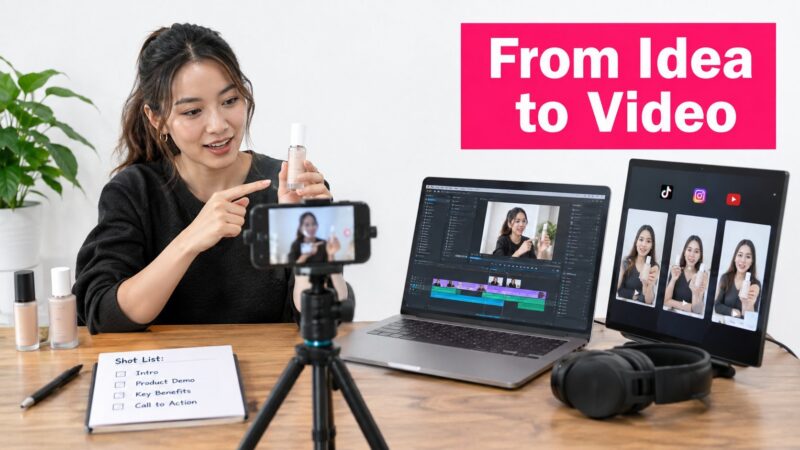
A scalable program starts with a limited set of repeatable formats. For example, a skincare brand might build recurring concepts around a product demonstration, a customer objection, a routine breakdown, and a creator testimonial. Each format can have its own hook patterns, shot list, product claims, caption treatment, and approval checklist.
AI can help with transcription, rough cuts, resizing, ideation, and versioning. It shouldn't become an excuse to remove editorial judgment. A machine can produce variations quickly, but a human still needs to decide whether the opening makes a credible promise, whether the product appears naturally, and whether the message sounds like the brand.
The most effective operating model separates creative decisions from administrative decisions. Creators should have room to choose delivery, framing, gestures, and language. The brand should be firm about mandatory claims, prohibited claims, product visibility, usage rights, technical specifications, and deadlines. That division reduces revisions without turning creators into camera operators reading a script.
Matching Video Formats to Strategic Goals
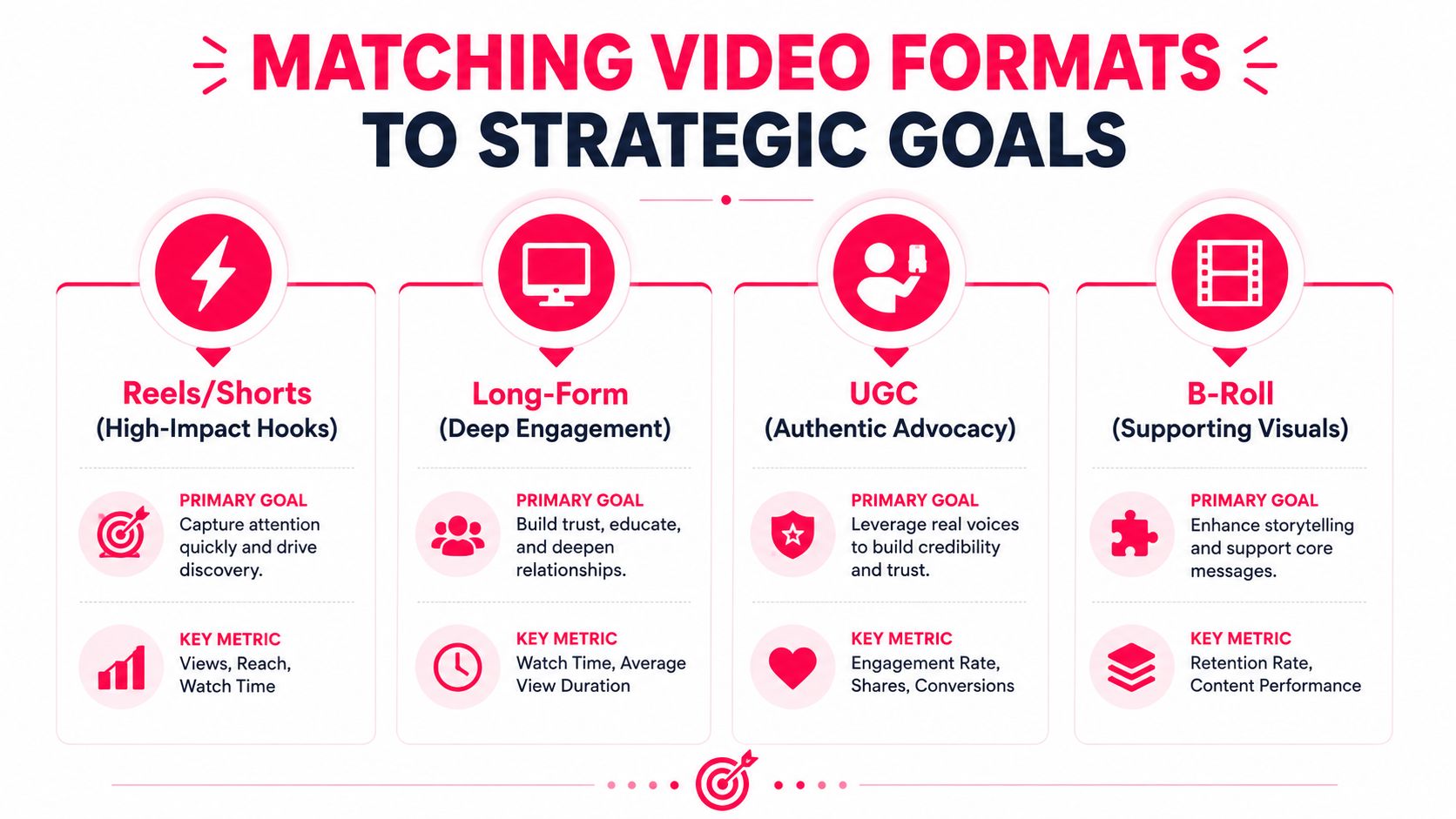
A format is useful only when it serves a job. Reels, Shorts, long-form videos, UGC, and B-roll aren't interchangeable containers. A polished explainer may clarify a complex product, while an informal creator demonstration may earn more trust for a familiar product that shoppers want to see in use.
Short-form viewing also happens frequently. A 2025 consumer study summarized by Media.net reports that 73% of people watch short-form videos several times a day, and 32% watch them multiple times per hour. That behavior favors a connected series of useful clips over a single oversized production. The viewer may encounter the brand repeatedly, so each video should work alone while reinforcing a recognizable promise, opening frame, or visual system.
Use the format that matches the decision
For awareness, choose Reels and Shorts. These formats are effective when the brand needs to introduce a problem, demonstrate a visual transformation, or create a memorable point of view. A DTC coffee brand could publish a quick “why your morning cup tastes flat” hook, followed by one practical correction and a clear product appearance. The creative priority is not exhaustive detail. It's immediate relevance.
For education, use long-form video when the product needs context. A software company selling to professional teams may need a structured walkthrough, comparison, or onboarding lesson. Long-form gives the viewer room to understand the workflow and evaluate fit. It also gives the brand an asset that sales, customer success, and email teams can reuse.
For conversion, test UGC against polished studio creative. UGC works well when shoppers need proof that a product fits real routines. A creator unboxing a complicated home product, showing the setup, and explaining one limitation can feel more credible than a flawless studio sequence. Polished production still has a place for hero launches, premium positioning, and controlled product demonstrations. The trade-off is speed and perceived authenticity.
For community building, prioritize personality and recurring participation. Behind-the-scenes clips, responses to customer questions, founder commentary, and creator-led series can give audiences a reason to return. These videos shouldn't be forced into direct-response language every time. Conversation and recognition are the objective.
For support, use B-roll as a modular layer. Close-ups, product handling, packaging, texture, screen recordings, and lifestyle footage make it easier to refresh ads, landing pages, and organic posts. B-roll rarely carries the message alone, but it reduces the cost of producing future versions because the team doesn't need to reshoot every visual.
A practical content plan assigns each format a primary purpose, a secondary reuse path, and a success metric. Don't ask one video to build awareness, explain the product, answer objections, create community, and close the sale. That usually produces a crowded script and a weak opening.
Building Briefs That Creators Actually Follow
Creators usually don't fail because they lack talent. They fail because the brief leaves critical decisions unstated. “Make a fun video about our product” gives the creator a subject, not a strategy.
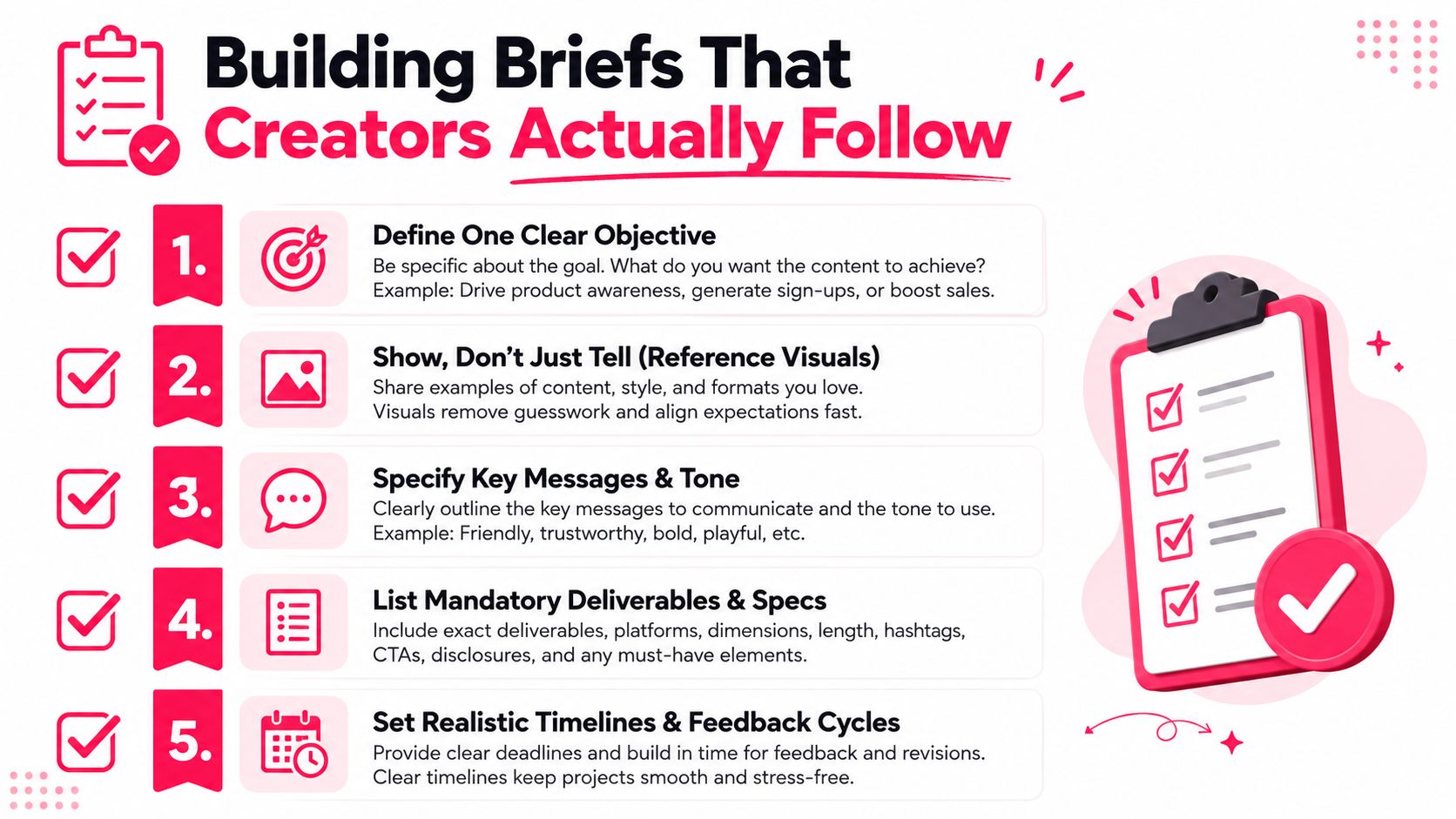
A useful brief gives the creator a clear destination while leaving room to choose the route. Start with one objective, such as introducing a new use case, overcoming a specific objection, or driving qualified visits to a product page. Then define the audience's situation before mentioning the desired tone. “Busy renters who need a compact storage solution” is more useful than “millennial customers.”
A brief needs decisions, not adjectives
Use this structure:
- Objective: State the one action or perception the video should influence.
- Audience context: Describe the problem, moment, or objection that should appear on screen.
- Hook direction: Provide two or three approved angles, not a rigid opening sentence. For example, “show the frustrating old method first” gives a creator room to make the hook natural.
- Product integration: Specify when the product must appear, what action it must demonstrate, and which features are mandatory.
- Message guardrails: List approved claims, required disclosures, words to avoid, and the call to action.
- Reference material: Include examples of pacing, framing, humor, wardrobe, or visual treatment. References eliminate guesswork better than descriptive language.
- Deliverables and specs: State the required aspect ratio, file type, duration range, raw footage requirements, caption expectations, and naming convention.
- Approval process: Name the approver, feedback location, revision allowance, and decision deadline.
The difference between “make it premium” and “use clean framing, restrained movement, neutral background, and close product detail” is the difference between opinion and direction.
Protect creator autonomy
A brief should answer what must be true, not dictate every gesture. If the brand writes a complete script, a shot-by-shot plan, and exact facial reactions for a creator whose appeal is natural delivery, the result often sounds manufactured. Give creators the product truth, customer tension, mandatory messages, and boundaries. Let them determine how the idea becomes believable.
A strong brief makes the brand's non-negotiables visible and the creator's choices intentional.
Set feedback cycles before production starts. One consolidated review from the brand owner is more useful than scattered comments from performance marketing, legal, product, and social teams. If legal needs to review claims, involve legal before the creator shoots, not after the final edit arrives.
Production and Editing for Platform Performance
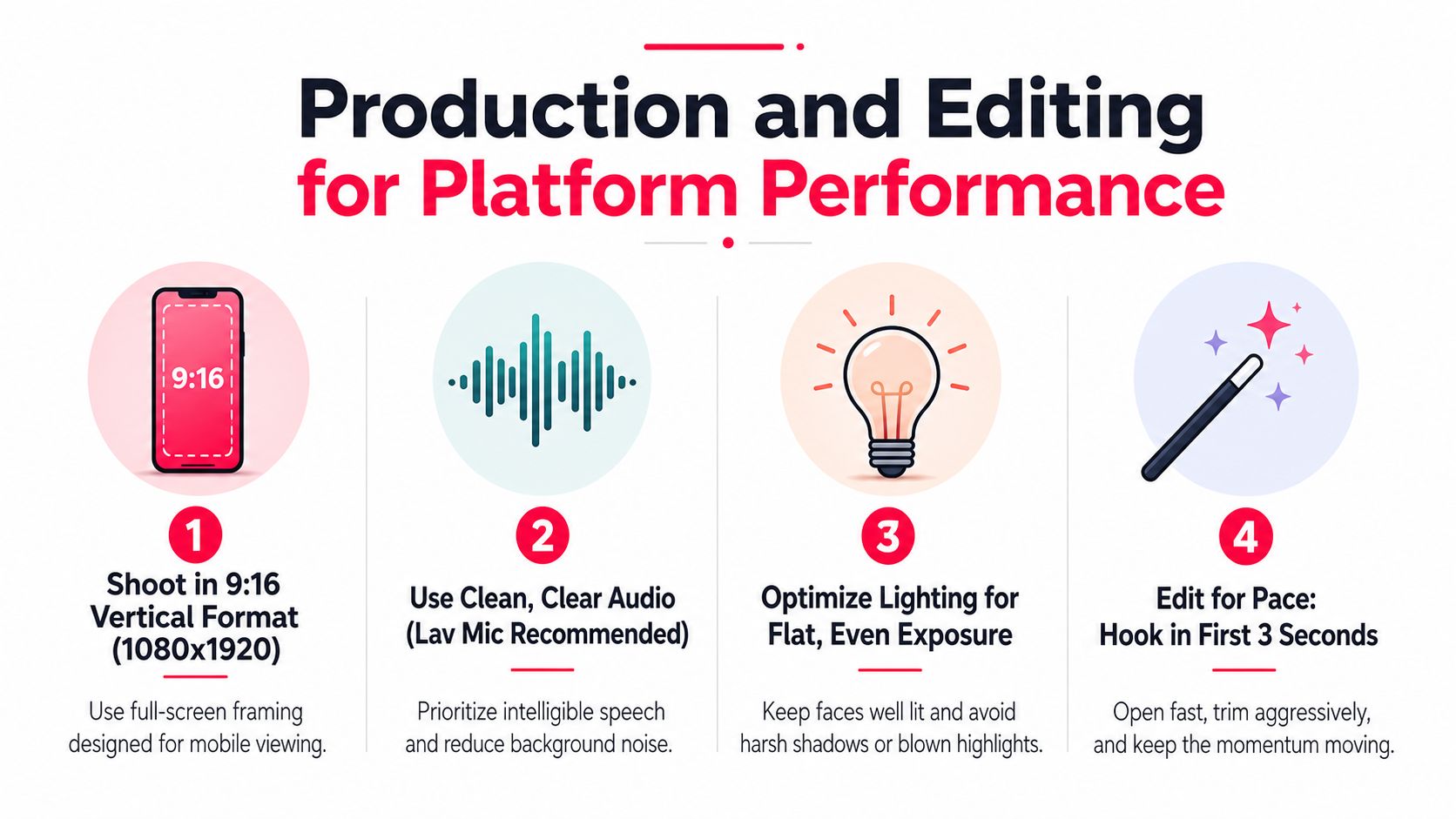
Production systems protect performance before an editor opens the timeline. For vertical short-form content, set the baseline at 9:16, 1080×1920, using H.264 video in an MP4 container. Current specifications guides support 30 to 60 frames per second, with 8 to 12 Mbps for 1080p and approximately 12 to 16 Mbps for 60 frames per second, as outlined in this 2026 social video specifications guide.
Platforms re-encode every upload. A compatible codec and container cannot stop compression, but they give the platform a clean source file. This matters when footage includes fast movement, fine textures, small packaging text, or dense on-screen copy. Put these requirements in the creator brief and export checklist so the team does not discover them during approval.
Edit for the viewer's first decision
The opening must establish relevance before the viewer has a reason to leave. Put the problem, result, surprising demonstration, or product action near the beginning. A logo animation, slow room reveal, or creator introduction belongs later unless the identity itself carries the value.
Use four editing passes:
- First pass, clarity: Remove anything that does not advance the idea.
- Second pass, pace: Tighten pauses, repeated phrases, and weak transitions.
- Third pass, proof: Add demonstrations, close-ups, screenshots, or customer language that supports the claim.
- Fourth pass, platform fit: Check safe areas, text size, audio levels, captions, and the final call to action.
Retention should guide the review queue. A YouTube benchmark from Stripo reports average YouTube retention at 23.7%, with 55% of viewers lost in the first 60 seconds. The same benchmark set treats 70% or higher retention as strong for videos under one minute and 60% or higher as strong for videos from one to three minutes. Use these as investigation points, not promises. A sharp drop identifies the section that needs a new opening, faster proof, or clearer context.
Accessibility belongs in the same checklist. University of Utah accessibility guidance recommends synchronized captions for prerecorded video that are accurate, complete, and inclusive of relevant sound effects and speaker identification. Its mechanics include 99% or higher accuracy, a maximum of two lines per caption, 32 to 37 characters per line, and one to five seconds on screen.
Captions support silent viewing and comprehension. A 2026 short-form benchmark from ClipSpeed reports 40% more watch time for videos with captions than videos without captions. Keep captions editable where possible, and burn text into the edit only when a platform requirement or creative treatment calls for it.
Distribution Strategy and Ad Activation
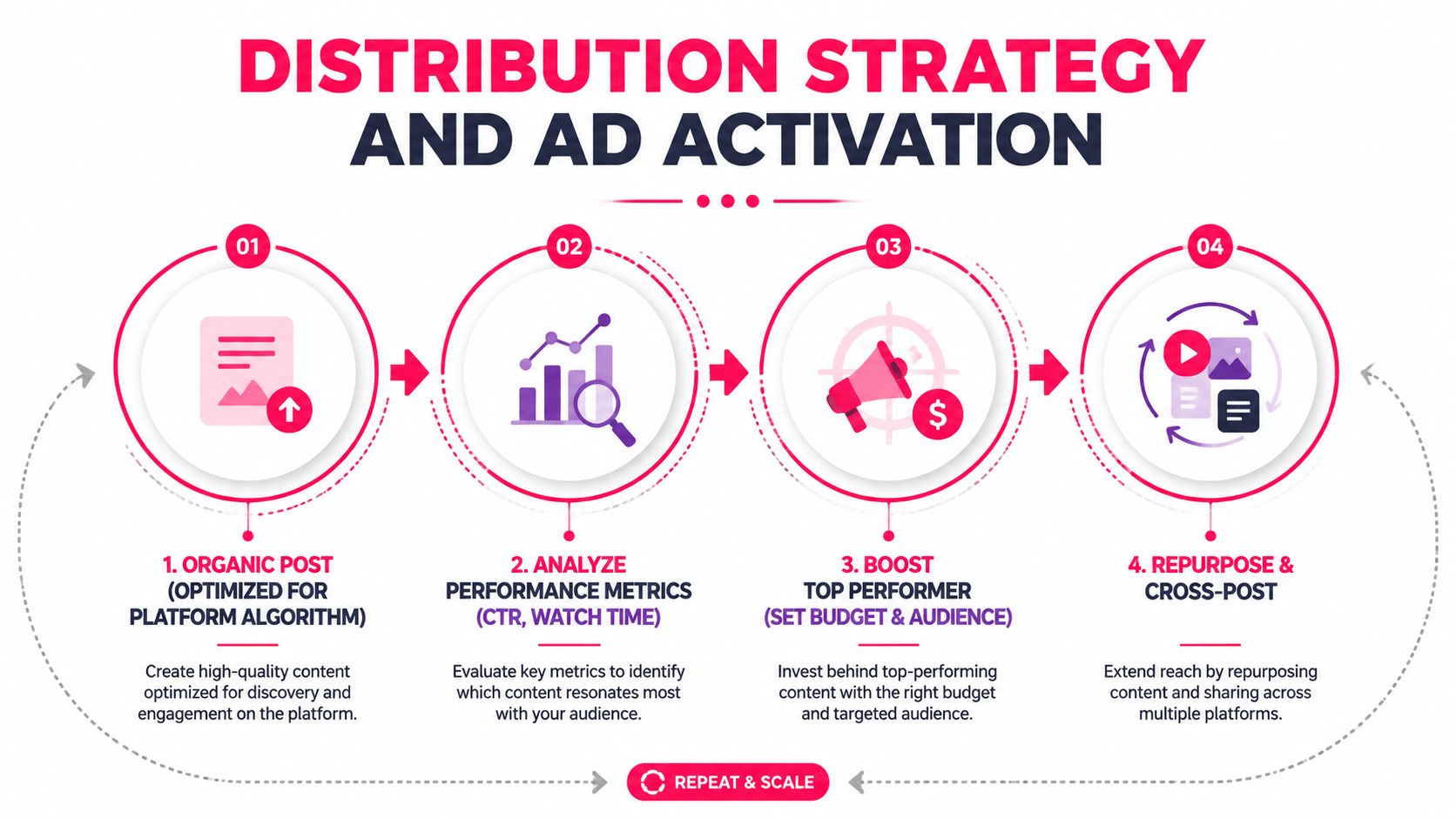
Publishing is not the finish line. It's the first signal in a distribution loop that tells the team which creative deserves more editing, more variations, or paid support.
Start with an organic post adapted to the platform's native behavior. Keep the opening, framing, caption style, and call to action appropriate for that placement rather than exporting one generic file everywhere. Once the post has enough directional feedback, review watch time, retention, comments, saves, shares, profile activity, and click behavior together. A high view count with weak downstream action may indicate an entertaining hook that attracts the wrong audience.
Treat organic content as a creative test layer
Paid activation should answer a specific question. Is the hook strong enough for cold audiences? Does the demonstration create product interest? Does the creator's delivery outperform a brand voiceover? Don't boost a post because it looks polished. Boost it because the audience behavior suggests a plausible business opportunity.
Creator authorization formats, including Spark Ads, can extend the reach of creator content while preserving the original post's social context. The brand still needs clear rights, usage terms, and approval for paid placement. A creator video that feels native organically may need a stronger first frame, a more direct product benefit, or a clearer landing-page match before it becomes an efficient ad.
A workable distribution calendar pairs each core concept with:
- Organic versions: Platform-native edits with different openings or captions.
- Paid candidates: Assets that show strong retention or meaningful action.
- Repurposed cuts: Short excerpts, product detail clips, still frames, and B-roll.
- Learning notes: The audience tension, hook, creator style, and offer that shaped performance.
The feedback loop should run in both directions. Organic results can identify creative worth testing in paid media. Paid results can reveal which objections, proof points, and audience segments deserve more organic content. This prevents the common split where the social team creates for reach and the performance team creates unrelated ads for conversion.
Measuring What Matters
Views show distribution, not business value. A video can reach a large audience while losing viewers before the product appears, or attract attention that produces no site visit or purchase. A measurement system earns its place when it connects viewing behavior to the next decision, whether that means revising the opening, changing the offer, or stopping production of a weak concept.
Retention offers a more useful editing signal than raw reach because it identifies where the argument breaks. As noted earlier, benchmark data points to substantial audience loss near the start of many videos. Treat that finding as a prompt to inspect the first frame, spoken context, pacing, and product payoff. If viewers leave before the value proposition, a new thumbnail or larger media budget will not fix the message.
Use retention benchmarks as directional review thresholds, not universal promises. For short videos, review the opening hold, average watch time, and completion together. For longer videos, examine where viewers leave relative to the demonstration, proof, and call to action. The right threshold depends on platform, format, audience temperature, and objective, so establish a baseline from the brand's own published assets before setting targets.
Build a dashboard around decisions
A practical dashboard has four layers:
- Attention: Three-second hold, average watch time, retention curve, and completion rate.
- Engagement quality: Shares, saves, meaningful comments, profile visits, and creator replies.
- Commercial intent: Click-through rate, product-page sessions, add-to-carts, and purchases.
- Operational efficiency: Brief-to-publish time, revision count, approval delay, usable asset rate, and cost per approved asset.
Pair the retention curve with the edit during review. A sharp early decline can indicate a weak hook, missing context, or slow delivery. A later decline may show that the demonstration has ended, the proof is thin, or the call to action lacks a clear reason to act. Tag these findings in the creative library so the next brief addresses a known failure instead of repeating it.
Dashboard design should also expose production constraints. Track how many submitted assets become usable, how long approvals take, and which creator or format requires repeated revisions. A video program can show acceptable media performance while consuming too much team capacity. Those operational signals determine whether the workflow can support more briefs without burning out editors, marketers, or creators.
Attribution remains imperfect when viewers watch a video, search for the brand later, and purchase through another channel. Combine platform reporting, site analytics, campaign parameters, post-purchase surveys, and creative-level comparisons. The goal is not to assign every sale to one asset. It is to identify repeatable creative patterns that produce qualified attention, commercial intent, and an acceptable cost to produce.
Scaling Creator Collaboration Without the Chaos
Creator collaboration breaks down when outreach, contracting, product delivery, review, payment, and paid authorization live in separate spreadsheets and email threads. The problem gets worse as the brand adds more products, markets, formats, and approval stakeholders. Manual coordination can work for a small number of trusted relationships, but it becomes fragile when every deadline depends on one person remembering the latest status.
A systematic workflow starts with creator selection criteria. Define the audience, content style, product category, delivery requirements, usage rights, and campaign objective before outreach. Then use a marketplace or creator management platform when matching, filtering, portfolio review, messaging, deadlines, and asset approval need to happen in one operating process.
JoinBrands provides an all-in-one creator marketing platform with a network of over 500,000+ creators, including TikTok Shop affiliates, Instagram and Amazon influencers, YouTube creators, AI and UGC producers, as described in its publisher information. Its workflow includes AI-powered creator matching, customizable filters, live chat support, secure multi-brand tools, campaign creation, product delivery, content approval, and Spark Ads activation. It also supports creator briefs and video deliverables such as product demonstrations, unboxings, voiceovers, and custom videos.
Choose systems without flattening relationships
A platform shouldn't replace judgment or turn every creator into an interchangeable supplier. Direct relationships remain valuable when a creator understands the brand well, contributes to strategy, or consistently produces a distinctive voice. A platform is more useful when the team needs discovery, structured operations, faster sourcing, or campaign visibility across multiple brands.
Set up one repeatable path:
- Create the campaign around a single objective.
- Filter creators by audience and creative fit.
- Share a brief with clear guardrails and references.
- Track delivery and review in one workspace.
- Record performance and reuse the learning in the next brief.
That system protects the creative relationship because creators receive clearer expectations and fewer contradictory revisions. It also gives the brand a reliable way to produce more video without asking the internal team to manually coordinate every detail.
JoinBrands gives DTC teams a structured way to source creators, manage briefs, review video deliverables, and coordinate workflows such as Spark Ads activation in one platform. Visit JoinBrands to build a repeatable creator program that supports consistent video content creation without adding unnecessary operational chaos.